

Demand Paging
Loading every single page of a process into RAM before it starts running sounds thorough, but it is actually quite wasteful. A typical application has large portions of code (like error handlers or specific feature modules) that rarely or never execute during a given session.
Demand paging is the smarter alternative: load nothing upfront, and bring pages into physical memory only when a process actually reaches for them.
What is Demand Paging?
Demand paging sits on top of the standard paging mechanism as an optimization layer. The fundamental rule is simple: a page only earns its spot in physical memory by being explicitly accessed. Until that moment, it stays on the hard disk.
When a process tries to reach a page that has not been loaded yet, the hardware triggers a Page Fault. The OS catches this, pulls the required page off disk, drops it into a free frame in RAM, updates the page table, and lets the process carry on as if nothing happened.
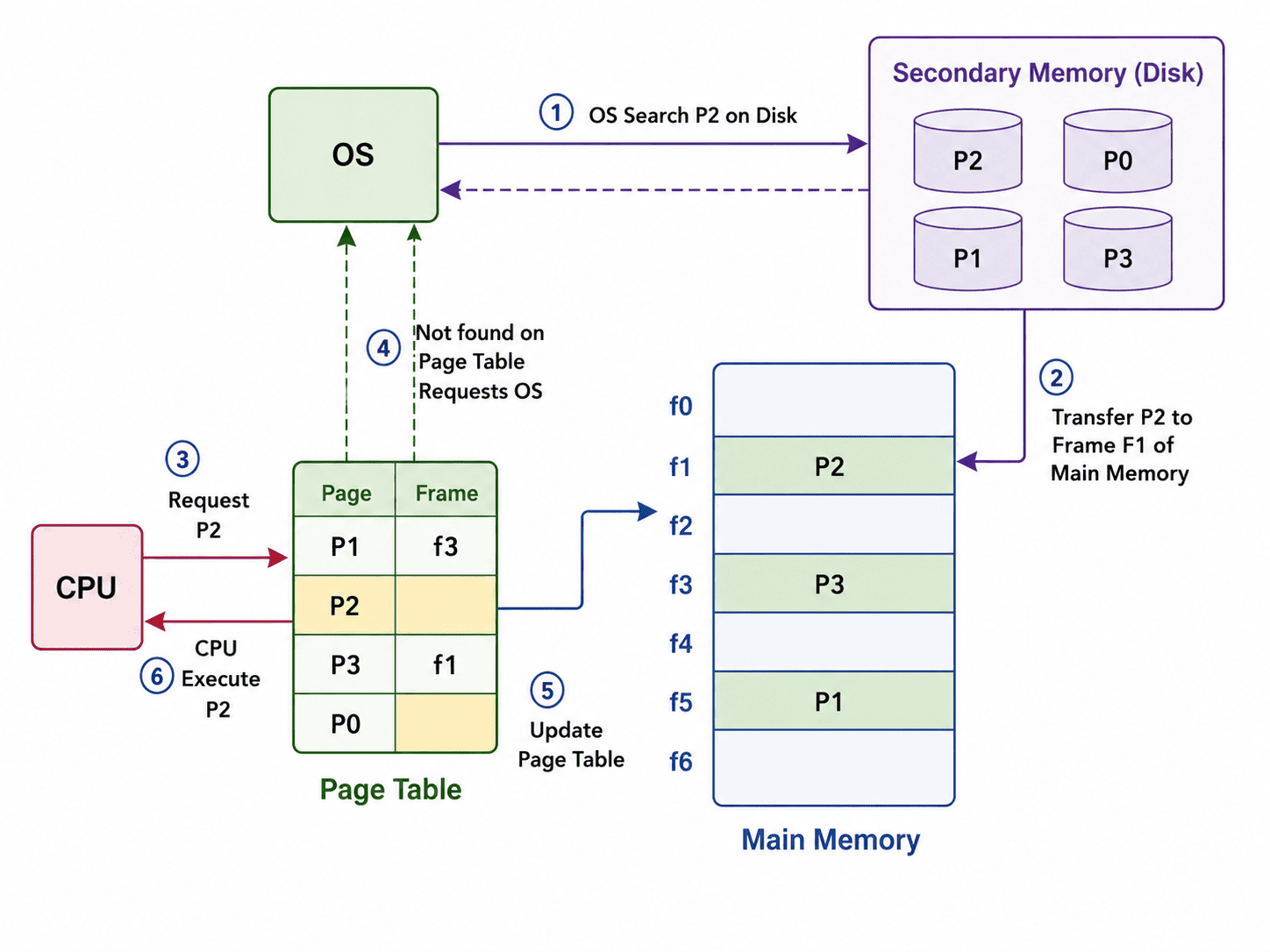
Demand Paging: Pages are swapped between the hard disk and physical RAM strictly as needed.
How It Works: Step by Step
1. The Valid/Invalid Bit
Every entry in a process's Page Table carries a valid/invalid bit alongside the frame number.
• Valid means the page is currently sitting in a RAM frame, ready to use.
• Invalid means the page exists only on disk right now. Any attempt to access it will trigger a page fault.
2. Handling a Page Fault
When the CPU detects an invalid bit while translating an address, it hands control to the OS. The recovery sequence goes like this:
- Locate the page: OS checks where the required page is stored on the hard disk.
- Find a free frame: If one exists in RAM, use it. If RAM is full, run a page replacement algorithm to free one up.
- Load the page: OS copies the page from the disk into the selected RAM frame.
- Update the table: The Frame number is recorded in the Page Table, and the bit is flipped to "Valid".
- Restart instruction: The exact instruction that caused the fault runs again, this time successfully.
Page Replacement Algorithms
When no free frame is available in RAM, the OS has to remove something to make room. Three commonly discussed algorithms decide what gets evicted:
- LRU (Least Recently Used): Removes the page that has gone the longest without being accessed. Based on the idea that pages unused for a while are unlikely to be needed soon.
- FIFO (First In First Out): Removes whichever page has been sitting in memory the longest. Simple to implement, but not always optimal since an old page might still be heavily used.
- Optimal Replacement: Evicts the page that will not be needed for the furthest point in the future. Produces the best possible results but requires knowing the future, so it exists only as a theoretical benchmark.
A Worked Example (Using LRU)
Consider a program with five pages: A, B, C, D, E. Physical memory has room for only three frames: F1, F2, F3. Initially, nothing is loaded, so all table entries are "Invalid".
1. Access A: Page fault. Load A into F1.
[ F1 = A ] [ F2 = empty ] [ F3 = empty ]

2. Access B: Page fault. Load B into F2.
[ F1 = A ] [ F2 = B ] [ F3 = empty ]

3. Access C: Page fault. Load C into F3.
[ F1 = A ] [ F2 = B ] [ F3 = C ]

4. Access D: Page fault. RAM is full! LRU identifies A as the least recently used.
OS evicts A, loads D into F1.
[ F1 = D ] [ F2 = B ] [ F3 = C ]

5. Access B again: No page fault. CPU reads directly from F2. No disk access needed.
[ F1 = D ] [ F2 = B ] [ F3 = C ]

6. Access A again: Page fault! A was evicted earlier. LRU identifies C as the least recently used (since B was just used).
OS evicts C, loads A into F3.
[ F1 = D ] [ F2 = B ] [ F3 = A ]
Demand Paging vs Pre-Paging
Pre-paging takes the exact opposite approach: rather than waiting for a fault, the OS speculatively loads nearby pages alongside the one actually requested, betting that they will be needed soon.
| Feature | Demand Paging | Pre-Paging |
|---|---|---|
| When pages load | Strictly only when accessed. | Speculatively, before they are needed. |
| Page Faults | More frequent initially. | Less frequent if predictions are correct. |
| Memory Efficiency | Higher; nothing loads unnecessarily. | Lower; unused pages might waste frames. |
| Complexity | Straightforward to implement. | Harder; requires complex prediction logic. |
Summary
Demand paging is a practical compromise between memory efficiency and performance. Rather than dedicating RAM to pages that might never be used, it lets processes start immediately and pulls in data only as the execution path demands it. Handled well, it is one of the key reasons modern systems can run programs far larger than their physical RAM without the user ever noticing.
Sort the Concepts
Classify the following characteristics as belonging to either Demand Paging or Pre-Paging.