

Page Table Concepts
Every time a running program touches a memory address, something has to translate that logical address into a real physical location in RAM. That something is the Page Table.
It sits quietly in the background, doing bookkeeping work that most programmers never think about, yet without it, the entire virtual memory system would fall apart.
What is a Page Table?
Think of a page table as a directory. A program generates addresses in its own private logical world. The hardware lives in the physical world of actual RAM chips. The page table bridges these two worlds, recording exactly which physical frame corresponds to each logical page.
When a program accesses an address, the CPU consults the page table first. If the page is present in memory, execution continues normally. If not, a Page Fault fires and the OS steps in to fetch the missing page from the disk.
The Page Table bridges the logical address space of a process to the physical frames in RAM.
Inside a Page Table Entry
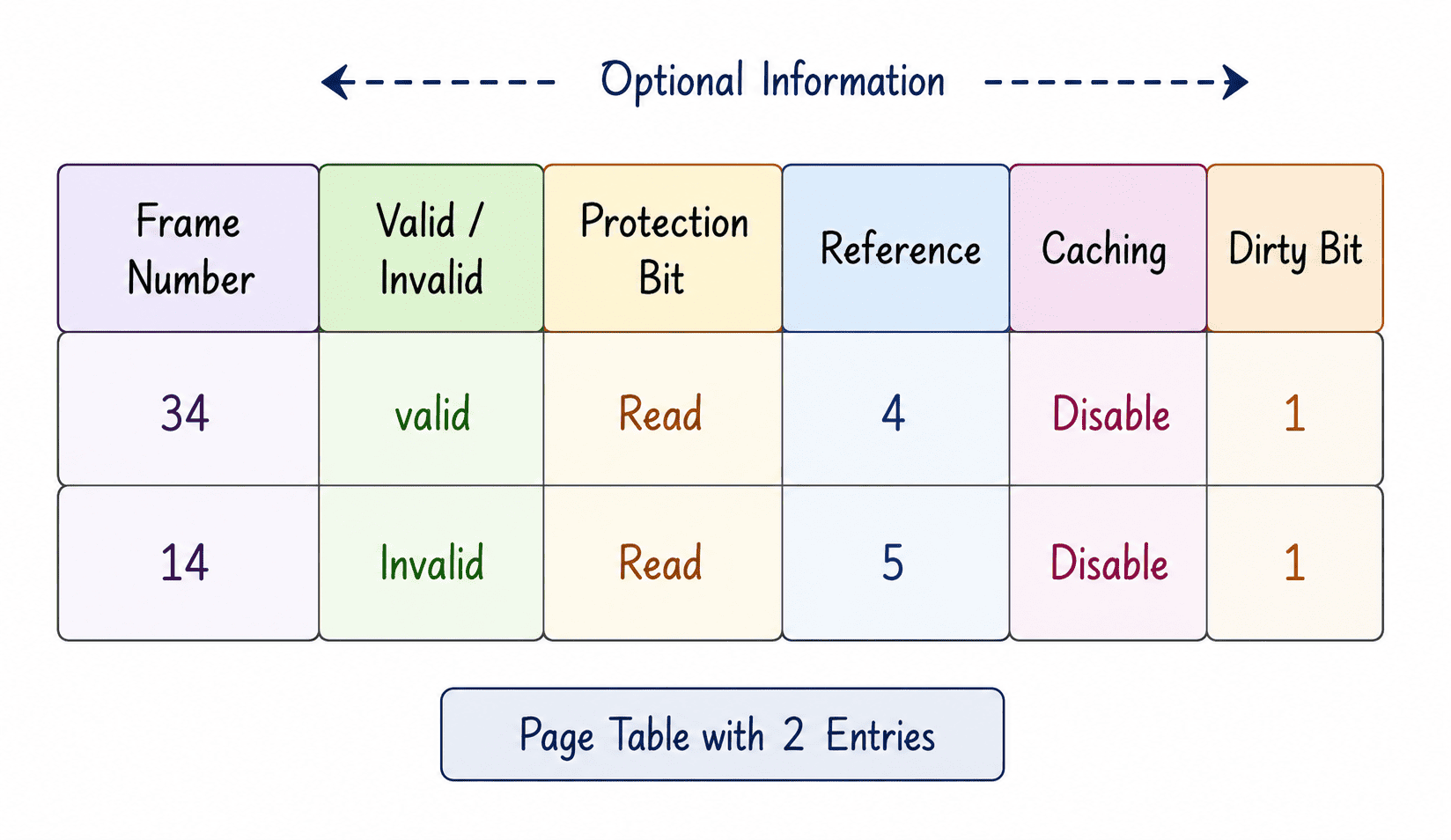
Each row in a page table is packed with more than just a frame number. It carries critical status information to help the OS make fast, accurate decisions without having to scan through the actual RAM.
1. Frame Number
This is the core mapping: the physical frame in RAM where a particular logical page currently lives.
The number of bits needed to store a frame number in the table depends entirely on how many physical frames exist in the system.
Formula:
Number of Frames = Physical Memory Size / Frame Size
Bits for Frame Number = log2(Number of Frames)

Example 1:
Physical Memory = 128 MB, Frame Size = 8 KB
Number of Frames = 128 MB / 8 KB = 131,072 KB / 8 KB = 16,384 frames.
Bits = log2(16384) = 14 bits.

Example 2:
Physical Memory = 256 MB, Frame Size = 16 KB
Number of Frames = 256 MB / 16 KB = 262,144 KB / 16 KB = 16,384 frames.
Bits = log2(16384) = 14 bits.
2. Valid / Invalid Bit
This single bit tells the CPU whether a page is currently loaded in RAM or not.
1 (Valid): The page is in memory. The CPU can use the frame number directly.
0 (Invalid): The page is not in memory. Accessing it causes a page fault.
3. Protection Bits
These bits define what operations are permitted on a page: Read (R), Write (W), and Execute (X). They prevent one part of a process from accidentally or maliciously corrupting another. Consider a web browser process:
| Page Contents | R | W | X |
|---|---|---|---|
| JavaScript engine code | 1 | 0 | 1 |
| User form data | 1 | 1 | 0 |
| Read-only config file | 1 | 0 | 0 |
4. Reference Bit
The reference bit tracks whether a page has been touched recently. Every time a program accesses a page, the hardware flips this bit to 1.
Page replacement algorithms (like LRU) check this bit when deciding which page to evict. A 0 signals that nothing has needed it in a while, making it a great eviction candidate.
5. Dirty Bit
The dirty bit records whether a page has been modified (written to) after being loaded into RAM. This matters enormously during page eviction.
If the bit is 0 (Clean), the page can simply be discarded from RAM since an identical copy already exists on disk. If the bit is 1 (Dirty), the page MUST be written back to disk before the frame is reused, otherwise the user's unsaved changes are permanently lost.
6. Caching Bit
This bit controls whether the CPU's hardware cache can hold a copy of the page. While usually set to 1 for speed, it is explicitly set to 0 for memory-mapped hardware registers (like a network card's receive buffer). Caching a network buffer would mean the CPU reads stale, old data from the cache rather than fresh incoming packets from the hardware.
Types of Page Tables
Not all systems use the same page table structure. Three main designs exist:
- Single Level: One flat table covers the entire logical address space of a process. Fast, but consumes massive amounts of RAM for large address spaces.
- Multi-Level: A hierarchical design. An outer table points to inner tables. This saves massive amounts of space because inner tables are only created for parts of the address space the process actually uses.
- Inverted: Flips the model entirely. There is only ONE table for the entire system, with one entry per physical frame. It saves memory but makes lookups incredibly slow (requires hashing).
| Feature | Single Level | Multi-Level | Inverted |
|---|---|---|---|
| Table Count | One per process | One per process (hierarchical) | One for entire system |
| Memory Usage | High (for large address spaces) | Moderate (sparse regions save space) | Low (tied strictly to physical RAM) |
| Lookup Speed | Fast (direct array index) | Moderate (must traverse levels) | Slower (requires search/hashing) |
Summary
The page table is the quiet engine behind virtual memory. The frame number does the core translation work, while the surrounding bits (Valid, Protection, Reference, Dirty, Caching) give the OS the power to protect memory, make smart replacement decisions, and keep data consistent.
Choosing the right page table structure is a critical design decision that balances memory consumption against lookup performance.
Calculate Frame Number Storage
Question 1 of 1Test your understanding of how physical memory size impacts page table overhead.