

Paging in Operating Systems
Running multiple processes simultaneously creates a constant tug of war over available memory. One of the most practical solutions modern operating systems use to manage this is Paging.
It sidesteps many of the headaches that come with traditional memory allocation by breaking everything into neat, equal-sized chunks.
The Core Idea
Paging works by splitting memory into two parallel structures of equal-sized blocks.
Physical memory (RAM) gets divided into fixed-sized slots called Frames. The logical memory that a process works with gets divided into equally sized chunks called Pages. Since pages and frames are always the exact same size, ANY page from ANY process can slide into ANY available frame in RAM.
When a process runs, its pages get loaded into whatever frames happen to be free at that moment. They do not need to be adjacent to each other.
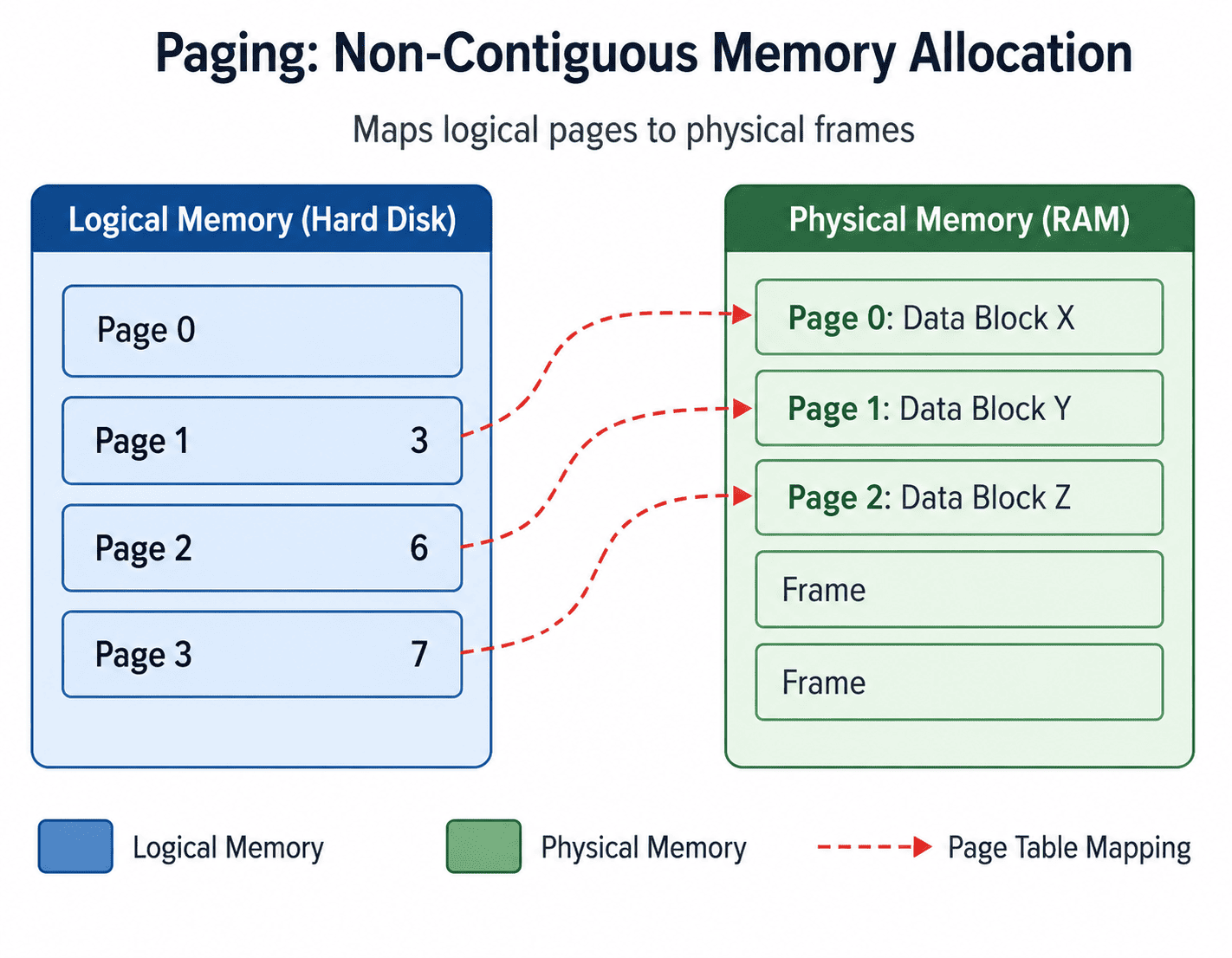
Paging: Dividing memory into strict, equal-sized blocks allows processes to be scattered efficiently.
Key Terms Worth Knowing
- Logical Address Space: The complete set of addresses a process generates while running.
- Physical Address Space: The actual addresses that exist in RAM. Divided into frames.
- Page Table: A lookup structure the OS maintains for each process. It maps every page number to the frame number where that page currently lives.
- Page Number: The index identifying which page within a process's logical memory is being referenced.
- Frame Number: The index identifying a specific slot within physical RAM.
- Page Size: The fixed size of each page and frame. Always a power of 2, commonly 4 KB or 8 KB.
How Address Translation Works
A process only ever sees logical addresses. It has no idea where its data physically sits in RAM. Every time it accesses a memory location, the OS hardware (the MMU) has to translate that logical address into a real physical one.
A logical address carries two pieces of information: the Page Number (which page is being accessed) and the Offset (the exact byte position within that page).
Formula:
Physical Address = (Frame Number × Page Size) + Offset

Example 1:
System Page Size = 512 bytes.
Logical Address = 1200.

1. Find Page Number: 1200 / 512 = 2 (integer division)
2. Find Offset: 1200 mod 512 = 176
3. Look up Page 2 in the Page Table. Assume it maps to Frame 5.
4. Calculate Physical Address: (5 × 512) + 176 = 2560 + 176 = 2736
Result: Logical address 1200 physically lives at address 2736 in RAM.

Example 2:
System Page Size = 512 bytes.
Logical Address = 3000.

1. Find Page Number: 3000 / 512 = 5
2. Find Offset: 3000 mod 512 = 440
3. Look up Page 5 in the Page Table. Assume it maps to Frame 3.
4. Calculate Physical Address: (3 × 512) + 440 = 1536 + 440 = 1976
Inside the Page Table
Each row in the page table is more than just a frame number. It packs in several critical bits of information:
| Field | Purpose |
|---|---|
| Frame Number | Where this page currently lives in physical RAM. |
| Valid / Invalid Bit | Whether the page is currently loaded in memory (Valid) or on disk (Invalid). |
| Protection Bits | Read, write, and execute permissions for the specific page. |
| Dirty Bit | Whether the page has been modified (written to) since it was loaded into RAM. |
| Reference Bit | Whether the page has been accessed recently (used by Replacement Algorithms). |
The Translation Lookaside Buffer (TLB)
Consulting the page table for every single memory access would be painfully slow since the page table itself sits in memory (meaning every memory request would actually require TWO memory accesses).
The TLB exists to shortcut this process. The TLB is a small, extremely fast hardware cache built directly into the CPU that stores recently used page-to-frame mappings.
When a process generates a logical address, the hardware checks the TLB first:
- TLB Hit: The mapping is already in the TLB. The physical address is calculated immediately without touching the Page Table.
- TLB Miss: The mapping is not cached. The OS must walk the Page Table in RAM, retrieve the frame number, and then store that mapping in the TLB for future use.
Effective Access Time (EAT)
Because of Locality of Reference, most programs tend to access the same memory regions repeatedly, meaning TLB hit rates often exceed 95%. This hit rate directly affects how fast memory access feels on average. We calculate this using Effective Access Time (EAT).
EAT = (Hit Ratio × TLB Access Time) + (Miss Ratio × (TLB Access Time + Memory Access Time))

Example 1 (80% Hit Rate):
TLB hit ratio = 0.8
TLB miss ratio = 0.2
TLB access time = 5 ns
Memory access time = 80 ns

EAT = (0.8 × 5) + (0.2 × (5 + 80))
EAT = 4 + (0.2 × 85)
EAT = 4 + 17 = 21 ns

Example 2 (95% Hit Rate):
TLB hit ratio = 0.95
TLB miss ratio = 0.05
TLB access time = 8 ns
Memory access time = 120 ns

EAT = (0.95 × 8) + (0.05 × (8 + 120))
EAT = 7.6 + (0.05 × 128)
EAT = 7.6 + 6.4 = 14 ns
Notice how jumping from an 80% to 95% hit ratio drops the average access time from 21 ns all the way down to 14 ns. A higher TLB hit rate makes a dramatic difference in real-world performance.
Pros and Cons of Paging
| Advantages | Disadvantages |
|---|---|
| No External Fragmentation: Since every frame is the same size, there are no awkward gaps between allocations that are too small to use. | Page Table Overhead: Every process needs its own page table, consuming megabytes of RAM just for bookkeeping. |
| Flexible Placement: Pages can scatter across RAM without needing to be contiguous, maximizing memory utilization. | Slower Access on TLB Misses: When a mapping is not cached, the OS suffers a severe performance penalty consulting the Page Table in RAM. |
| Enables Virtual Memory: Inactive pages can be pushed to disk and brought back when required, bypassing physical RAM limits. | Internal Fragmentation: A process's final page rarely fills its 4 KB frame completely, wasting a small amount of space inside the frame. |
Summary
Paging is a foundational idea in OS design that quietly makes everything else work. By treating memory as a pool of interchangeable equal-sized slots, it completely eliminates external fragmentation and gives the OS ultimate flexibility.
The TLB is what makes it fast enough to be practical. The Page Table is what makes it accurate. Together, they form the backbone of memory management in virtually every modern operating system.
Address Translation Math
Question 1 of 1Test your understanding of how Logical Addresses are split into Page Numbers and Offsets.