

Process Suspension and Process Switching
Modern operating systems create the illusion of running multiple programs simultaneously, but CPUs actually handle one task at a time. They switch between tasks so rapidly that everything feels concurrent. Two fundamental mechanisms make this possible: process suspension and process switching.
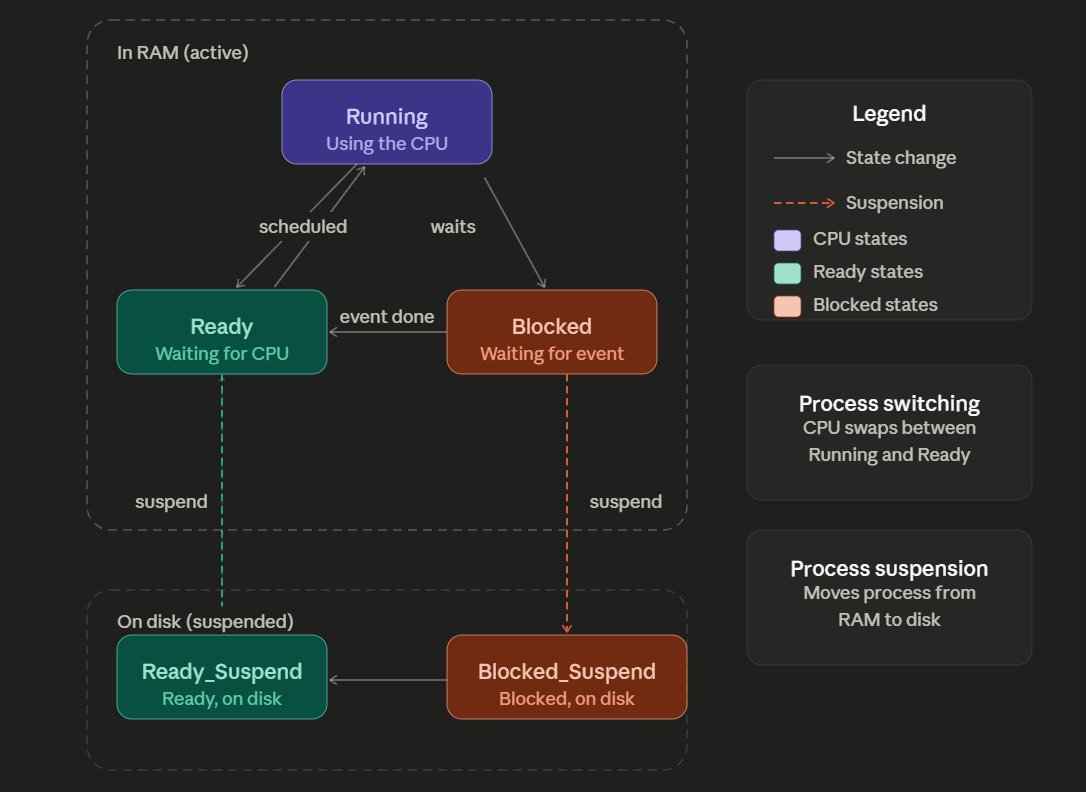
Process Suspension and Process Switching
Process Suspension
When a process has nothing to do, say it is waiting for user input or a file to load, keeping it in RAM is wasteful. The OS handles this by moving idle processes out of RAM and onto disk, freeing up that valuable memory for processes that are actually ready to work. This is called suspension.
RAM is fast but limited. Rather than terminating a waiting process, the OS shelves it temporarily and brings it back when needed.
Beyond the familiar Ready, Running, and Blocked states, real operating systems add a Suspended state, and actually two variants of it:
- Blocked_Suspend: means the process is waiting for an event and has been moved to disk.
- Ready_Suspend: means the process is ready to run but has not been loaded back into RAM yet.
Why suspend processes?
- Memory pressure (Swapping): When RAM fills up, the OS offloads inactive processes to disk to make room for ones that need to execute.
- Scheduling delays: Lower-priority processes may be deliberately held back so urgent tasks get resources first.
- User-initiated pauses: When you pause a download or stop a background job, the OS suspends that process while keeping its state intact for later resumption.
- Parent process control: A parent program may ask the OS to temporarily hold a child process it spawned, keeping both in sync.
Process Switching
While suspension deals with memory, process switching deals with CPU time. Since only one process can use the CPU at any instant, the OS continuously rotates processes in and out, stopping one and loading another. This is commonly called a context switch.
Switching is typically triggered by an interrupt, which is a signal demanding the OS's immediate attention. These can come from hardware like a keyboard or mouse, or from software conditions.
What triggers a process switch?
- Supervisor calls: mean a process requests the OS to perform a privileged action like reading from disk. While the OS handles it, the waiting process steps aside and the CPU moves on.
- Traps: occur when an error happens mid-execution such as division by zero or illegal memory access. The OS intervenes to decide whether to recover or terminate.
- Interrupts: are external events that demand attention regardless of what is currently running, such as a timer firing, a network packet arriving, or a key being pressed.
Steps involved in a context switch
- Save the current process's CPU state
- Switch from user mode to kernel mode
- Update the current process's control block (PCB)
- Move it to the appropriate queue
- The scheduler selects the next process to run
- Load that process's saved state and memory mappings
- Return to user mode and resume execution
This entire sequence happens in microseconds, though it does carry a small overhead cost each time.
Suspension vs. Switching: The Core Difference
| Concern | Process Suspension | Process Switching |
|---|---|---|
| Main Objective | Memory management | CPU allocation |
| What moves? | Process shifted to/from disk | CPU context saved and restored |
| Availability | Process unavailable until reloaded | Happens continuously at high speed |
| Trigger | Memory shortage, user action, priority | Interrupts, traps, supervisor calls |