

Process States and the Machine Cycle
Process states explain how the operating system handles programs, while the machine cycle describes how the CPU actually executes instructions. Although they belong to different areas, they are tightly connected.
The CPU's machine cycle enables processes to move between states, and the behavior of processes influences what the CPU does next.
What are Process States?
Process states represent the current condition or stage of a process during its execution. A process does not run continuously from start to finish. Instead, it shifts between different states depending on CPU availability, resource requirements, and external events. The operating system monitors these states to decide which process should run, wait, or terminate.
There are five main process states:
1. New State
In this stage, the process is being created. The program is stored in secondary memory (like a hard disk or SSD), and the OS prepares it for execution. At this point, nothing has started running yet.
Before moving ahead, the OS checks things like:
- Availability of memory
- Validity of the program
- User permissions
Only after these checks does the process proceed further.
2. Ready State
Once created, the process is loaded into main memory (RAM) and waits for CPU allocation. It is fully prepared to execute but is waiting for its turn.
Multiple processes can be in this state at once, forming a ready queue. The scheduler selects one process from this queue based on a scheduling policy.
3. Running State
In this state, the CPU is actively executing the process's instructions. The process continuously goes through the machine cycle (fetch → decode → execute → store).
A process remains in this state until:
- It completes execution
- It requires some resource and must wait
- It is interrupted or preempted by the scheduler
Only one process per CPU core can be in the running state at a time.
4. Waiting (Blocked) State
A process enters this state when it cannot continue execution because it is waiting for something, such as:
- User input
- Data from disk
- Access to a shared resource
Since it cannot use the CPU during this time, the OS switches to another process. This helps maintain system efficiency.
5. Terminated State
This is the final stage, where the process has completed its execution or has been stopped. The OS releases all resources, deletes the process control block (PCB), and frees memory.
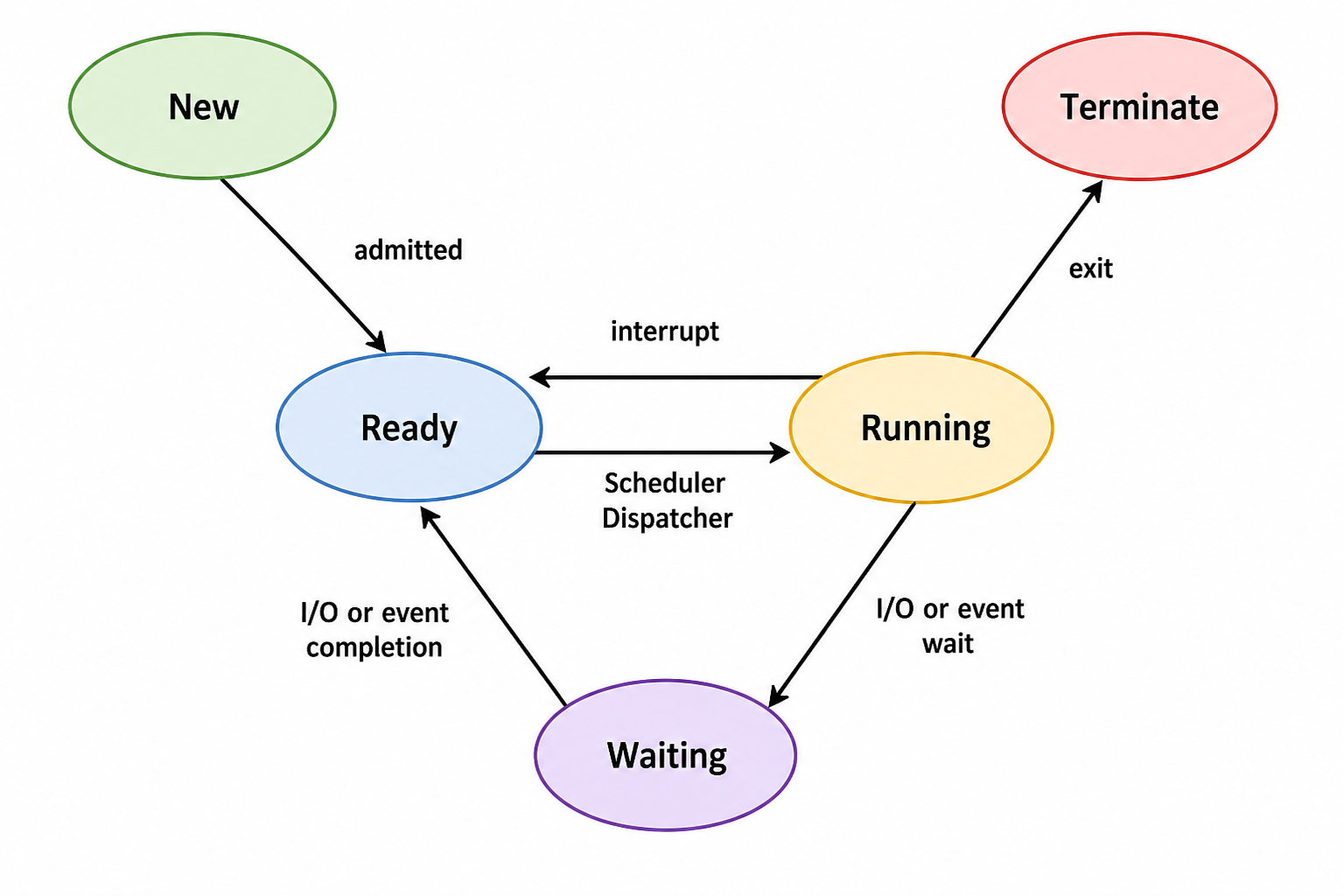
Diagram showing the transitions between process states
What is the Machine Cycle?
The machine cycle is the basic operation loop of the CPU. It is a sequence of steps repeated continuously to execute instructions. Every instruction processed by the CPU goes through this cycle.
The four main steps are:
- 1. Fetch: The CPU retrieves the next instruction from memory. The address of this instruction is stored in the program counter (PC).
- 2. Decode: The instruction is interpreted to understand what operation needs to be performed (such as addition, comparison, or branching).
- 3. Execute: The CPU performs the required operation. Calculations are handled by the ALU, memory operations involve communication with RAM, and control instructions may change the flow of execution.
- 4. Store: If the instruction produces a result, it is saved in a register or memory. Then the program counter updates, and the next cycle begins.
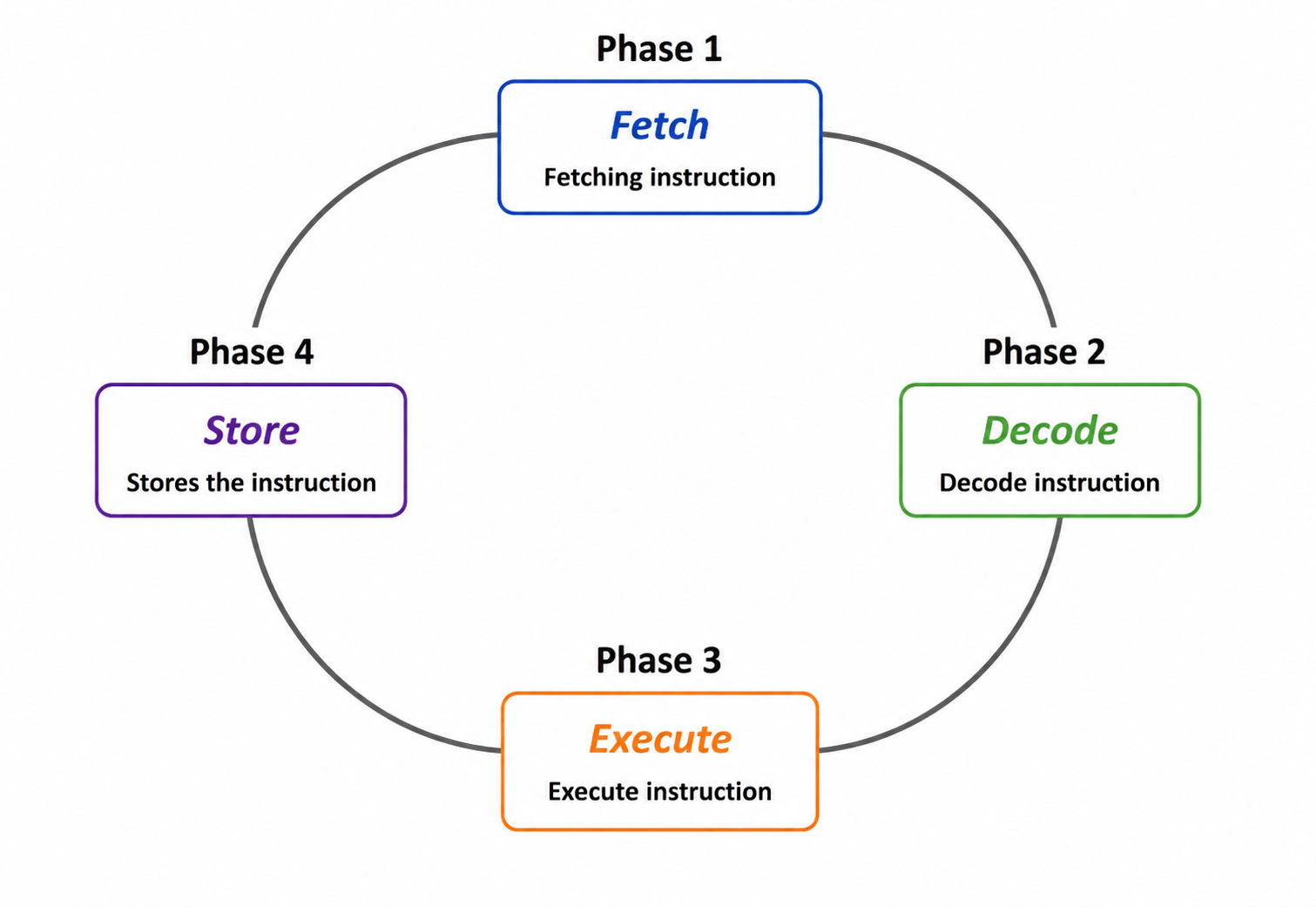
The four steps of the Machine Cycle
Relationship Between Process States and the Machine Cycle
Though they seem separate, process states and the machine cycle are closely linked:
- State changes depend on instruction execution: As the CPU executes instructions, certain situations (like waiting for input) cause the OS to change the process state.
- Only running processes use the machine cycle: The CPU executes instructions only for the process currently in the running state. Processes in ready or waiting states do not use the CPU.
- Context switching pauses the cycle: When the OS switches processes, it temporarily stops the current execution, saves its state, and loads another process. The machine cycle then continues with the new process.
- Waiting occurs when execution cannot continue: If an instruction requires a slow operation (like disk access), the CPU cannot proceed immediately. The OS moves the process to the waiting state.
- Ready processes wait for CPU time: Once a waiting process becomes ready again, it must wait in the ready queue until the CPU becomes available.
- Completion happens after final instruction: A process reaches termination only after its last instruction has been executed through the machine cycle.
Knowledge Check: States & Cycles
Question 1 of 2Let's test what you've learned about the machine cycle and process states.