

Network Devices
Network devices are physical hardware components that are used to connect computers, printers, servers, and other electronic equipment together so they can communicate, share data, and access common resources.
Each device in a network plays a specific role in making sure that data moves accurately and efficiently from one point to another.
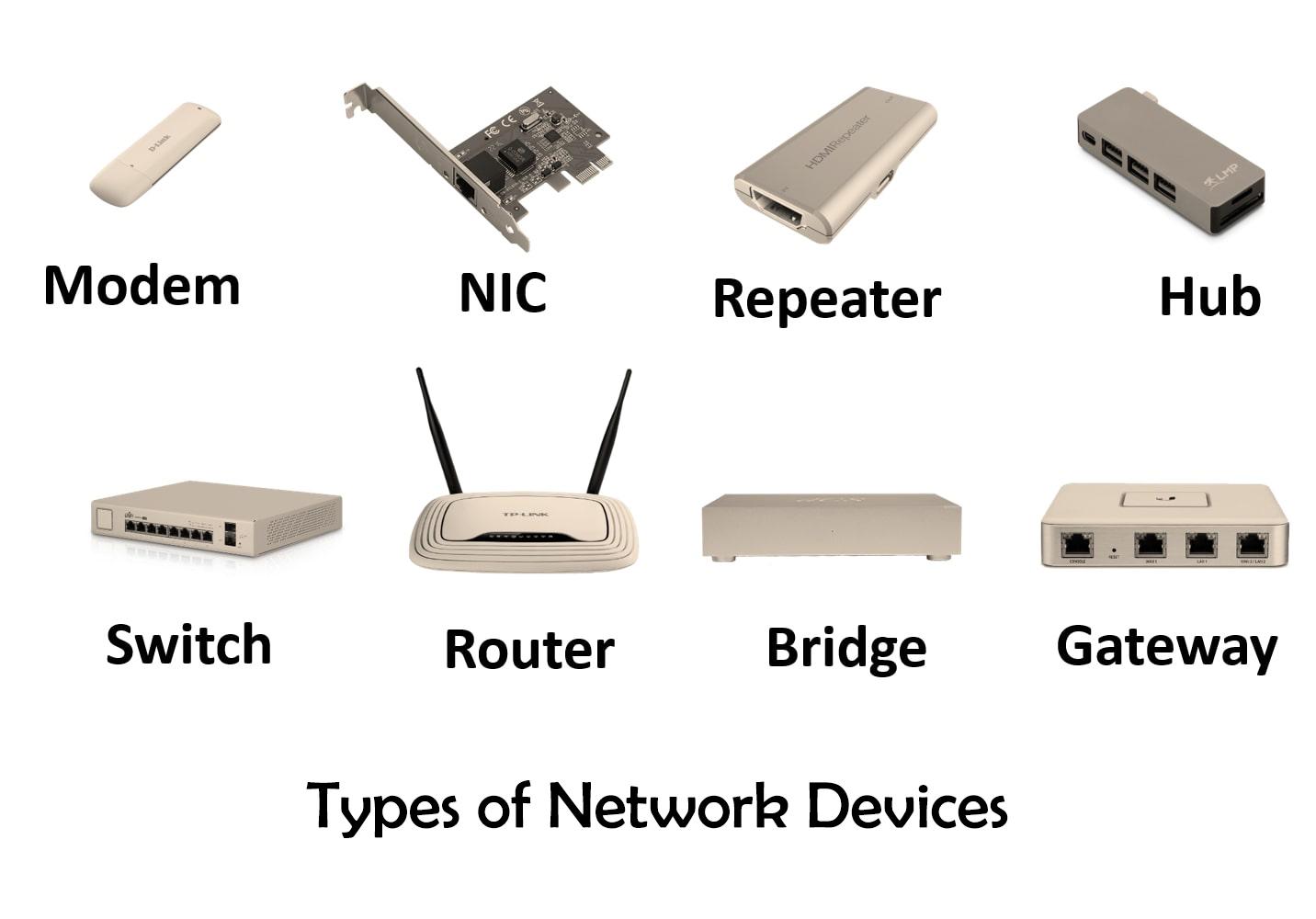
An overview of common network devices like routers, switches, and modems.
1. Router
A router is a networking device that connects multiple networks together and manages the flow of data between them. It is most commonly used to connect a home or office network to the internet.
- How it Works: When data is sent from one device to another, the router reads the destination IP address of each data packet and decides the best possible path for it to travel. It then forwards the packet along that path until it reaches its destination.
- Functions: Connects a local network to the internet, allows all devices to share a single internet connection, determines the most efficient route for packets, and includes built-in security features like firewalls and encryption.
- Types: Wired routers (use physical cables), Wireless routers (Wi-Fi routers), and Core routers (used inside large networks and internet backbone).
2. Switch
A switch is a device that connects multiple devices within the same network (like computers, printers, servers) and manages communication between them. Unlike a hub, a switch is intelligent enough to send data only to the specific device it is meant for.
- How it Works: A switch maintains a table of MAC addresses of all connected devices. When it receives a data packet, it checks the destination MAC address and forwards the packet directly to that device only, rather than broadcasting it to everyone.
- Functions: Reduces unnecessary traffic, improves overall speed and efficiency, and supports full duplex communication (sending and receiving data at the same time).
- Types: Unmanaged switches (simple plug and play), Managed switches (advanced features like traffic control and security), and Layer 3 switches (can perform some routing functions).
3. Hub
A hub is one of the most basic networking devices. It connects multiple devices in a network and simply passes data along to all connected devices regardless of who the intended recipient is.
- How it Works: When a hub receives data from one device, it broadcasts that data to every other device connected to it. Each device then decides whether the data is meant for it or not.
- Functions: Connects multiple computers and devices, operates at the physical layer, and does not perform any filtering or traffic management.
- Limitations: Creates unnecessary traffic making it slower and less efficient than a switch. It also poses a security risk because every device can see all data passing through. Hubs have largely been replaced by switches.
4. Bridge
A bridge is a network device that connects two or more network segments and controls the flow of data between them. It helps divide a large network into smaller, more manageable parts while still allowing them to communicate.
- How it Works: A bridge reads the MAC address of data packets and decides whether to forward a packet to another segment or block it. If the destination is on the same segment as the sender, it doesn't forward the packet, reducing traffic.
- Functions: Filters traffic between segments to reduce congestion, uses MAC addresses to make forwarding decisions, and helps extend a network without degrading performance.
5. Gateway
A gateway is a device that connects two networks that use different communication protocols. It acts as a translator between two systems that would otherwise not be able to understand each other.
- How it Works: When data travels from one network to another that uses a different protocol, the gateway receives the data, converts it into a format that the destination network can understand, and forwards it.
- Functions: Enables communication between completely different architectures or protocols. Commonly used to connect private internal networks to the internet. Can perform security functions by filtering traffic.
6. Access Point
A wireless access point (AP) is a device that allows wireless devices to connect to a wired network using Wi-Fi. It acts as a bridge between wired and wireless parts of a network.
- How it Works: An access point is connected to a router or switch through a cable. It then transmits a wireless signal that nearby devices can detect and connect to.
- Functions: Extends the coverage area of a network by providing Wi-Fi where cables aren't practical. Allows multiple wireless devices to connect simultaneously.
7. Modem
A modem is a device that connects a home or office network to the internet through an ISP. The word comes from modulation and demodulation, which describe what the device actually does.
- How it Works: Internet signals travel through telephone, cable, or fiber lines in analog form. The modem converts these analog signals into digital data for computers. When sending data to the internet, it converts digital data back to analog.
- Functions: Provides the connection between a local network and the internet by handling the conversion between digital and analog formats.
8. Firewall
A firewall is a security device that monitors all incoming and outgoing network traffic and decides whether to allow or block it based on a set of security rules.
- How it Works: It inspects each data packet passing through, checking the source, destination, and content against its rules. If it meets the rules, it's allowed; otherwise, it's blocked.
- Functions: Prevents unauthorized users from accessing a private network, filters malicious data/viruses, and logs network activity. Can be hardware, software, or both.
9. Repeater
A repeater is a device that receives a network signal and retransmits it at a higher strength. As data travels over long distances, the signal weakens; a repeater boosts the signal.
- Functions: Extends the range of a network without needing to lay additional long cables. Operates at the physical layer and does not modify or filter data.
10. NIC (Network Interface Card)
A Network Interface Card (NIC) is a hardware component installed inside a device that allows it to connect to a network. Every connected device needs a NIC.
- Functions: Provides the physical connection point for a cable or wireless antenna. Converts data from the device into a format suitable for transmission. Each NIC is assigned a unique MAC address.
11. Proxy Server
A proxy server is an intermediate device that sits between a client device and the internet. Requests first go to the proxy, which then forwards them on behalf of the client.
- Functions: Can cache frequently visited websites to speed up access, filter content, block access based on rules, and hide the IP address of the client for privacy.
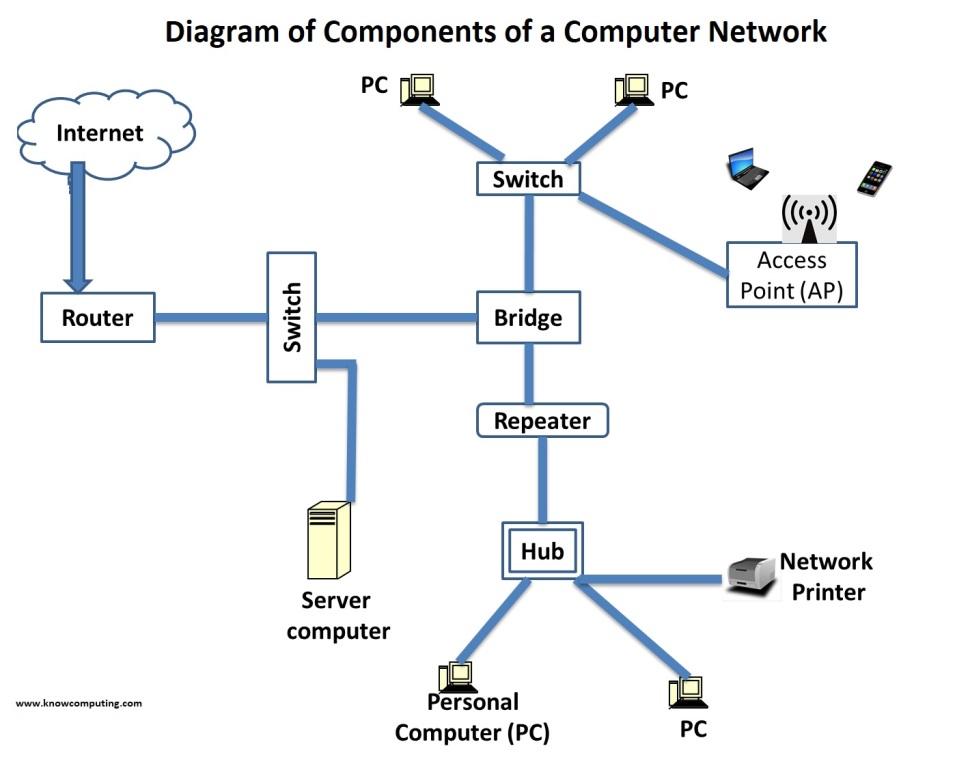
A typical network topology showing how various devices connect together to form a functional network.
Goals and Uses of Network Devices
- Resource sharing: allows multiple users to access the same hardware, software, and data without needing separate copies.
- Internet and cloud access: is made possible by modems, routers, and access points giving users reach to online services.
- Cost efficiency: is achieved because shared resources reduce the need for individual equipment.
- Reliability and availability: improve when network devices provide alternate paths for data and backup mechanisms.
- Scalability: is supported because new devices can be added without rebuilding the setup.
- Security and control: are maintained through firewalls, proxy servers, and managed switches.