

The OSI Model
The Open Systems Interconnection (OSI) Model is a conceptual framework created by the International Organization for Standardization. It helps us understand how data travels over a network from one computer to another.
Think of it as a universal language for computer networking. It takes the highly complex process of network communication and breaks it down into seven distinct, manageable layers. This makes it much easier to design networks, build compatible hardware, and troubleshoot problems.
The 7 Layers of the OSI Model
Let us look at each layer individually, starting from the physical hardware at the bottom and moving all the way up to the applications we interact with everyday.
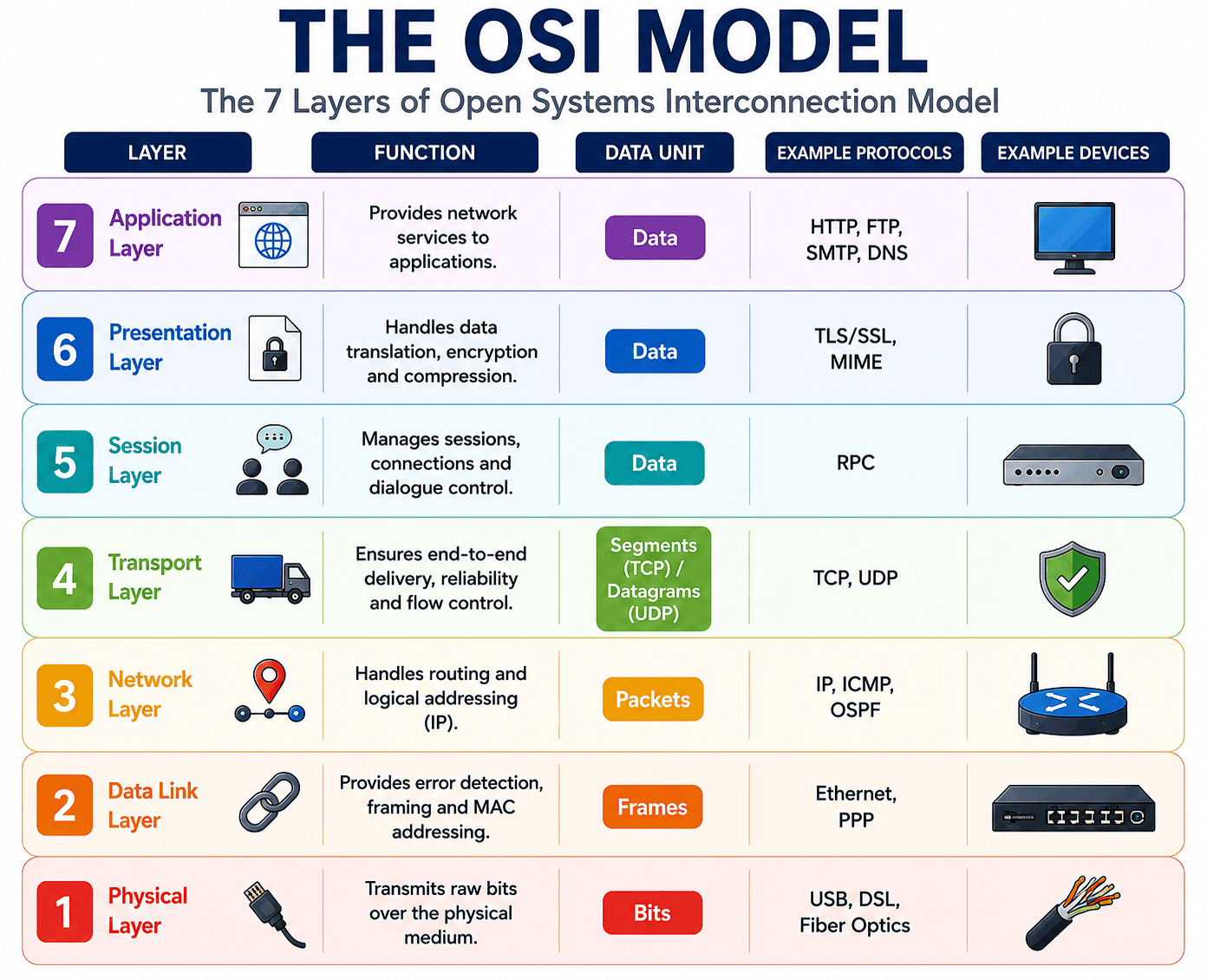
The 7 layers of the OSI model, from the Physical Layer up to the Application Layer.
Layer 1: The Physical Layer
- Core Responsibility: This is the lowest layer. It handles the actual physical transmission of raw data in the form of 0s and 1s over a physical medium like cables or Wi-Fi signals.
- Hardware: Devices like hubs, repeaters, cables, and modems operate at this layer.
- Functions: It manages bit synchronization, dictates the transmission speed, and defines the physical topology of the network.
Layer 2: The Data Link Layer
- Core Responsibility: This layer acts as a bridge between the physical hardware and the logical network. It ensures that data transfers smoothly from one node to the next without errors.
- Data Packaging: It takes data and divides it into manageable units called Frames.
- Addressing: It uses physical MAC addresses to identify exactly which device is sending or receiving the data. Switches and bridges operate here.
- Functions: It performs error checking to catch broken frames and manages flow control so a fast sender does not overwhelm a slower receiver.
Layer 3: The Network Layer
- Core Responsibility: The Network layer is in charge of routing data between different networks across the globe.
- Data Unit: At this stage, data is packaged into Packets.
- Logical Addressing: It assigns unique IP addresses to the sender and receiver so devices can be located anywhere in the world.
- Hardware: Routers are the main devices working at this layer to find the most efficient path for data to travel.
Layer 4: The Transport Layer
- Core Responsibility: This layer ensures that entire messages arrive flawlessly from start to finish. It acts as a liaison between the application and the network.
- Data Unit: Data is broken down into Segments.
- Addressing: It uses Port numbers to ensure data reaches the correct application on a device, not just the device itself.
- Protocols: It uses protocols like TCP for highly reliable connections and UDP for fast, connectionless data transfers.
Layer 5: The Session Layer
- Core Responsibility: Think of this layer as a dialogue manager. It governs the opening, closing, and managing of communication channels between two devices.
- Functions: It handles user authentication, connection security, and can even insert checkpoints so interrupted downloads can resume where they left off instead of starting over.
Layer 6: The Presentation Layer
- Core Responsibility: Often called the Translation Layer, this step ensures that data is formatted correctly so the receiving application can understand it.
- Functions: It handles data translation, encryption for security, and compression to make files smaller for faster transmission over the network.
Layer 7: The Application Layer
- Core Responsibility: This is the very top layer. It provides the direct interface that software and users interact with.
- Functions: It produces the data to be sent and displays the received data. Web browsers and email clients rely heavily on this layer.
- Protocols: It utilizes high level protocols like HTTP for websites, SMTP for emails, and FTP for file transfers.
How Data Flows Through the OSI Model
When you send a message, the data travels completely down the 7 layers on your device. Each layer adds its own specific instructions or headers to the data. Then, it travels across the physical cables, and climbs back up the 7 layers on the receiver's device, with each layer unpacking the instructions.
Let us look at a real example of sending an email to a friend:
- You type an email in your app and hit send. This happens at the Application Layer.
- The Presentation Layer formats the text and encrypts the data so it cannot be read by hackers.
- The Session Layer establishes a stable connection over the internet with the email server.
- The Transport Layer chops your email into smaller segments and adds sequence numbers.
- The Network Layer takes those segments, turns them into packets, and attaches IP addresses to find the best route.
- The Data Link Layer encapsulates the packets into frames and adds MAC addresses for local delivery.
- Finally, the Physical Layer converts everything into raw electrical or optical signals and fires them across the Wi-Fi or cables.
- When your friend's device receives the signals, the entire process happens in reverse until the email pops up on their screen!
Summary of OSI Layers and Protocols
| Layer | Data Unit | Key Protocols |
|---|---|---|
| 7. Application | Data | HTTP, FTP, SMTP, DNS |
| 6. Presentation | Data | TLS/SSL, MIME |
| 5. Session | Data | RPC |
| 4. Transport | Segments (TCP) / Datagrams (UDP) | TCP, UDP |
| 3. Network | Packets | IP, ICMP, OSPF |
| 2. Data Link | Frames | Ethernet, PPP |
| 1. Physical | Bits | USB, DSL, Fiber Optics |