

The TCP/IP Model
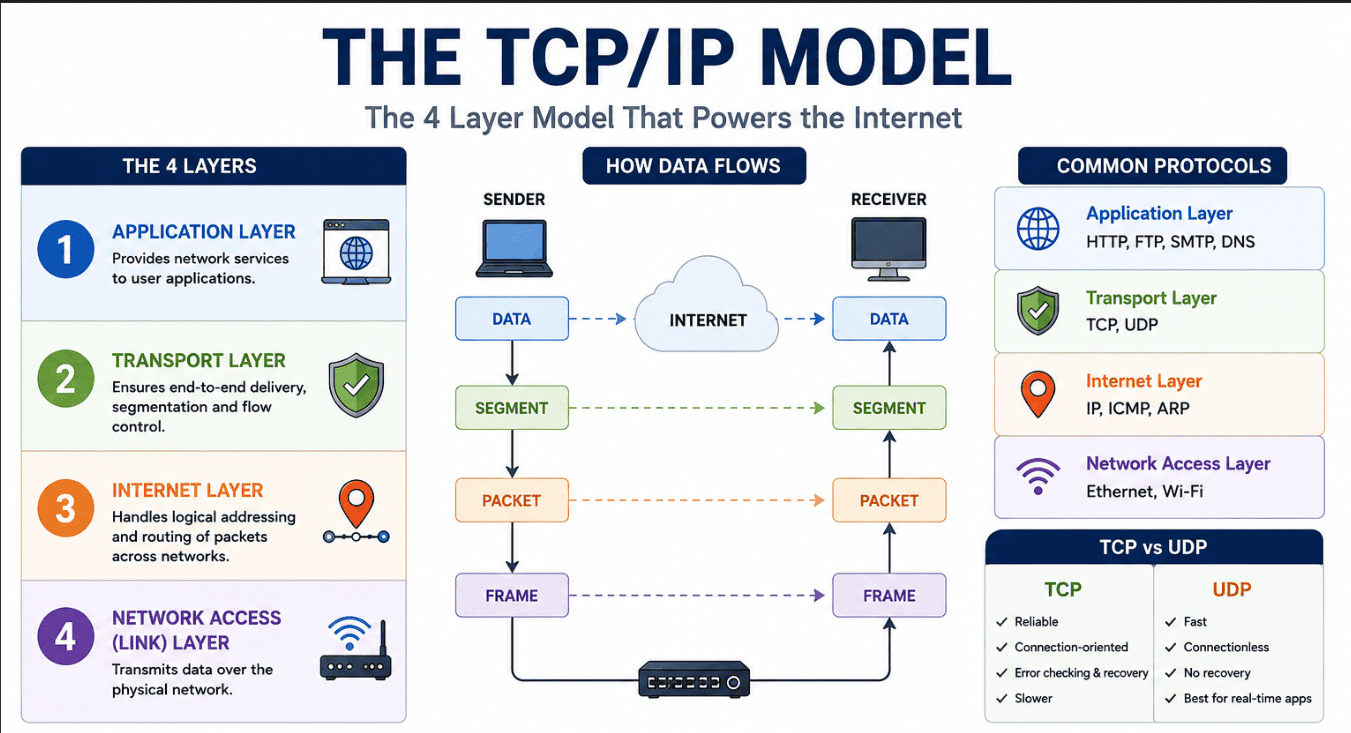
The TCP/IP model is the foundational networking framework that makes the modern internet possible. It explains exactly how data is communicated between devices over a network using standardized protocols to ensure that everything is transmitted reliably and efficiently.
While the OSI model has seven layers and is mostly used for theory and learning, the TCP/IP model simplifies things into just four highly practical layers. It was designed specifically to be robust, flexible, and open for everyone to use.
The 4 Layers of the TCP/IP Model
1. Application Layer
This is the top layer where your daily applications interact with the network.
- Function: It acts as a bridge between the user's software and the lower network layers.
- Formatting and Security: It handles data formatting so information is correctly understood by both the sender and receiver, and it provides encryption for secure communication.
- Protocols: It supports protocols for web browsing, email delivery, and file sharing.
2. Transport Layer
The Transport layer takes the data from the Application layer and ensures it is delivered efficiently and reliably to the destination device.
- Segmentation: It breaks large messages into smaller packets for transmission and reassembles them at the destination.
- Traffic Control: It prevents the receiver from being overwhelmed by regulating the flow of data.
- Addressing: It uses port numbers to allow multiple applications on your device to share the network at the exact same time.
This layer heavily relies on two major protocols: TCP and UDP.
A comparison between the reliable TCP protocol and the fast UDP protocol.
| Feature | TCP (Transmission Control Protocol) | UDP (User Datagram Protocol) |
|---|---|---|
| Focus | Reliability and accuracy. | Speed and low latency. |
| Error Checking | Detects errors, resends lost data, and ensures packets arrive in the correct sequence. | Detects errors but does not verify or recover from them. Lost data is simply skipped. |
| Connection | Establishes a strict connection before sending any data. | Sends data immediately without establishing a formal connection. |
| Use Case | Web browsing, downloading files, sending emails. | Live video streaming, online gaming, real time voice calls. |
3. Internet Layer
The Internet layer is responsible for addressing, packaging, and routing data packets so they can travel across multiple different networks and reach the correct destination.
- Addressing: It assigns IP addresses to uniquely identify the source and destination devices.
- Routing: It determines the absolute best path for data to travel across interconnected networks.
- Protocols: It primarily uses the Internet Protocol (IP), along with supporting protocols for error reporting and address resolution.
4. Network Access (Link) Layer
This is the bottom layer, responsible for physically transmitting data over your actual network hardware.
- Transmission: It sends and receives raw bits over physical media like copper cables, fiber optics, or wireless signals.
- Framing: It organizes data into frames so devices can properly recognize and process the transmission.
- Hardware Addressing: It uses hardware addresses to identify devices within the same local network segment and manages how multiple devices share the physical medium to avoid collisions.
How Data Flows in the TCP/IP Model
- Sending Data: The user's software creates data at the Application layer. The Transport layer breaks it into segments and adds control details. The Internet layer encapsulates those segments into packets with IP addresses. Finally, the Network Access layer converts them into frames and transmits them over physical cables or airwaves.
- Receiving Data: The Network Access layer receives the physical frames and checks for errors. The Internet layer unpacks the frames to extract the IP packets. The Transport layer reassembles the segments into the original message. Finally, the Application layer displays the complete data to the user.
Advantages and Disadvantages
| Advantages | Disadvantages |
|---|---|
| Widely Used: Forms the foundation of the modern internet. | Complexity: It can be difficult for beginners to fully understand all the underlying protocols. |
| Platform Independent: Works seamlessly on completely different hardware and operating systems. | No Strict Layer Enforcement: Unlike the OSI model, layer boundaries are not rigid, which can cause variations in implementation. |
| Reliable Communication: Ensures error checking and data integrity. | Overhead: The strict error checking features can add extra data overhead and slow down transmission. |
| Scalable: Supports small home networks all the way up to massive global networks. | Security Limitations: The basic design lacked strong built-in security, requiring extra protocols to be added later. |
Why TCP/IP Won Over the OSI Model
You might wonder why we use TCP/IP in the real world instead of the OSI model. The main reason is practicality. The OSI model is highly theoretical and was designed before any working protocols were fully established.
TCP/IP, on the other hand, was built entirely around working, battle tested protocols. Its simpler 4 layer structure makes it much easier to implement in real systems. While the OSI model is fantastic for learning the theory of networking, TCP/IP is the robust, flexible standard that actually powers the world today.
Sort the Concepts
Let's test your understanding! Sort these features into the correct Transport Layer protocol bucket.