

Process Control Block (PCB) in Operating Systems
A Process Control Block (PCB) is a data structure used by the operating system to store all the important details about a process. It is sometimes also called a process descriptor or task control block.
Each process in the system has its own PCB, and all these PCBs are maintained in a process table inside the operating system's kernel.
Whenever a new process is created, the OS automatically creates a PCB for it. This PCB keeps track of all process-related information, including its current state such as new, ready, running, waiting, or terminated.
PCBs are essential for managing processes because they are continuously accessed and updated by system components like schedulers and resource managers. They are especially important during context switching, where process information needs to be saved and restored.
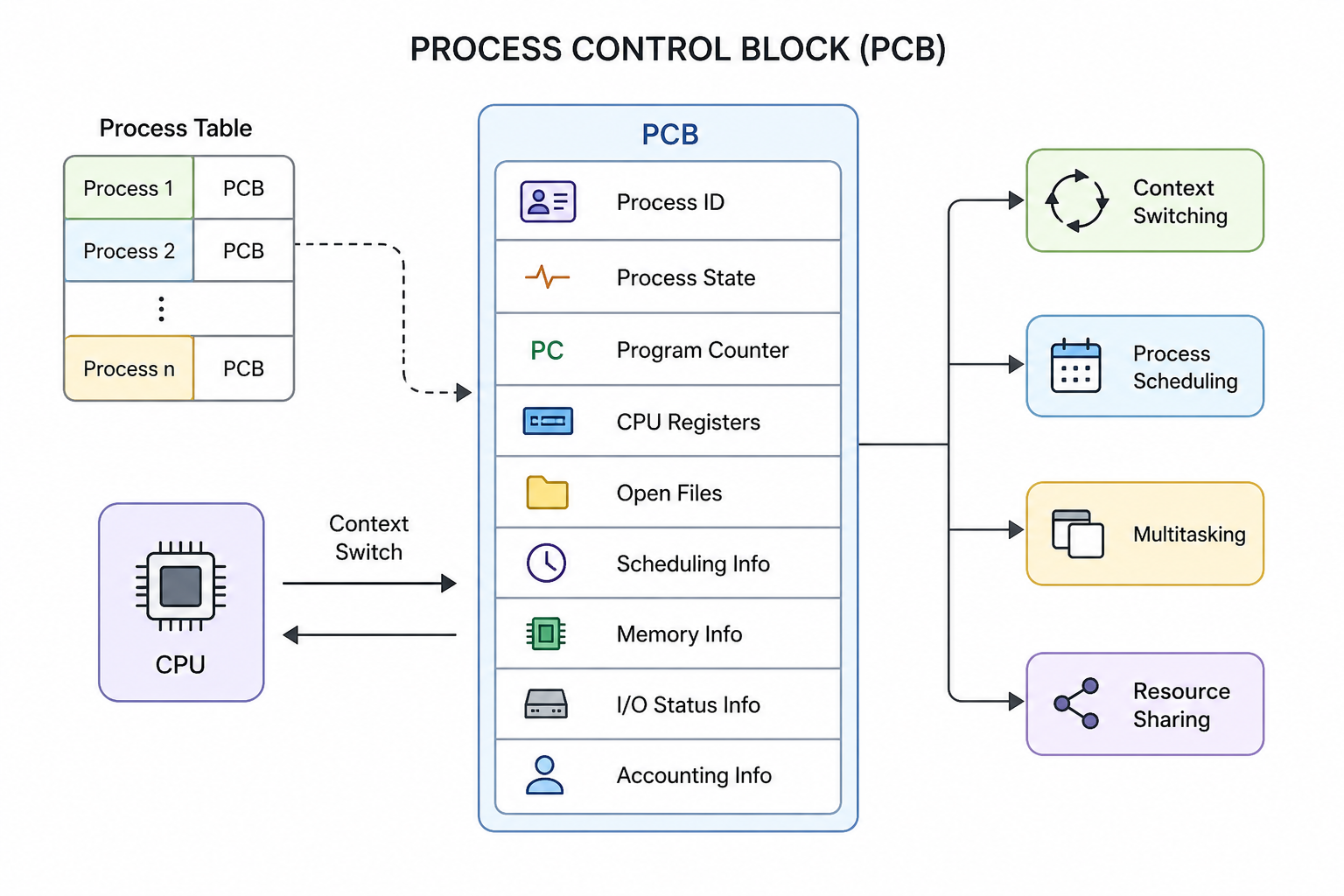
A visual representation of the Process Control Block structure
Structure of a Process Control Block
A PCB contains several pieces of information required for effective process management. Some of the key components are:
- Process ID (PID): A unique identifier assigned to each process.
- Process State: Indicates the current status of the process (new, ready, running, waiting, or terminated).
- Program Counter: Stores the address of the next instruction to be executed.
- CPU Registers: Holds the values of various registers such as accumulators, stack pointers, index registers, and general-purpose registers.
- List of Open Files: Contains references to files that the process is currently using.
- CPU Scheduling Information: Includes details like process priority and pointers to scheduling queues.
- Memory Management Information: Contains data related to memory usage such as page tables, segment tables, base and limit registers.
- I/O Status Information: Stores details about input/output devices and operations associated with the process.
- Accounting Information: Includes execution time, process usage statistics, account details, and other related data.
Location of PCB
The PCB is stored in a protected memory area within the operating system. This ensures that normal user programs cannot access or modify it.
In some systems, the PCB is placed at the beginning of the kernel stack, which provides a secure and efficient location for storing process-related data.
Role of PCB in Process Management
PCBs are crucial for performing several important operations in an operating system. Some of the major uses include:
- Context Switching: During context switching, the current state of a running process is saved into its PCB. When the process resumes later, its state is restored from the PCB so that execution can continue from where it stopped.
- Process Scheduling: The scheduler uses information stored in the PCB such as priority, state, and resource usage to decide which process should be executed next.
- Multitasking: PCBs allow the operating system to manage multiple processes at the same time. By keeping track of each process's state and resources, the OS can efficiently switch between them.
- Resource Sharing: The PCB contains details about the resources allocated to a process, such as memory and files. When another process requests resources, the OS checks existing PCBs to determine availability and sharing possibilities.