

Virtual Memory Concepts
To understand virtual memory, think of it as an elaborate trick the operating system plays. It makes programs believe they have access to far more memory than what is actually, physically installed on the motherboard.
In reality, only a tiny portion of a program sits inside the physical RAM at any given time. The rest is tucked away on the hard disk. A special lookup data structure, known as the Page Table, keeps track of where each piece of data actually lives.
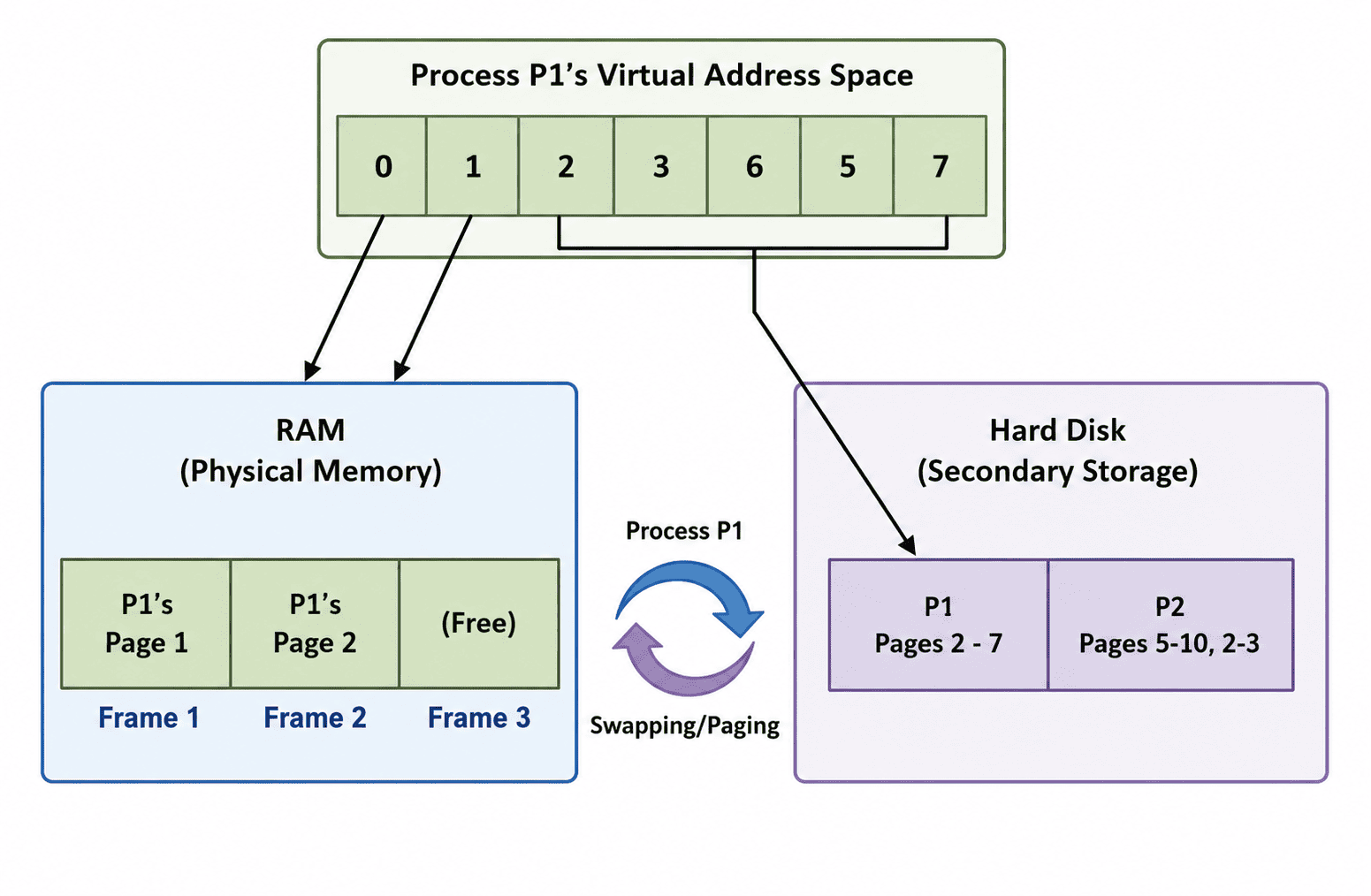
Virtual Memory allows the OS to scatter pieces of a program between physical RAM and the much slower Hard Disk.
The Core Mechanism: Page Faults
A running program is divided into manageable chunks. The most actively used chunks sit in RAM, immediately ready to be processed by the CPU. Everything else waits on the hard disk until the exact moment it is needed.
When the program requests to read a variable or execute a function that is NOT currently in RAM, the system triggers an event called a Page Fault. The OS pauses the process, fetches the required chunk from the disk, and brings it into memory so the program can continue.
Two Ways to Slice Up Memory
There are two main strategies operating systems use to pull off virtual memory architecture:
1. Paging
In paging, both the RAM and the program's virtual memory are split into fixed, identical, equal-sized blocks. The physical blocks in RAM are called Frames, and the logical blocks from the program are called Pages. When execution begins, pages get loaded into whichever frames happen to be available.
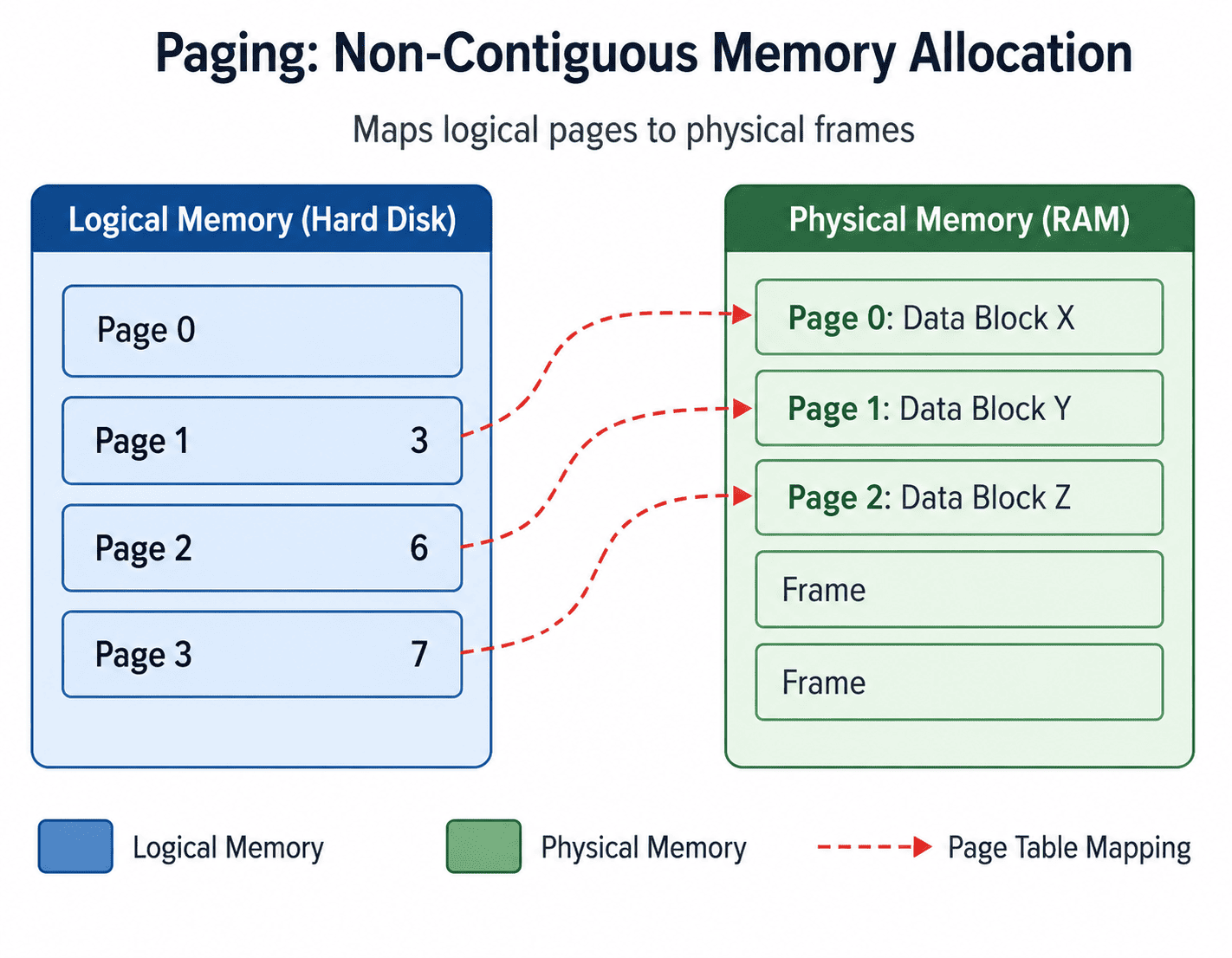
Paging: Dividing memory into strict, equal-sized blocks.
2. Segmentation
Rather than cutting memory into rigid, uniform pieces, segmentation respects the natural structure of a program. Code goes into one segment, Data into another, and the Stack into yet another. These divisions vary in size depending on what the program actually needs.
Segmentation also has a major practical advantage: Access Control. Each segment can carry its own permissions. For example, the "Code" segment can be marked as Read-Only, preventing malicious overwrites, while the "Data" segment allows full Read/Write access.
Why Virtual Memory is Worth Having
- Bypassing Hardware Limits: The most obvious benefit is that programs are no longer limited by how much RAM a machine has. A 10 GB application can run flawlessly on a machine with only 4 GB of RAM.
- Reducing Waste: Unused portions of a program (like error-handling code that rarely runs) never occupy physical memory unnecessarily.
- Isolation & Security: Every process operates in its own virtual address space. This creates a hard boundary, meaning one process cannot accidentally or maliciously read the physical memory of another process. This is fundamental to modern system stability.
Where Things Get Complicated
Virtual memory is not without its downsides. Building and maintaining the entire system—from managing the Page Tables to optimizing the Page Replacement Algorithms—is incredibly complex software engineering.
The bigger everyday concern is Speed. Reading from a hard disk is orders of magnitude slower than reading from RAM. If a program keeps jumping to parts of itself that are not currently loaded, performance drops sharply.
A Quick Comparison
| Physical Memory | Virtual Memory |
|---|---|
| The actual RAM hardware soldered onto or plugged into the motherboard. | A software-level construct that borrows space from the hard disk. |
| Has a hard physical ceiling on capacity. | Extends that ceiling artificially, allowing massive programs to run. |
| Extremely fast to access. | Significantly slower to access if the data must be fetched from the disk. |
Summary
Virtual memory is a brilliant illusion. By keeping only the actively needed chunks of a program in the fast RAM and storing the rest on the slow disk, the OS allows us to run massive, complex applications on limited hardware.
Virtually every mainstream operating system today—including Windows, Linux, macOS, Unix, and Android—relies completely on this technique to function.