

Transaction Management
A transaction is a single logical unit of work consisting of a series of database operations. In the real world, a single action like 'Transferring money' actually consists of multiple underlying database queries.
These operations begin with high-level code execution and are translated into low-level memory block manipulations, primarily abstracted as Read and Write operations.
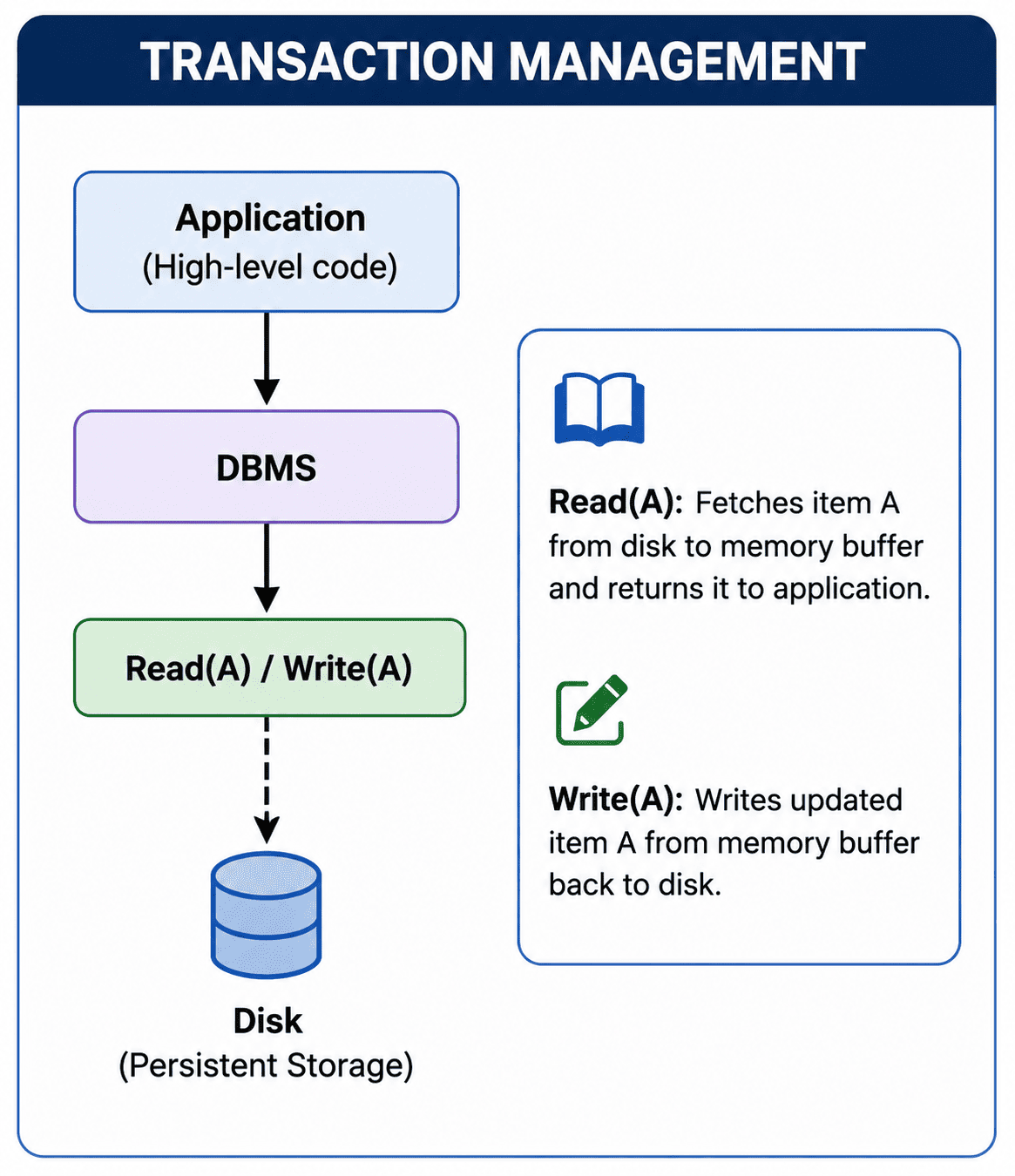
- Read(A): Fetches the database block containing item A from the physical disk, loads it into a volatile main memory buffer, and presents it to the application.
- Write(A): Writes the updated value of item A from the volatile main memory buffer back to the physical database on the disk.
The Transaction Lifecycle (States)
To recover from system crashes and application errors, the database management system (DBMS) rigorously tracks each transaction through a state machine during its execution.
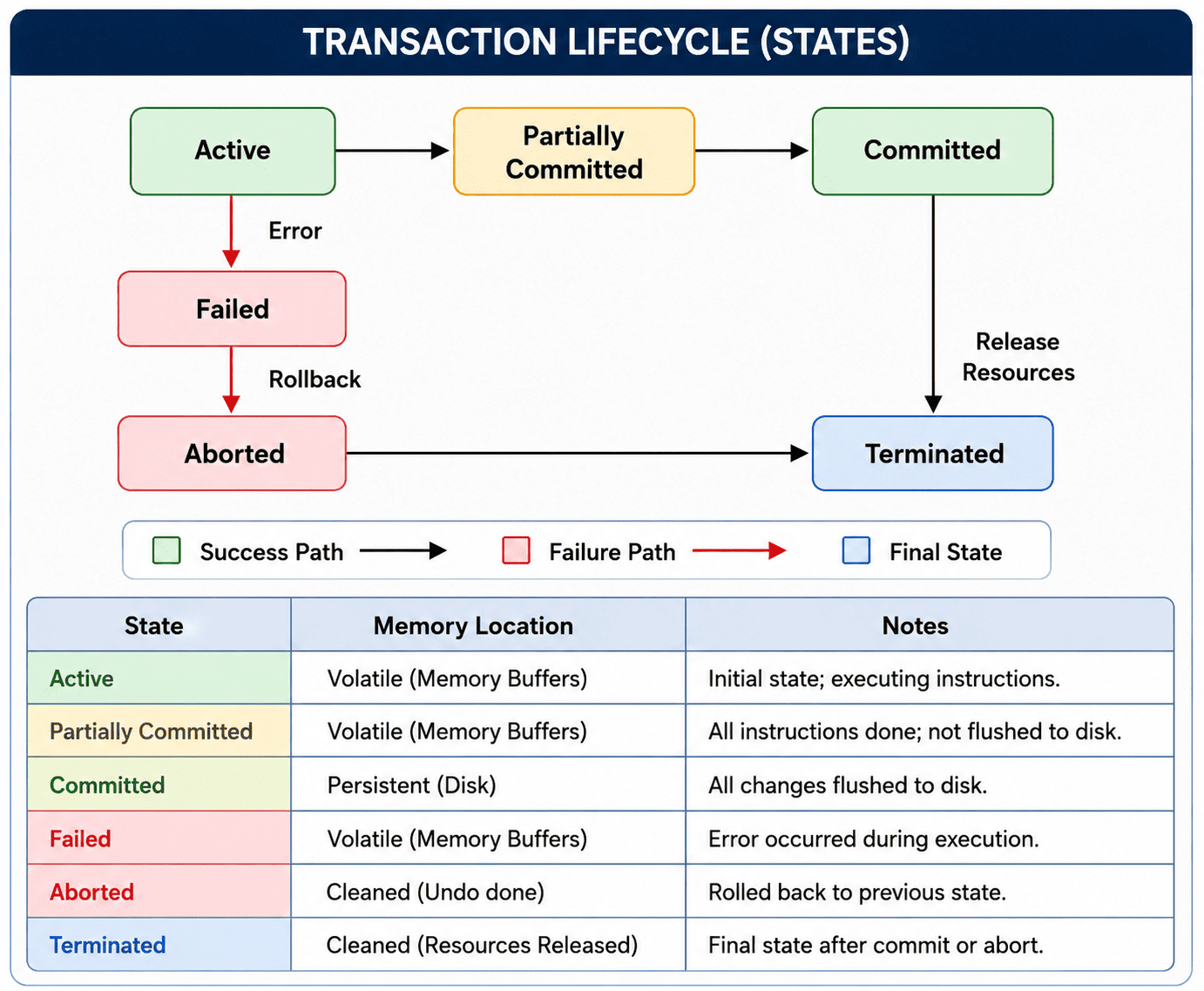
- Active: The transaction is in its initial state while its instructions are actively executing. During this state, all modifications reside ONLY in volatile memory buffers, not on the physical disk.
- Partially Committed: The transaction enters this state immediately after its last instruction has executed. The operations are computationally complete, but the changes STILL reside in volatile memory buffers and haven't safely reached the disk.
- Committed: The transaction reaches this state after all its modifications are successfully written (flushed) to the physical disk. The changes are now permanent.
- Failed: If a hardware failure, software error, or logic error prevents the transaction from completing its execution, it enters the failed state.
- Aborted: Once failed, the system performs a 'Rollback' operation to undo any partial modifications, restoring the database to its pre-transaction state. After rollback, the transaction is marked as aborted.
- Terminated: The final state. A transaction enters the terminated state after it has successfully Committed or has been safely Aborted. At this point, all locks and resources are released.
| Transaction State | Current Memory Location | Transition Path & Actions |
|---|---|---|
| Active | Volatile memory buffers | Transitions to Partially Committed on success, or Failed on error. |
| Partially Committed | Volatile memory buffers | Transitions to Committed after flushing buffers to disk. |
| Committed | Persistent non-volatile disk | Final state; successfully completed. |
| Failed | Volatile memory buffers | Transitions to Aborted after initiating a rollback. |
| Aborted | Cleaned (Changes Undone) | Final state; rolled-back transaction. |
| Terminated | Cleaned (Resources Released) | Reached after entering either Committed or Aborted. |
The ACID Properties
To maintain absolute database consistency through system failures, power outages, and concurrent access by thousands of users, the DBMS strictly enforces four pillars known as the ACID properties.
1. Atomicity ('All or Nothing')
Definition: Guarantees that a transaction executes completely or not at all. If any single operation within the transaction fails, the entire transaction is aborted and rolled back to the beginning.
| Account | Balance |
|---|---|
| A | $500 |
| B | $300 |
| Account | Balance |
|---|---|
| A | $500 (Refunded!) |
| B | $300 |
Example: T1 transfers $100 from A to B. It deducts $100 from A, but the server crashes before adding to B. The money is lost in the void! Atomicity ensures the system detects the failure upon reboot and rolls back the deduction, refunding A.
2. Consistency (Integrity Conservation)
Definition: Ensures that a transaction transitions the database from one valid, consistent state to another valid, consistent state, perfectly satisfying all schema constraints (like Primary Keys, Foreign Keys, and custom checks).
| Account | Balance |
|---|---|
| A | $500 |
| B | $300 |
| Account | Balance |
|---|---|
| A | $400 |
| B | $400 |
Example: Before the $100 transfer, A has $500 and B has $300. The total sum is $800. After the transfer completes (A has $400, B has $400), the total sum must STILL be exactly $800. Consistency guarantees that internal business rules remain intact.
3. Isolation (Independence)
Definition: Ensures that concurrently executing transactions do not interfere with one another. The system behaves as if transactions are executed strictly serially (one by one), preventing concurrent operations from reading incomplete or 'dirty' data.
| Account | Balance |
|---|---|
| A | $400 (Deducted) |
| B | $300 (Not added yet) |
| Action | Status |
|---|---|
| Calculate Total Sum | LOCKED (Waiting...) |
Example: While T1 is transferring $100, T2 tries to calculate the total funds. If T2 reads the data *during* the transfer, it will see $700 total instead of $800! Isolation locks the data, forcing T2 to wait until T1 is completely finished.
4. Durability (Permanence)
Definition: Guarantees that once a transaction reaches the 'Committed' state, its updates persist in non-volatile storage and can NEVER be lost, even if someone immediately unplugs the database server's power cord.
Placement Takeaways: Who handles what?
In interviews, you will frequently be asked to identify which internal subsystem of the DBMS is responsible for maintaining each specific ACID property. Memorize this mapping:
| ACID Property | Responsible DBMS Component |
|---|---|
| Atomicity | Transaction Manager |
| Consistency | Application Programmer / Integrity Constraints |
| Isolation | Concurrency Control Manager |
| Durability | Recovery Manager |
Sort the Concepts
Drag the real-world scenario to the ACID property it represents: