

The Need for Indexing
The physical storage layer defines how your logical SQL tables are organized as physical records on non-volatile disk blocks.
Because disk I/O operations (reading from a hard drive) are incredibly slow compared to RAM, they become a massive performance bottleneck. Without an index, the database engine must scan every single physical block to find a record (a full table scan).
An Index is an auxiliary file containing search keys and pointers. It acts just like the index at the back of a textbook, allowing the engine to instantly locate the exact physical data block without reading the entire book.
Types of Physical Indexes
Physical indexes are classified into Primary, Clustering, and Secondary indexes based on how the underlying data file is organized.
- Primary Index: Built on a data file where records are physically ordered by its Primary Key. It is a Sparse Index. The average number of block accesses to find a record is log₂(B) + 1 (where B is the number of index blocks).
- Clustering Index: Built on a data file where records are physically ordered by a Non-Key attribute (e.g., Department_ID). It is also a Sparse Index, containing one entry per unique key value.
- Secondary Index: Built on a data file where records are physically UNORDERED (a heap file). Because the data is scattered, it MUST be a Dense Index.
Visualizing Sparse vs Dense Indexes
A Sparse Index only contains a pointer for the *first* record of every data block (called the anchor record). A Dense Index contains a pointer for *every single record* in the entire table.
| Index Key | Block Ptr |
|---|---|
| 1 | -> Block A |
| 50 | -> Block B |
| ID (PK) | Name |
|---|---|
| 1 | Alice |
| 25 | Bob |
| ID (PK) | Name |
|---|---|
| 50 | Charlie |
| 99 | Dave |
Notice how the Sparse Index above is tiny! It only needs 2 entries to index 4 records because the Data Blocks are physically sorted by ID.
| Index Key | Record Ptr |
|---|---|
| Alice | -> Block B |
| Bob | -> Block A |
| Charlie | -> Block B |
| Dave | -> Block A |
| Name | ID |
|---|---|
| Dave | 99 |
| Bob | 25 |
| Name | ID |
|---|---|
| Charlie | 50 |
| Alice | 1 |
If we create a Secondary Index on 'Name', the data is NOT sorted by Name. Therefore, the Dense Index MUST contain exactly 4 entries pointing to the exact location of each of the 4 scattered records.
B-Trees vs B+ Trees
Linear indexes (like arrays) are too slow for massive databases. Instead, databases use specialized tree data structures.
- B-Tree (Balanced Tree): A self-balancing search tree designed to optimize disk block reads. Each node contains search keys, child pointers, AND actual data pointers. The order (P) defines the max children a node can have. Internal nodes must have between ceil(P/2) and P children.
- B+ Tree (The Industry Standard): Modifies the B-Tree by strictly separating routing from data storage. Non-leaf nodes contain NO data pointers; they are purely used for routing. All data pointers are stored exclusively at the bottom in the leaf nodes.
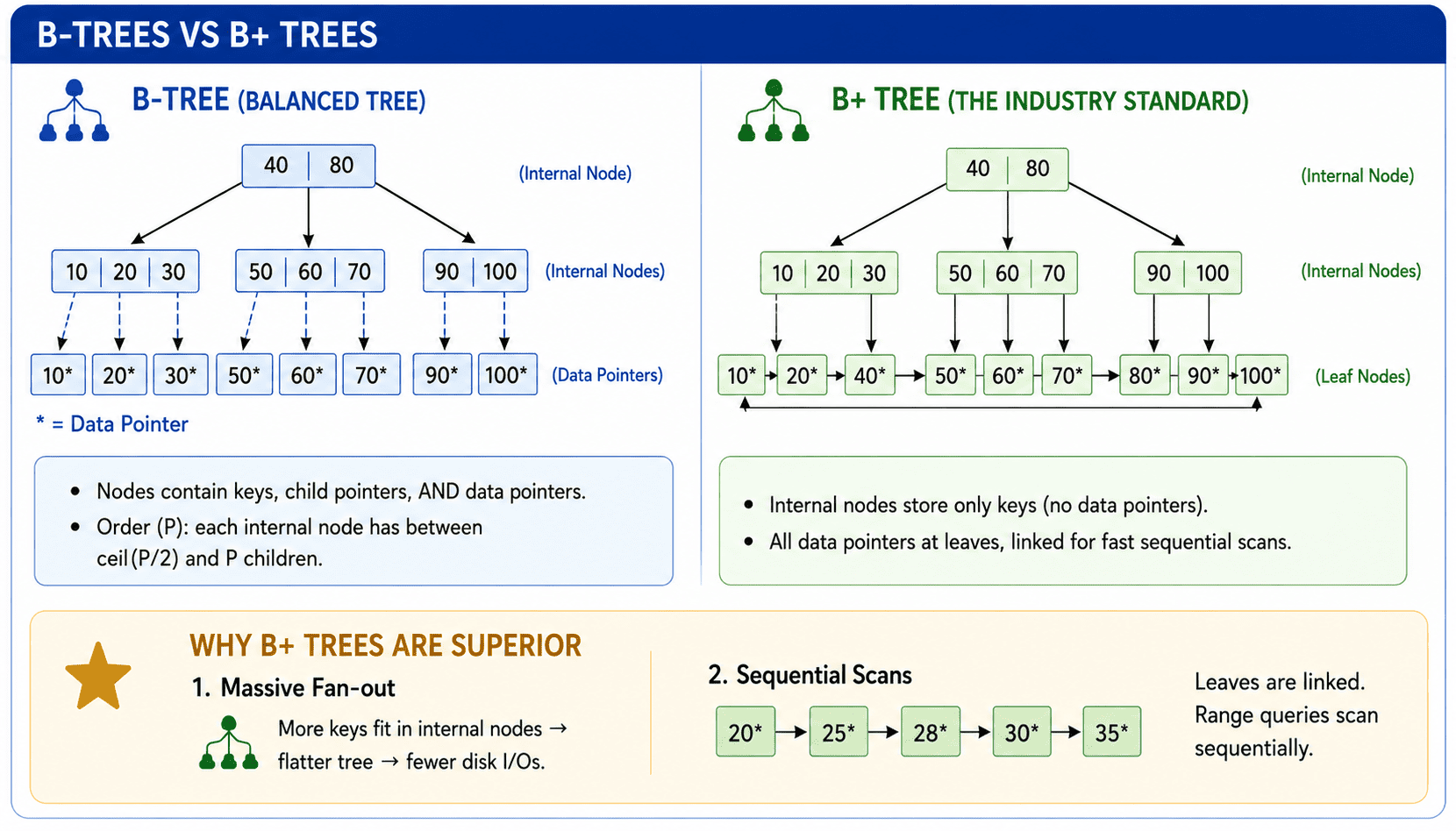
SELECT * WHERE Age BETWEEN 20 AND 30, the B+ tree simply traverses to 20, and then sweeps horizontally across the linked list! A standard B-Tree cannot do this.Placement Takeaways
| Indexing Model | Data File Physical Ordering | Index Density |
|---|---|---|
| Primary Index | Ordered by Primary Key | Sparse (1 entry per data block) |
| Clustering Index | Ordered by Non-Key Field | Sparse (1 entry per unique key) |
| Secondary Index | Physically Unordered | Dense (1 entry per data record) |
Fill in the Blank
Sort the Concepts
Sort the index types based on their structural density: