

Introduction to Electronic Mail
Electronic Mail, or Email, is one of the oldest and most universally utilized services on the internet. Operating at the Application Layer, it relies on a strict client server architecture to route messages globally.
Unlike real time communication such as a voice call or live chat, email operates on a store and forward mechanism. The message is stored on various servers along its journey and waits until the recipient is ready to explicitly retrieve it.
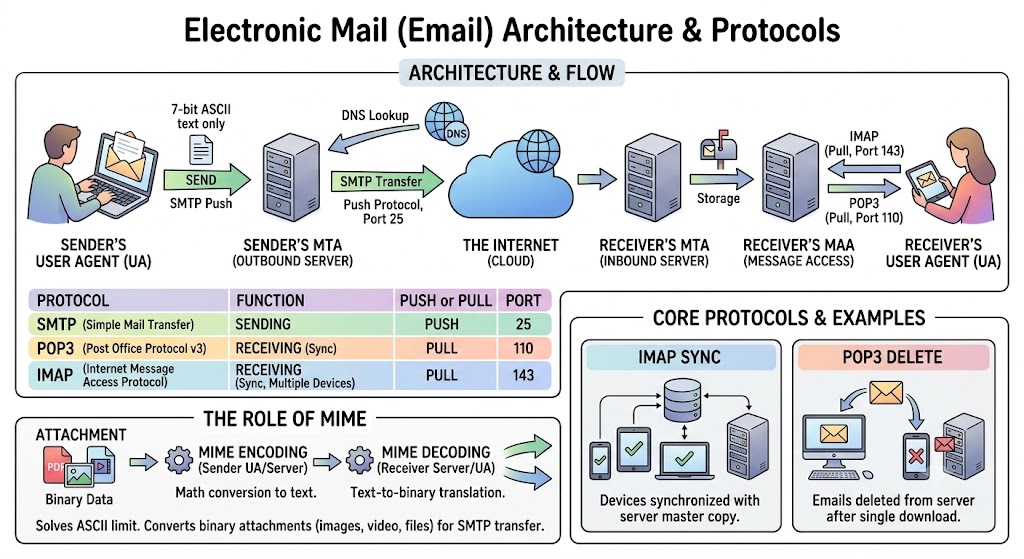
A visual representation of how emails are transferred between senders and receivers using various protocols.
The Architecture of Email
To fully understand how email works, we must divide the system into three distinct software components:
- User Agent (UA): The client software interface that the end user interacts with directly to compose, read, and manage emails.
- Message Transfer Agent (MTA): The backend server software strictly responsible for routing and physically transferring the email across the internet from the sender to the receiver.
- Message Access Agent (MAA): The server software responsible for holding the received emails and allowing the recipient's User Agent to retrieve them.
Core Email Protocols
Email relies entirely on three distinct protocols. A highly common exam trap is confusing the sending protocols with the receiving protocols.
1. Simple Mail Transfer Protocol (SMTP)
SMTP is strictly a push protocol. It is used exclusively for sending emails. It operates on Port 25.
It is used in two places: first, to push the email from the sender's User Agent to their local outbound server. Second, to push the email from the sender's server across the internet to the receiver's server. You can never use SMTP to download an email.
2. Post Office Protocol Version 3 (POP3)
POP3 is a legacy pull protocol used strictly for receiving emails. It operates on Port 110.
When a user connects via POP3, the protocol downloads the emails from the server to the local device and then immediately deletes the master copy from the server.
For example, if you download an email on your office computer using POP3, you will not be able to see that same email later on your smartphone because it has been permanently removed from the server.
3. Internet Message Access Protocol (IMAP)
IMAP is an advanced pull protocol used for receiving emails. It operates on Port 143.
Unlike POP3, IMAP strictly synchronizes the client with the server. It downloads a copy of the email but leaves the master copy securely on the server.
For example, this allows a modern user to read an email on their smartphone, mark it as unread on their tablet, and reply to it from their laptop, with all devices perfectly synced.
Handling Attachments: The Role of MIME
Historically, SMTP was designed to only understand basic 7 bit ASCII text. It would completely crash if you tried to send binary data like an image, a video, or a software file.
To solve this, Multipurpose Internet Mail Extensions (MIME) was introduced. MIME sits on top of SMTP. When you attach a PDF document to an email, MIME mathematically converts that binary PDF into a long string of standard ASCII text so SMTP can safely transmit it. When the email arrives, the receiver's MIME protocol translates that text back into the exact original PDF.
The Step by Step Flow of an Email
- Composition: The sender writes an email in their User Agent and hits send.
- Initial Push: The User Agent uses SMTP to push the email to the sender's local mail server (MTA).
- DNS Lookup: The sender's MTA looks at the destination domain and uses DNS to find the exact IP address of the receiver's mail server.
- Internet Transfer: The sender's MTA uses SMTP again to push the email across the internet to the receiver's MTA.
- Storage: The receiver's MTA accepts the email and drops it into the receiver's digital mailbox.
- Retrieval: The receiver opens their User Agent, which uses IMAP (or POP3) to pull the email down from the server to be read.