

Thrashing in Operating Systems
There is a point in every system where adding more work stops improving performance and starts destroying it. In virtual memory systems, that breaking point has a name: thrashing.
It is one of the more dramatic failure modes an OS can experience, and understanding it requires connecting several concepts from memory management together.
What is Thrashing?
Thrashing happens when a system gets so overwhelmed trying to shuffle pages between RAM and disk that it barely has time to actually run any processes.
The CPU sits mostly idle, not because there is nothing to do, but because every single process is constantly waiting for its pages to be loaded in from the disk.
What Triggers Thrashing?
Several conditions push a system into thrashing territory:
- Too many processes running at once: When the OS allows more processes to run than the RAM can comfortably support, each process gets too few frames. Every process ends up constantly generating page faults.
- Poor page replacement choices: An algorithm that repeatedly evicts pages that are immediately needed again amplifies the problem. FIFO is a classic offender here.
- Insufficient physical memory: Some workloads simply need more RAM than the machine has. No amount of clever scheduling fixes an architectural mismatch.
The Multiprogramming Connection
The relationship between how many processes run simultaneously (Degree of Multiprogramming) and CPU utilization follows a curve.
As active processes increase from zero, CPU utilization climbs steadily. More processes mean the CPU spends less time sitting idle. But push too far past the sweet spot, and the curve breaks downward sharply. Each new process added takes frames away from existing ones.
Processes that already had barely enough frames now have even fewer. Page faults multiply. The OS spends all its time handling faults, and CPU utilization collapses toward zero.
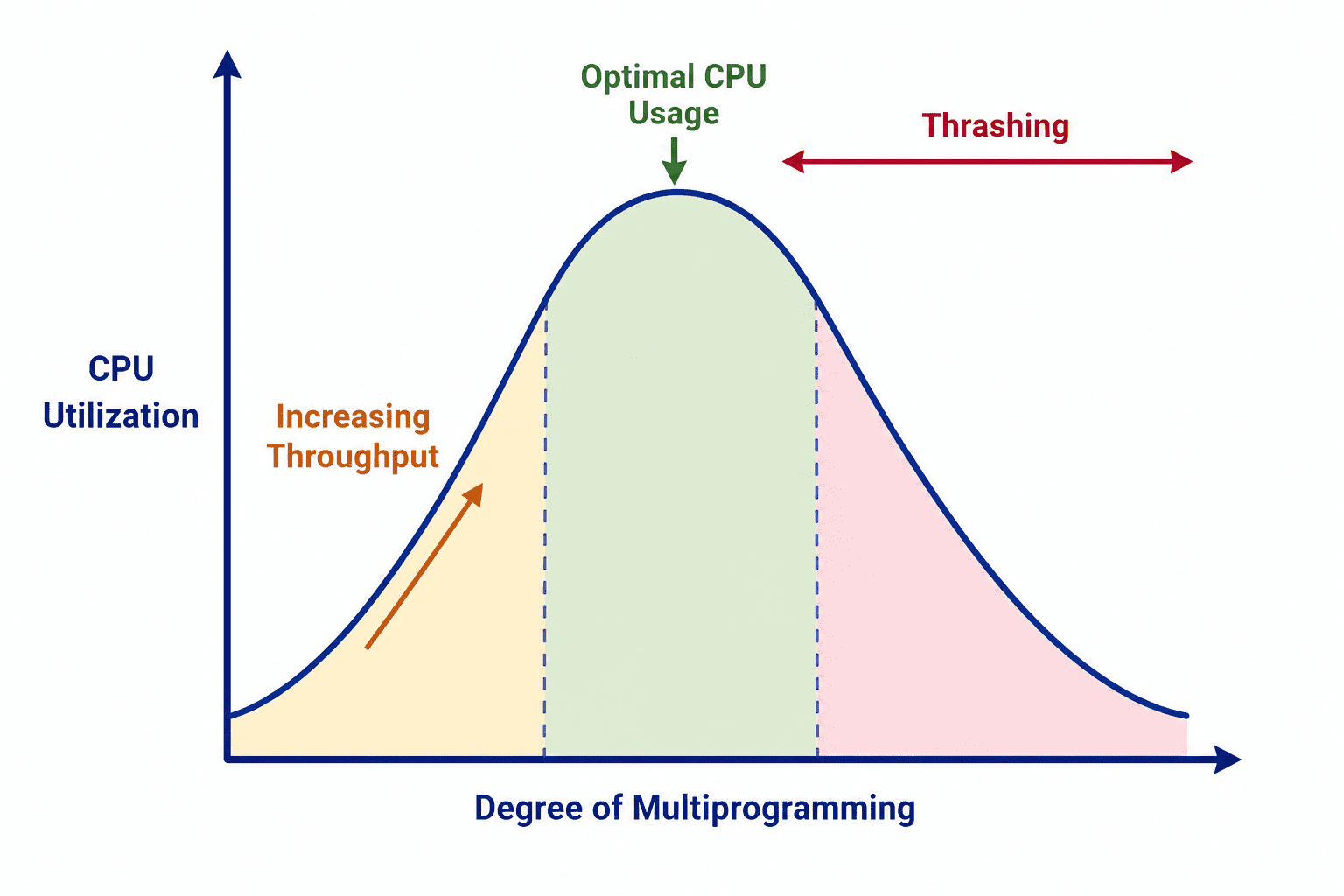
The breaking point: When the degree of multiprogramming gets too high, thrashing begins and CPU utilization collapses.
Detecting Thrashing
The Working Set Model
Introduced by Peter Denning, the Working Set Model gives the OS a way to measure how much memory each process genuinely needs at any given moment.
For a process at time t, the working set W(t, Δ) is the collection of distinct pages that process has referenced within the last Δ memory accesses. This window Δ represents a recent slice of the process's activity.
Example:
Process history (most recent on the right): 4, 7, 4, 2, 7, 3, 4, 3, 4, 7
Window size Δ = 5

The last 5 references are: 3, 4, 3, 4, 7
Working set = {3, 4, 7}
Size = 3 distinct pages needed right now.
Now say the system has 5 running processes with working sets of sizes 8, 6, 10, 7, and 9 pages respectively. The total demand is 40 pages.
If physical memory can hold only 32 pages total, the system is 8 pages short. Thrashing is guaranteed. The OS needs to suspend at least one process until the total demand fits within available memory.
Monitoring Signals
Beyond working set calculations, the OS watches two key indicators:
- Page Fault Rate: A healthy system generates occasional page faults. When faults start arriving in rapid succession across multiple processes, it signals the system is struggling.
- CPU Utilization: Counterintuitively, extremely LOW CPU utilization can point to thrashing. Every process is waiting for the disk, leaving the CPU with nothing to execute.
Preventing Thrashing
1. Local Page Replacement
With Global Page Replacement, any process can steal frames from any other process. A memory-hungry compiler could steal frames belonging to a video player, causing the video to stutter violently.
Local Page Replacement fixes this by giving each process its own dedicated pool of frames. When a process needs to evict a page, it can only choose from its own frames. The compiler is forced to manage its own small pool, and the video player runs smoothly.
2. Working Set Model as a Control Mechanism
The OS can actively use the Working Set Model for admission control. Before admitting a new process into RAM, it checks whether the available memory can absorb that process's expected working set.
If admitting it would push total demand over physical capacity, the OS holds it in a ready queue on disk until an existing process finishes.
3. Page Fault Frequency (PFF) Scheme
This approach treats the page fault rate as a dial for tuning frame allocation. The OS sets acceptable upper and lower thresholds for page faults per second.
Comparison of Prevention Strategies
| Strategy | How It Works | Best For |
|---|---|---|
| Local Page Replacement | Isolates each process to its own dedicated frame pool. | Preventing inter-process interference. |
| Working Set Model | Tracks active page demand per process. | Proactive admission control. |
| PFF Scheme | Adjusts frames based on page fault rate feedback. | Dynamic fine-tuning during execution. |
Summary
Thrashing represents the ultimate failure state of virtual memory under pressure. It is caused by too many processes competing for too little RAM, compounded by poor replacement policies.
The OS has to walk a tightrope: enough processes running to keep the CPU busy, but not so many that page fault handling consumes all available resources. Working set tracking, smart replacement policies, and dynamic frame allocation are the tools it uses to stay on that tightrope.
Calculate the Working Set
Question 1 of 1Test your ability to determine a process's Working Set.