

Batch Processing Operating System
Batch processing operating systems are among the oldest forms of OS design, tracing back to the early days of computing in the 1950s and 60s.
What made them unique was that users had absolutely no way to communicate with the computer while their programs were running. There were no screens to look at and no keyboards for real-time input. You simply handed your work over and waited.
What is a Batch Processing OS?
The core idea is straightforward: jobs that share similar characteristics are grouped together and processed one by one without any manual intervention.
A user would prepare their work in advance, submit it to a human operator, and that operator would sort everything into groups (batches) before sending them off for processing.
Why was this approach needed?
Setting up early computers for different programming languages was a slow and tedious process. If some users needed FORTRAN and others needed COBOL, it made no sense to reset the entire machine after every single job.
Instead, the operator would collect all FORTRAN jobs into one batch and all COBOL jobs into another. The machine only needed to be configured once per language, saving a massive amount of setup time.
How Does It Work?
The process was largely offline. Users prepared jobs using punch cards or magnetic tapes and handed them to the operator. From there, a program called the Batch Monitor took over.
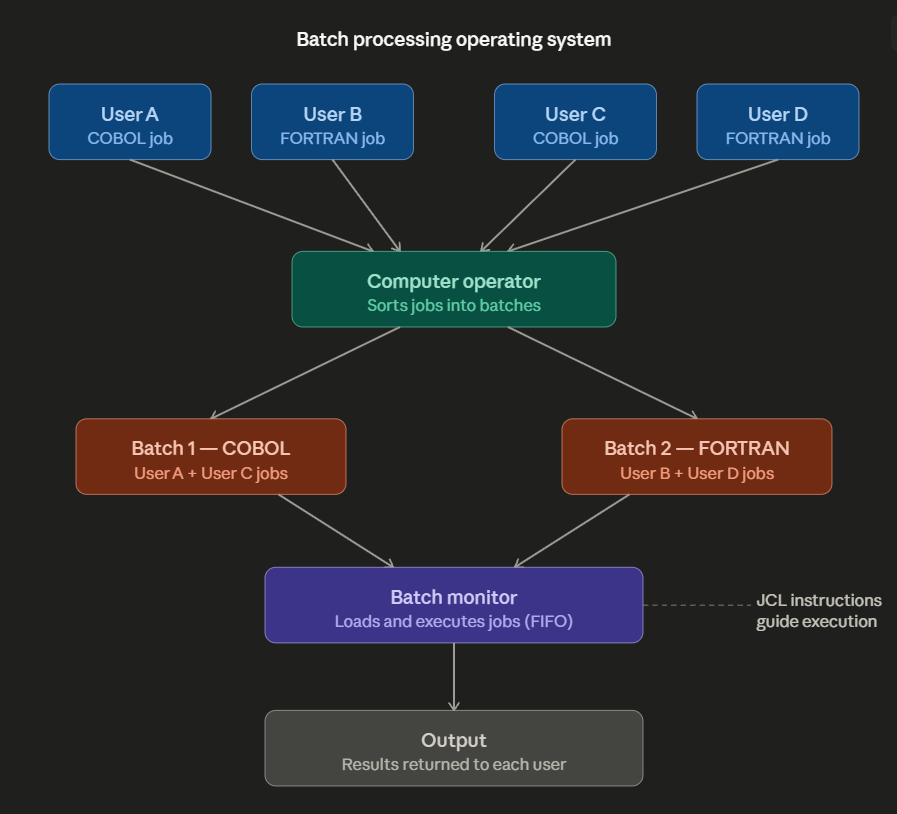
The Batch Processing Workflow: From multiple users to sorted batches, handled by the Batch Monitor using JCL instructions.
- Users: Prepare jobs offline and pass them to the operator. They have no further involvement until the output is returned.
- Computer Operator: Acts as a middleman, collecting jobs and organizing them into logical groups based on shared requirements.
- Batch Monitor: A specialized program that handles execution. It loads each job in order, runs it, and moves to the next one automatically.
- Output: Results are collected after each job finishes and eventually returned to the respective user.
Key Features
- Lack of Control: Once a job is submitted, the user loses all control. If an error occurs, the user must fix the punch cards and resubmit the entire job from scratch.
- FIFO Processing: Jobs are handled strictly in the order they arrive (First-Come, First-Served).
- Job Control Language (JCL): A primitive language used to give the Batch Monitor instructions about which program to run and where the input/output data is located.
Advantages & Disadvantages
| Advantages | Disadvantages |
|---|---|
| Saves setup time by grouping similar jobs together. | No way to intervene or correct errors while a job is running. |
| Simple to manage and requires minimal hardware resources. | Slow turnaround time if many jobs are ahead in the queue. |
| Ideal for large-scale, repetitive tasks (like payroll). | Poor CPU usage: the processor sits idle during slow mechanical I/O operations. |
Examples
Well-known batch processing systems from the early era include IBM OS/360, UNIVAC EXEC II, Burroughs MCP, and CDC SCOPE.
Summary
Batch processing was a vital solution for early computing when hardware time was incredibly expensive. By reducing setup overhead, it allowed organizations to process massive amounts of data efficiently, even if it meant a lack of real-time interaction for the users.
Batch OS Mechanics
Question 1 of 1Test your knowledge on the specialized components of a Batch OS.