

Memory Management in Operating Systems
Every program needs memory to run. But memory is a finite resource, and when dozens of processes are competing for it simultaneously, someone needs to keep things organized.
That job falls on the memory management component of the operating system. It tracks what is being used, what is free, and makes sure every process gets what it needs without stepping on anyone else.
Process Address Space
When a process runs, it works with a set of addresses that refer to memory locations in its code. These are NOT the actual physical addresses in your RAM chips. Instead, they are logical addresses, and the OS handles the translation.
Addresses go through three stages as a program moves from source code to execution:
- Symbolic Addresses: What programmers write (e.g., variable names, labels, constants). These exist only in source code.
- Relative Addresses: Produced by the compiler. It converts symbolic names into positions relative to the start of the program (e.g., "14 bytes from the start").
- Physical Addresses: Generated by the loader when the program is actually placed into RAM hardware.
Loading and Linking
Before a program can run, it must be linked with external libraries and loaded into memory.
| Concept | Static | Dynamic |
|---|---|---|
| Loading (Putting code in memory) | Everything is compiled and loaded into memory at once. Stays there until the program ends. | Only the core program loads at startup. Additional modules load from disk only when called. |
| Linking (Connecting to libraries) | All required library code is bundled directly into the executable file. Makes the file large, but self-contained. | The executable just holds a reference. The actual library (like a DLL) is connected at runtime, saving space and allowing multiple programs to share it. |
Swapping
Sometimes there simply is not enough RAM for every process that wants to run. Swapping is the mechanism that handles this situation. The OS temporarily moves an idle process out of RAM and onto the hard disk, freeing up memory. Later, when the original process needs to run again, it gets brought back in.
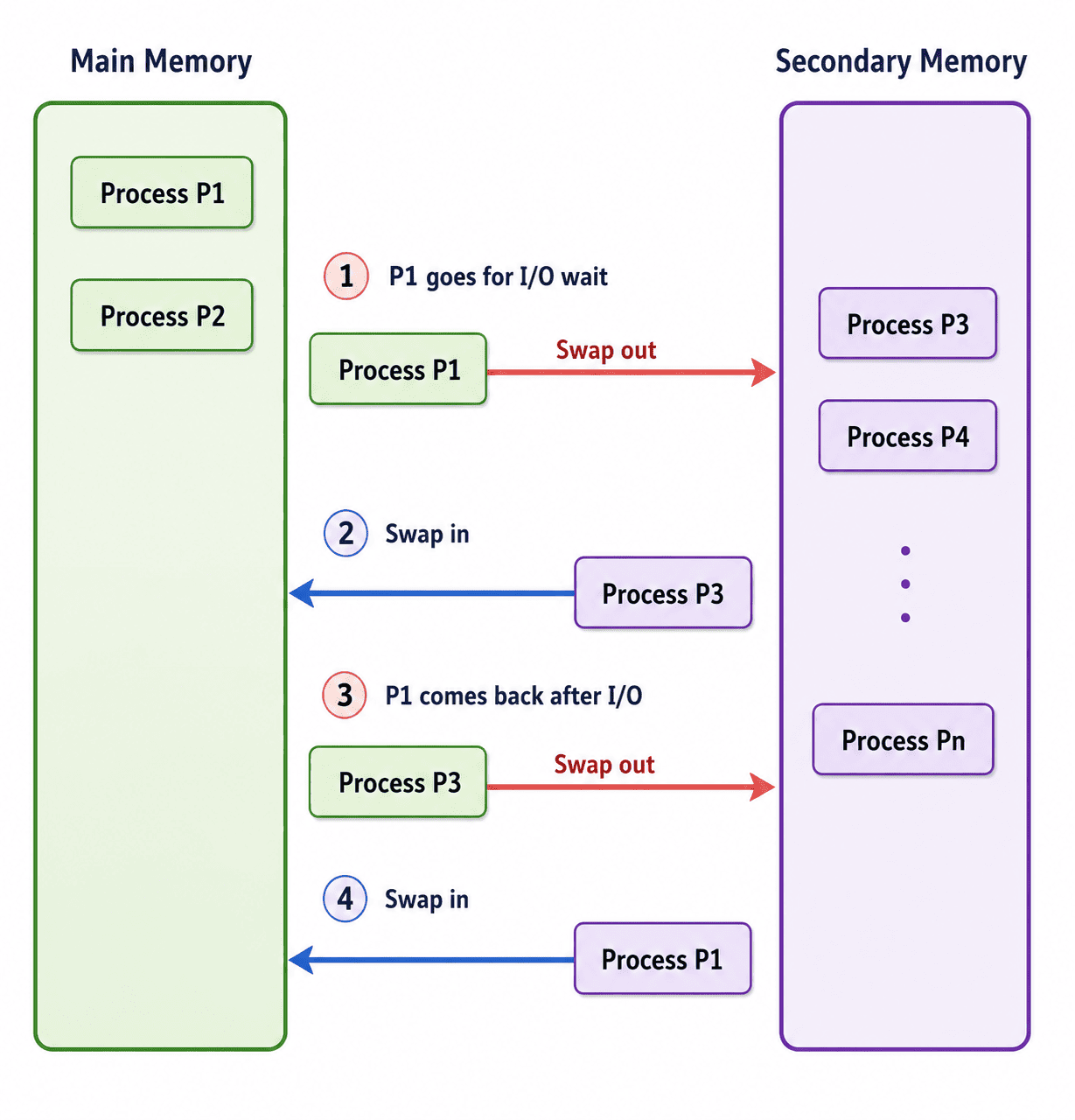
Swapping: Moving processes between Main Memory (RAM) and the Backing Store (Disk).
Swapping has a massive performance cost because disk I/O is notoriously slow. Let's look at the math:
Process Size: 2048 KB (2 MB)
Disk Transfer Rate: 1 MB per second

Time to swap out to disk: 2 seconds
Time to swap back into RAM: 2 seconds
Total Overhead: 4 full seconds of waiting
Despite the heavy cost, swapping is a necessary evil. It makes it possible to run more processes than would otherwise physically fit in memory.
Memory Allocation and Fragmentation
The OS can manage user memory in two ways: Single Partition Allocation (one process gets a large chunk protected by limit registers) or Multiple Partition Allocation (memory is divided into fixed-sized chunks for multiple processes).
As processes come and go, the free memory left behind tends to get scattered. This is called Fragmentation.
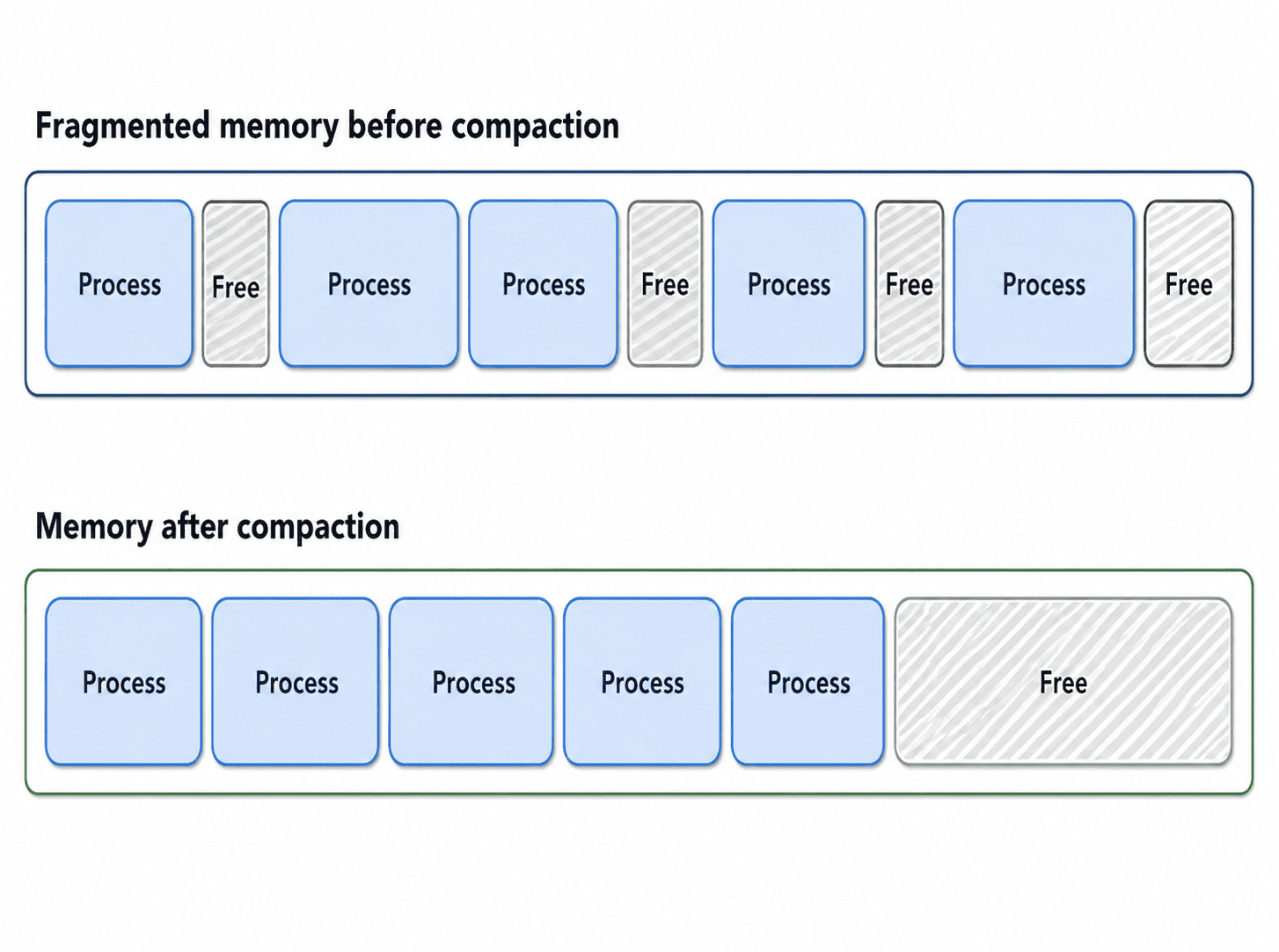
Fragmentation: Free memory becomes scattered into small, unusable gaps.
- External Fragmentation: There is technically enough total free memory to satisfy a request, but it is spread across many small gaps rather than sitting in one contiguous block.
- Internal Fragmentation: A process is assigned a memory block slightly larger than it actually needs. The leftover space INSIDE that block sits unused and cannot be given to anyone else.
One fix for external fragmentation is Compaction. The OS literally shuffles processes around in memory to push all the free space together into one large block. This requires dynamic relocation to work.
Paging
Paging is one of the most important memory management techniques. The core idea is to stop trying to fit processes into variable-sized contiguous blocks. Instead, we break everything into equal-sized chunks.
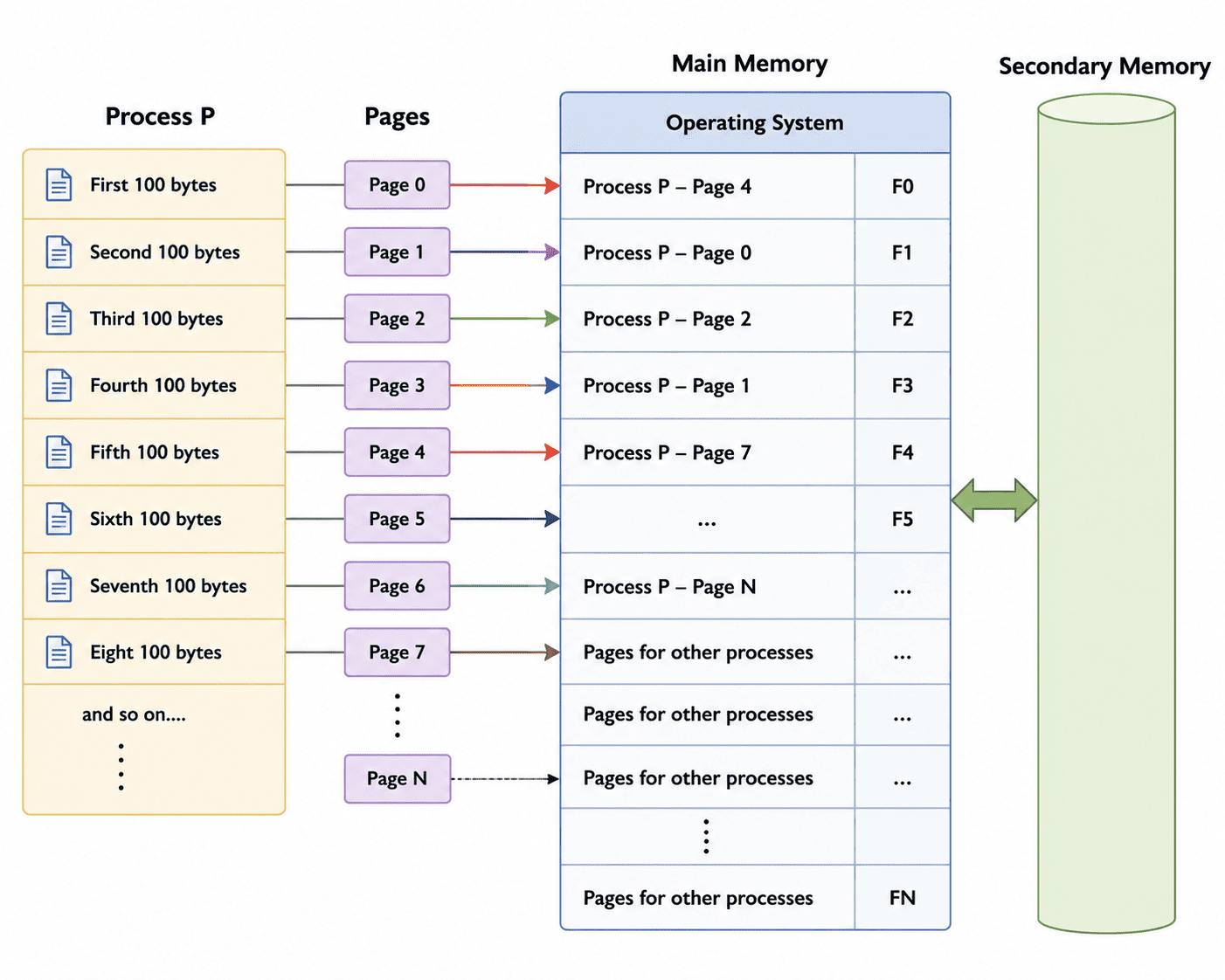
Paging: Breaking logical memory into Pages and physical memory into Frames of the exact same size.
The logical chunks of a process are called Pages. The physical chunks of RAM are called Frames. Because they are the exact same size, ANY page can fit into ANY available frame. This completely eliminates External Fragmentation.
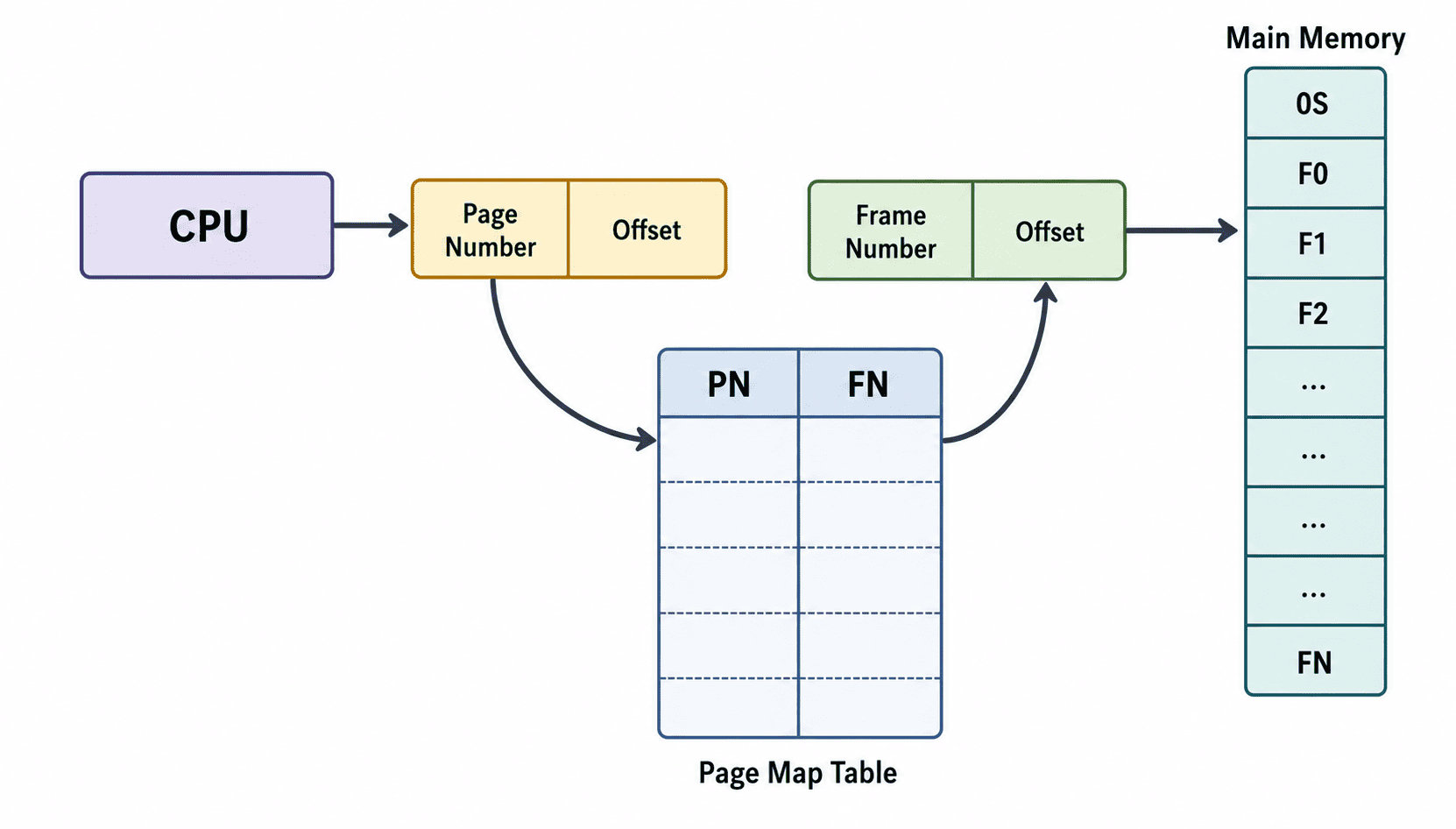
Page Map Table: The MMU uses this table to translate Logical Page Numbers into Physical Frame Numbers on the fly.
Segmentation
Segmentation takes a different approach. Instead of dividing memory into strict, equal-sized pieces (like cutting a cake into identical squares), it divides a program into variable-sized segments based on logical structure.
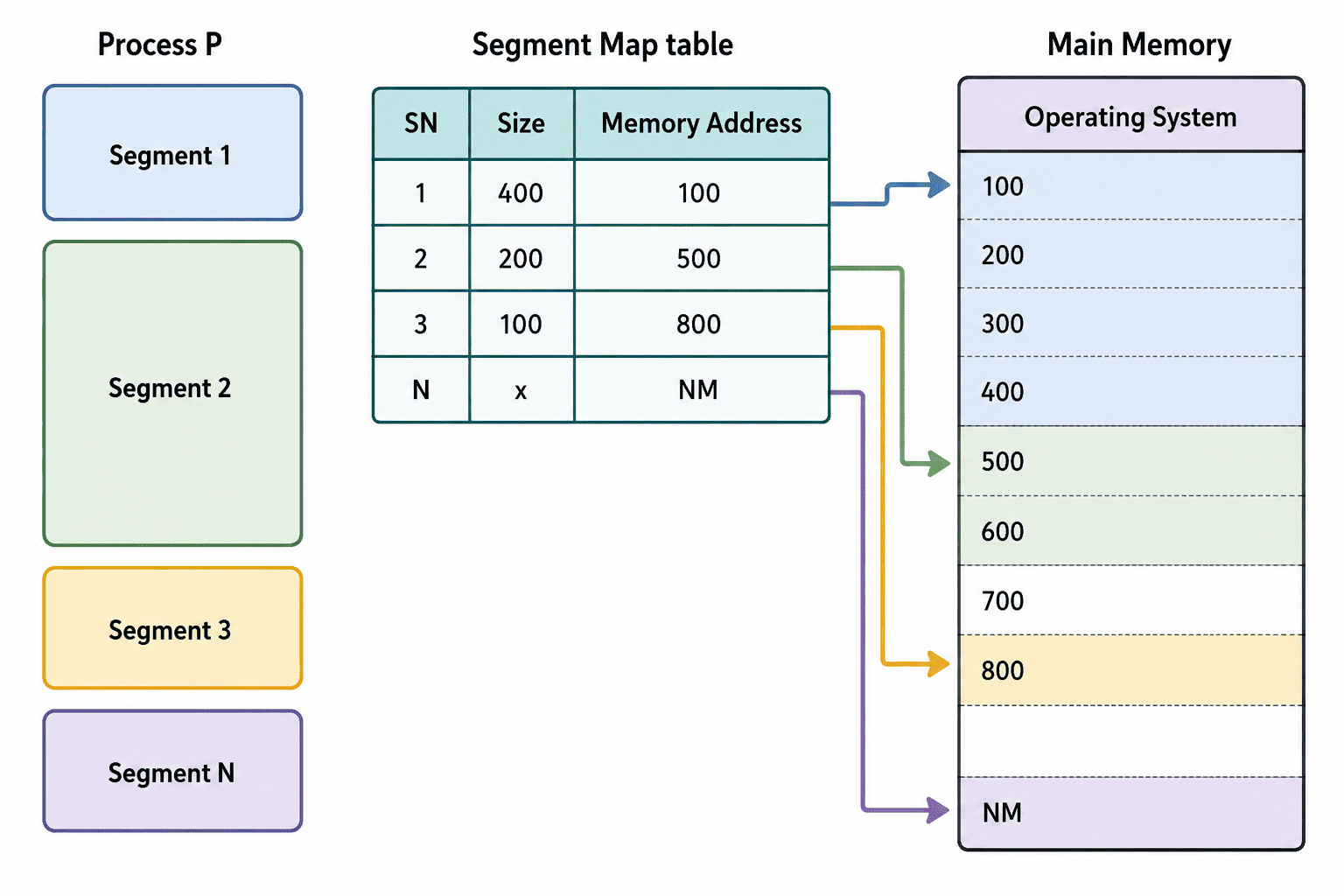
Segmentation: A program is split logically (Main, Data, Utilities) rather than arbitrarily.
A program might have one segment for its main function, another for its data structures, and another for utility routines. These segments are logically meaningful to the programmer.
When the process runs, its segments are loaded into available memory blocks. The segments do not need to be contiguous with each other, though each individual segment must be a solid, contiguous block. The OS maintains a Segment Map Table to track the starting address and length (limit) of every segment.
The downside? Because segments are variable-sized, allocating them is tricky, and External Fragmentation becomes a real problem once again.
Summary
Memory management sits at the heart of how an OS keeps multiple processes running smoothly. From translating logical addresses via the MMU, to deciding what stays in RAM and what gets swapped to disk, every decision directly impacts system performance.
Paging and segmentation each solve parts of the problem in different ways, and most modern systems (like Windows and Linux) combine ideas from both to get the best of both approaches.