

Buffering in Operating Systems
Modern computers are built from components that operate at wildly different speeds. A CPU can crunch through instructions in nanoseconds, while a printer or hard disk operates orders of magnitude slower. Without some way to bridge this gap, the fast components would constantly sit idle, waiting for the slow ones to catch up.
Buffering is the solution the OS uses to keep everything moving.
What is Buffering?
A buffer is a temporary holding area in memory. When data travels from one place to another, say from a disk to the CPU, or from an application to a printer, the buffer acts as a waiting room. The sender drops data into the buffer and moves on. The receiver picks data up from the buffer when it is ready.
Neither side has to wait for the other directly. This decoupling is what makes buffering valuable. The two parties involved can operate at their own natural speeds, and the buffer absorbs the difference between them.
Why Buffering is Needed
- Speed mismatch: When a data source produces information faster than the destination can consume it, or vice versa. A fast disk feeding a slow printer is a classic case.
- Block size mismatch: Two devices might transfer data in chunks of different sizes. Buffering lets the system collect smaller pieces and deliver them as larger blocks, or break up larger blocks into smaller ones.
- Copy semantics: Applications should not have to sit and wait while an I/O operation finishes. When a program writes data, it hands that data to a buffer and immediately continues working. The OS handles the actual transfer in the background.
| Advantages of Buffering | Limitations of Buffering |
|---|---|
| Fewer I/O operations are needed overall since data moves in larger chunks. | Larger buffers consume more RAM, which can pressure other parts of the system. |
| Processes spend less time waiting for data to arrive. | Some latency is introduced since data sits in the buffer before being processed. |
| Throughput improves because reads and writes happen in batches rather than byte by byte. | Real-time systems can run into trouble when immediate processing is required but buffering adds a small delay. |
Types of Buffering
1. Single Buffering
Single buffering is the most basic form. There is exactly one buffer sitting between the producer and the consumer.
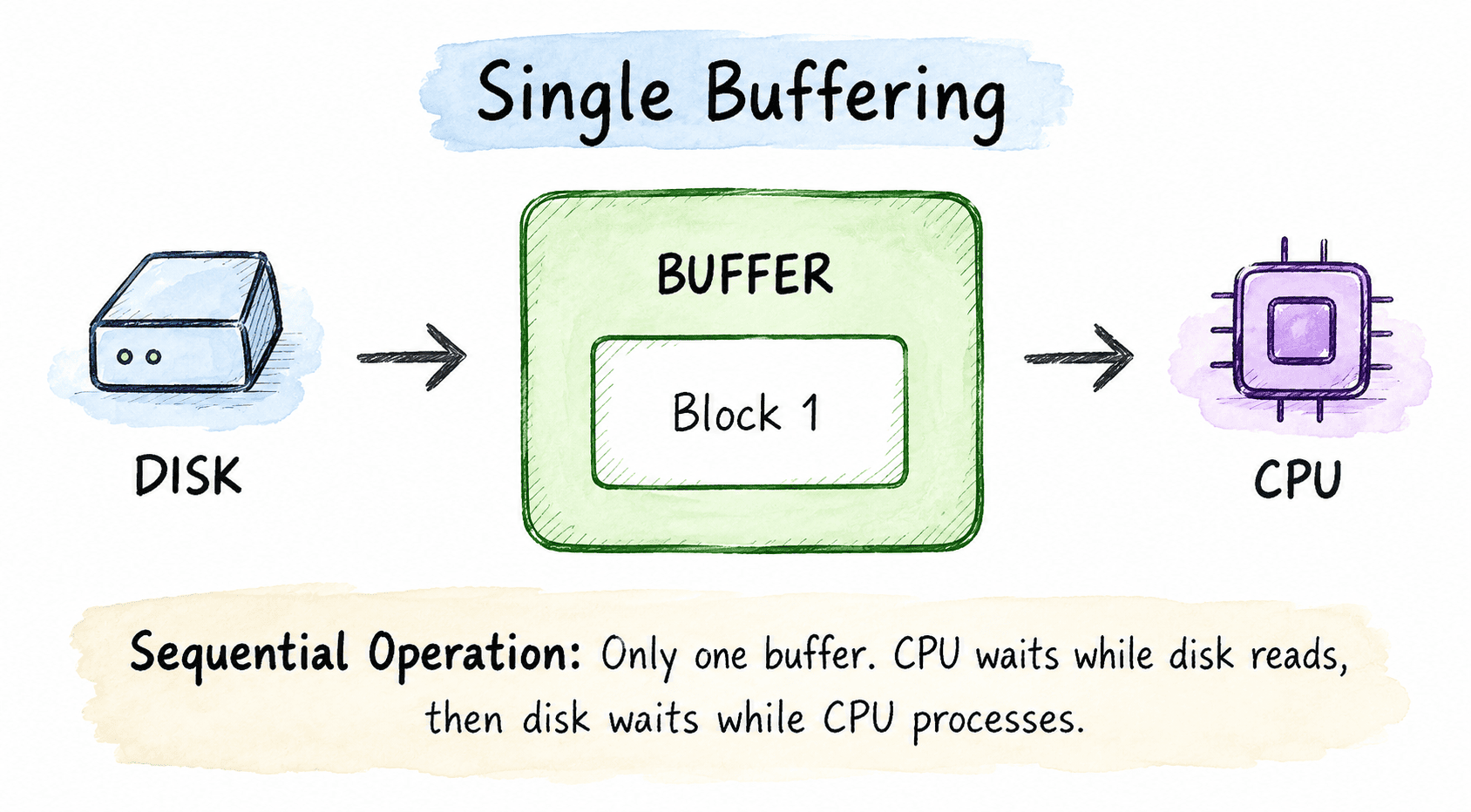
Single Buffering: The producer and consumer must take turns using the single shared buffer.
The input device fills the buffer with a block of data. The CPU then reads and processes that block. Once the CPU is done, the input device refills the buffer with the next block. Since only one buffer exists, the two sides take turns rather than working simultaneously.
- Pros: Simple to implement, minimal memory needed, reduces total number of I/O calls.
- Cons: True parallel operation is not possible. The producer has to stop when the buffer is full, and the consumer has to stop when the buffer is empty.
2. Double Buffering
Double buffering introduces a second buffer to allow the producer and consumer to work at the same time. While one buffer is being filled, the other is being read. When the roles are complete, they swap.
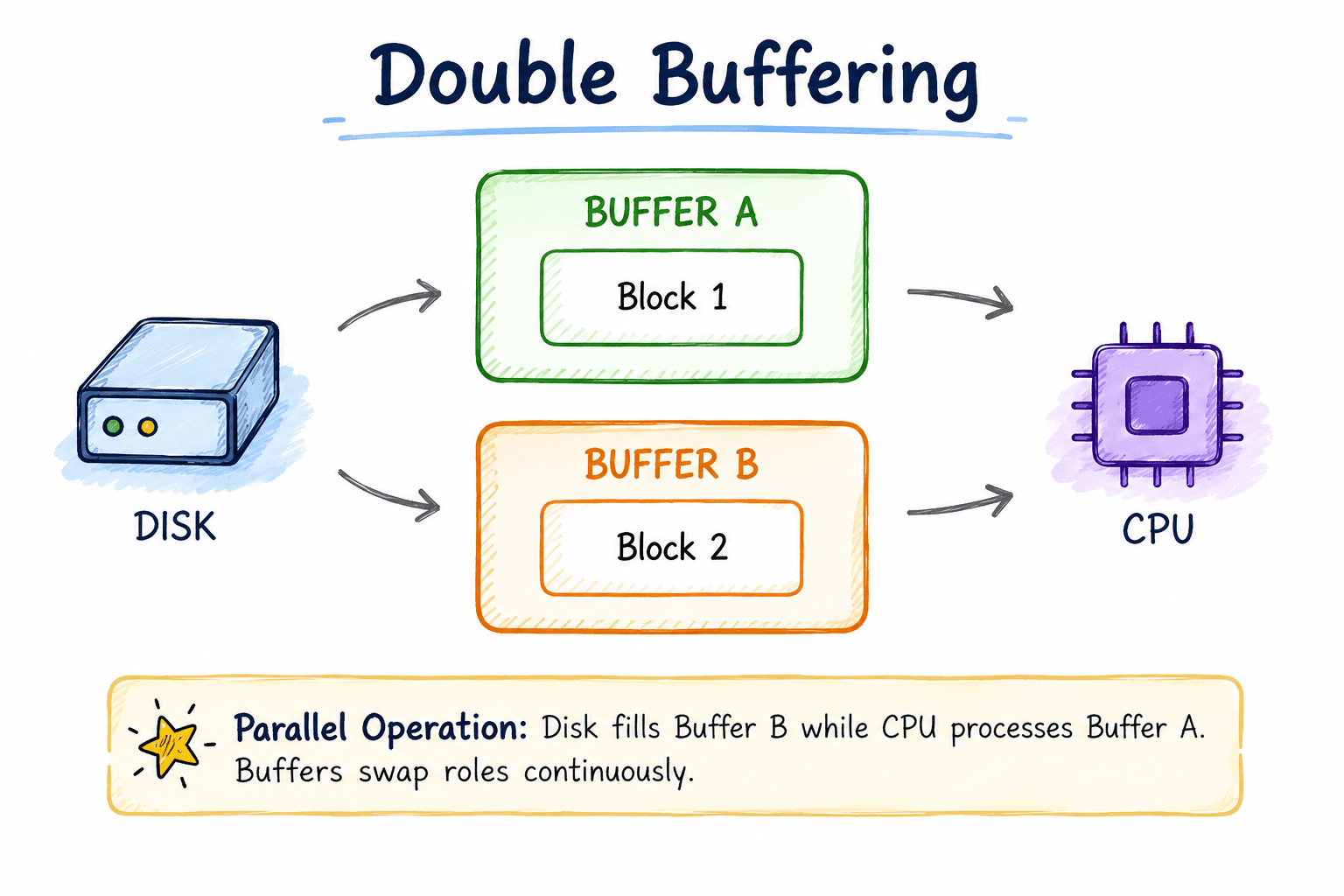
Double Buffering: One buffer is filled while the other is read, enabling true parallelism.
Step-by-step Double Buffering:
T1: Disk fills Buffer A with Block 1
T2: Disk fills Buffer B with Block 2 | CPU processes Block 1 from Buffer A
T3: Disk fills Buffer A with Block 3 | CPU processes Block 2 from Buffer B
T4: Disk fills Buffer B with Block 4 | CPU processes Block 3 from Buffer A- Pros: Producer and consumer genuinely run in parallel. Total throughput increases significantly. Works well for media-heavy tasks like audio, video, and gaming.
- Cons: Uses twice the memory of single buffering. Synchronization between the two buffers adds some management complexity.
3. Circular Buffering (Ring Buffer)
Circular buffering takes the concept further by arranging multiple buffer slots in a ring structure. The last slot connects back to the first, creating a loop.
Two independent pointers track positions: a write pointer (W) for the producer and a read pointer (R) for the consumer. Both move through the ring at their own pace.
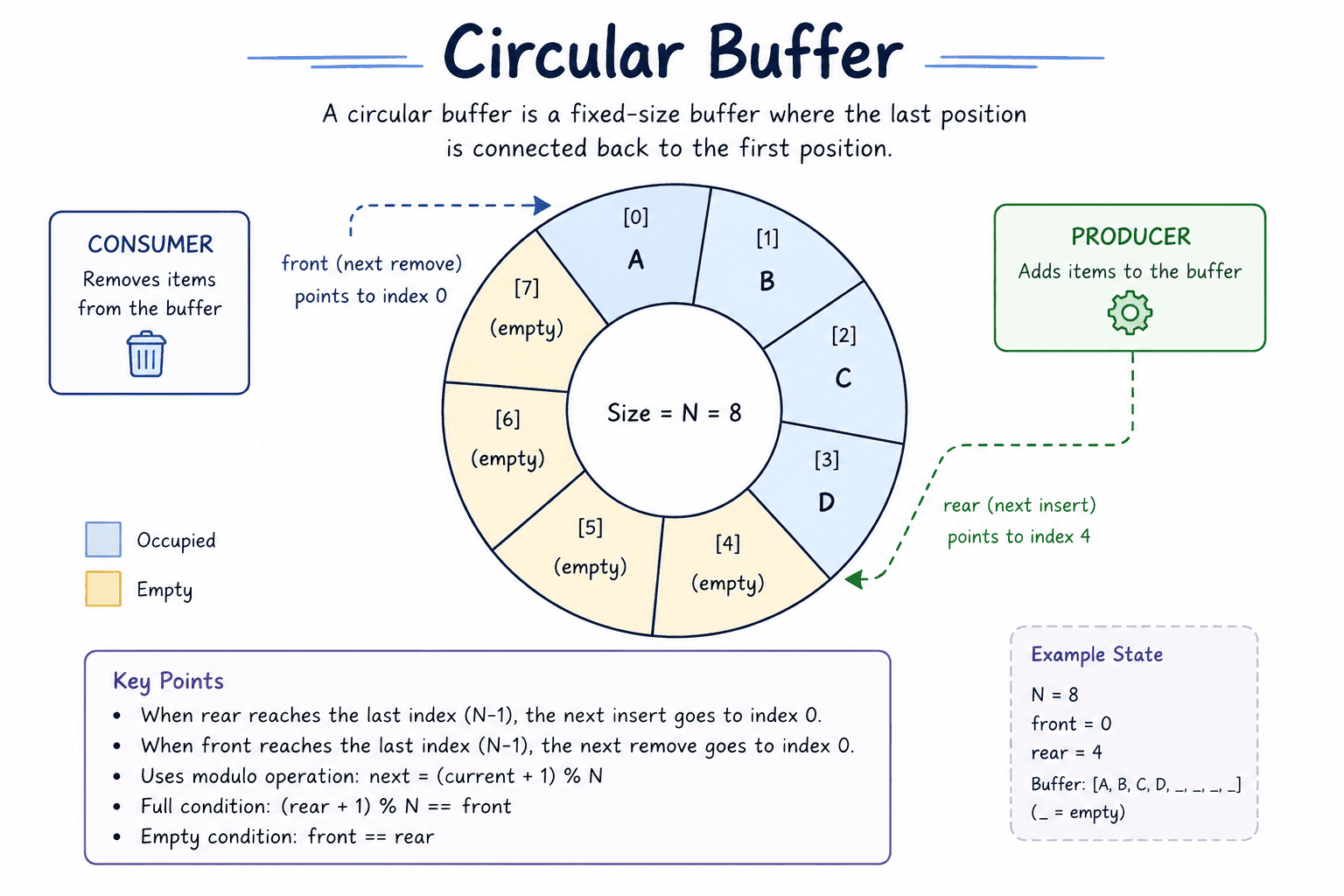
Circular Buffering: A ring of multiple buffer slots managed by independent Read and Write pointers.
When a pointer reaches the last slot, it wraps around to the beginning automatically. It follows strict FIFO ordering. The buffer is empty when both pointers are at the same position. It is full when the write pointer is exactly one step behind the read pointer. No data ever gets physically moved or copied; only the pointers shift, keeping operations blazing fast.
Step 1: Initial State (Empty)
Both R and W pointers at slot 0.
[ _ | _ | _ | _ | _ ]
  R,W

Step 2: Producer writes D1, D2, D3
W moves to slot 3. R stays at slot 0.
[ D1 | D2 | D3 | _ | _ ]
  R              W

Step 3: Consumer reads D1, Producer writes D4 and D5
R moves to slot 1. W moves to slot 0 (wraps around).
[ _ | D2 | D3 | D4 | D5 ]
W R- Pros: Excellent for continuous data streams (audio, network packets). Memory is reused efficiently with no fragmentation. Handles speed variations gracefully.
- Cons: Fixed size. If the producer outruns the consumer, older unread data might get overwritten. If the consumer outruns the producer, it runs dry and waits.
Performance Comparison
To make the differences concrete, consider transferring 10 blocks of data from disk to CPU, where each disk read takes 10ms and each CPU processing step takes 8ms.
No Buffering:
Total = 10 x (10ms + 8ms) = 180ms
CPU and disk strictly alternate with no overlap.

Single Buffering:
Total = 10 x max(10ms, 8ms) + overhead = ~110ms
Some overlap achieved, but limited by the shared space.

Double Buffering:
Total = max(10 x 10ms, 10 x 8ms) = 100ms
Near full parallelism once both buffers are active.

Circular Buffering:
Total = ~100ms
Often more consistent than double buffering as extra slots absorb temporary speed spikes.
Summary
Buffering is one of those mechanisms that quietly keeps a computer running smoothly without most users ever noticing it. By temporarily holding data between components that operate at different speeds, it eliminates wasted waiting time and keeps both the CPU and I/O devices productive.
Single buffering is a starting point, double buffering enables real parallelism, and circular buffering handles the relentless demands of continuous high speed data streams.