

Deadlock Detection and Recovery in Operating Systems
Prevention and avoidance are great when you can plan ahead. But some systems simply let processes run freely and deal with deadlocks after they happen. For those systems, detection and recovery become the primary tools.
This lesson walks through how operating systems identify deadlocks under the hood and exactly what they do once one is found.
Detecting a Deadlock
The OS cannot just guess when a deadlock has occurred. It needs a structured way to inspect the current state of the system and spot the problem. Detection algorithms run periodically in the background, examining how resources are distributed and which processes are waiting on what.
There are three main approaches used for this.
1. Resource Allocation Graph (RAG)
A Resource Allocation Graph is a directed graph where both processes and resources appear as nodes. Two types of edges exist in this graph:
- Request Edge: An edge pointing from a process to a resource means that process is requesting that resource.
- Assignment Edge: An edge pointing from a resource to a process means that resource has been assigned to that process.
Detecting a deadlock here comes down to one question: is there a cycle in the graph? If you can trace a path that loops back to where it started, the processes involved in that loop are deadlocked.
Process P1 holds Resource R2 and is waiting for Resource R1
Process P2 holds Resource R1 and is waiting for Resource R2

Graph Trace: P1 -> R1 -> P2 -> R2 -> P1

The cycle is clearly visible, confirming a deadlock between P1 and P2.
Operating systems typically use cycle detection algorithms like Depth-First Search or Topological Sorting to find these cycles programmatically.
2. Wait-for Graph
The Wait-for Graph is a leaner version of the RAG. Resources are removed from the picture entirely. Only processes remain as nodes, and an edge from one process to another simply means the first is waiting on a resource that the second is currently holding.
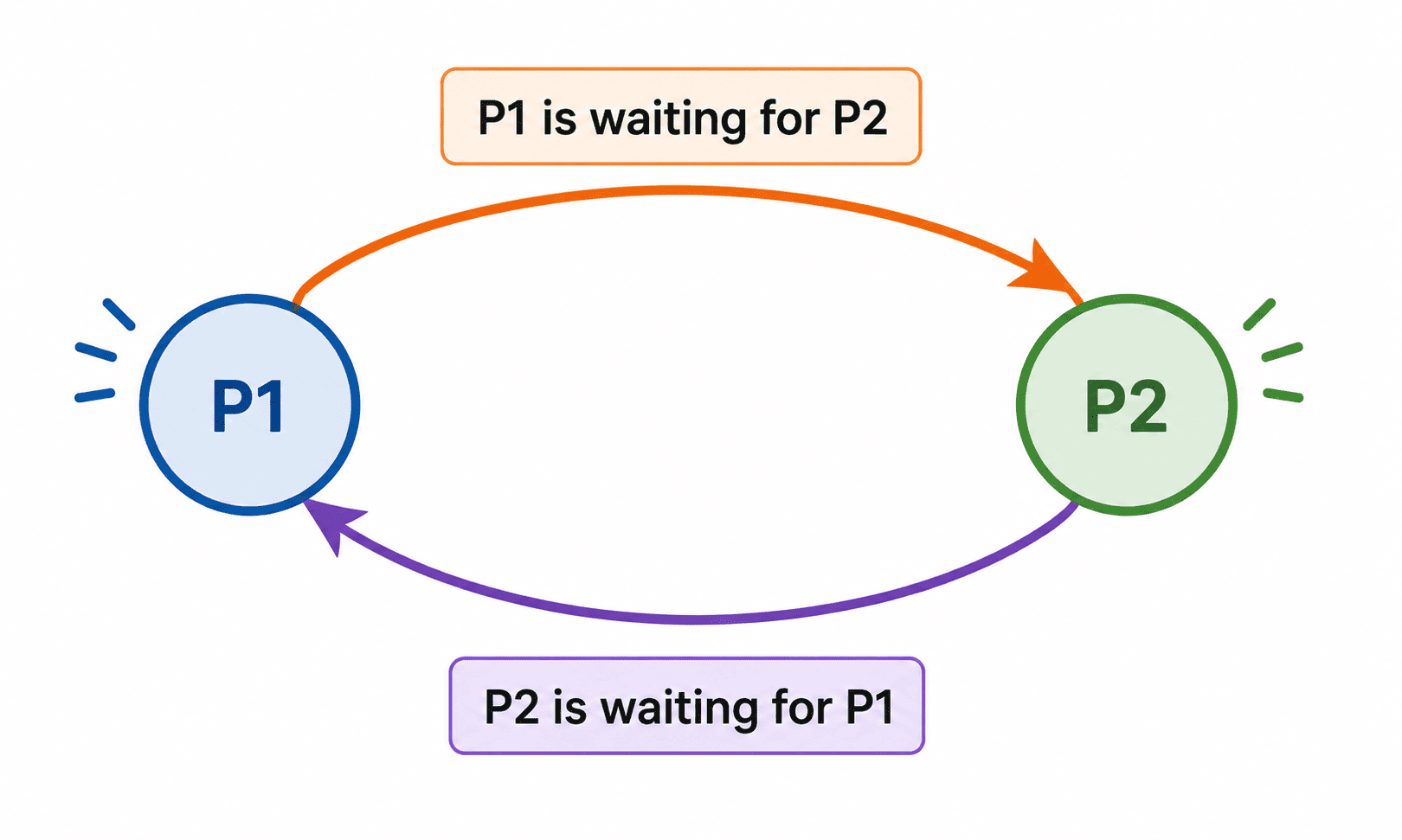
Wait-for Graph: Resources are omitted, showing only process-to-process wait dependencies.
Taking the same example above, the Wait-for Graph would show a direct edge from P1 to P2 and another from P2 to P1. That two-node cycle immediately flags the deadlock.
This graph is simpler to maintain and much faster to analyze. However, both the RAG and Wait-for Graph share a critical limitation.
3. Banker's Algorithm for Detection
When a system has multiple instances of one or more resource types, graph cycle detection breaks down. This is where the Banker's Algorithm steps in.
While typically used for avoidance before allocating resources, it can also serve as a detection tool. The OS periodically runs the safety check portion of the algorithm against the CURRENT allocation state. If the system turns out to be in an unsafe state (no valid sequence for all processes to finish), that signals a deadlock has already occurred.
Recovering from a Deadlock
Finding the deadlock is only half the job. The system then needs to break it. There are two practical ways to do this.
Approach 1: Terminating Processes
The most direct solution is to shut down one or more of the stuck processes. When a process is terminated, every resource it was holding gets released back into the pool. That freed-up resource may be exactly what another process needed to move forward.
The OS does not have to terminate everyone at once. It can go one process at a time, checking after each termination whether the deadlock has cleared.
Scenario:
P1 -> Holds R1, waiting for R2
P2 -> Holds R2, waiting for R3
P3 -> Holds R3, waiting for R1

Resolution:
1. OS terminates P1. Resource R1 becomes available.
2. P3 acquires R1, finishes work, releases R3.
3. P2 acquires R3, finishes work, releases R2.
The whole chain resolves from a single termination. The obvious downside is that terminating a process throws away whatever work it had done up to that point.
Approach 2: Resource Preemption
Instead of killing processes, the OS can forcibly take resources away from them and reassign those resources to other processes that need them. The process that lost its resource gets rolled back and will have to try again later.
Scenario:
P1 -> Holds R1, waiting for R2
P2 -> Holds R2, waiting for R3
P3 -> Holds R3, waiting for R1

Resolution:
1. OS preempts (takes) R1 from P1 and gives it to P3.
2. P3 finishes and releases R3.
3. P2 acquires R3, finishes, and releases R2.
4. P1 eventually acquires R2 and regains R1, finishing its work.
This approach is gentler than termination since no process is permanently killed, but it requires the ability to save and restore process state (checkpointing), which adds significant complexity.
Comparing the Two Recovery Methods
| Feature | Process Termination | Resource Preemption |
|---|---|---|
| What happens to the process | Killed permanently | Rolled back, retried later |
| Work lost | Yes, all progress is gone | Partial, depends on the rollback checkpoint |
| Complexity | Lower (easy to just kill) | Higher (requires state saving) |
| Best suited for | Quick, blunt resolution | When preserving computational progress matters |
Summary
Deadlock detection and recovery gives the OS a reactive safety net. Rather than constraining how processes request resources upfront, it watches the system, catches deadlocks when they form using graphs or algorithms, and surgically breaks them.
For systems where deadlocks are infrequent but not impossible, and where the cost of strict prevention would be too high, this approach strikes a reasonable balance between flexibility and reliability.
Choosing the Right Detection Tool
Question 1 of 1Test your understanding of when to use which detection method.