

Quiz App
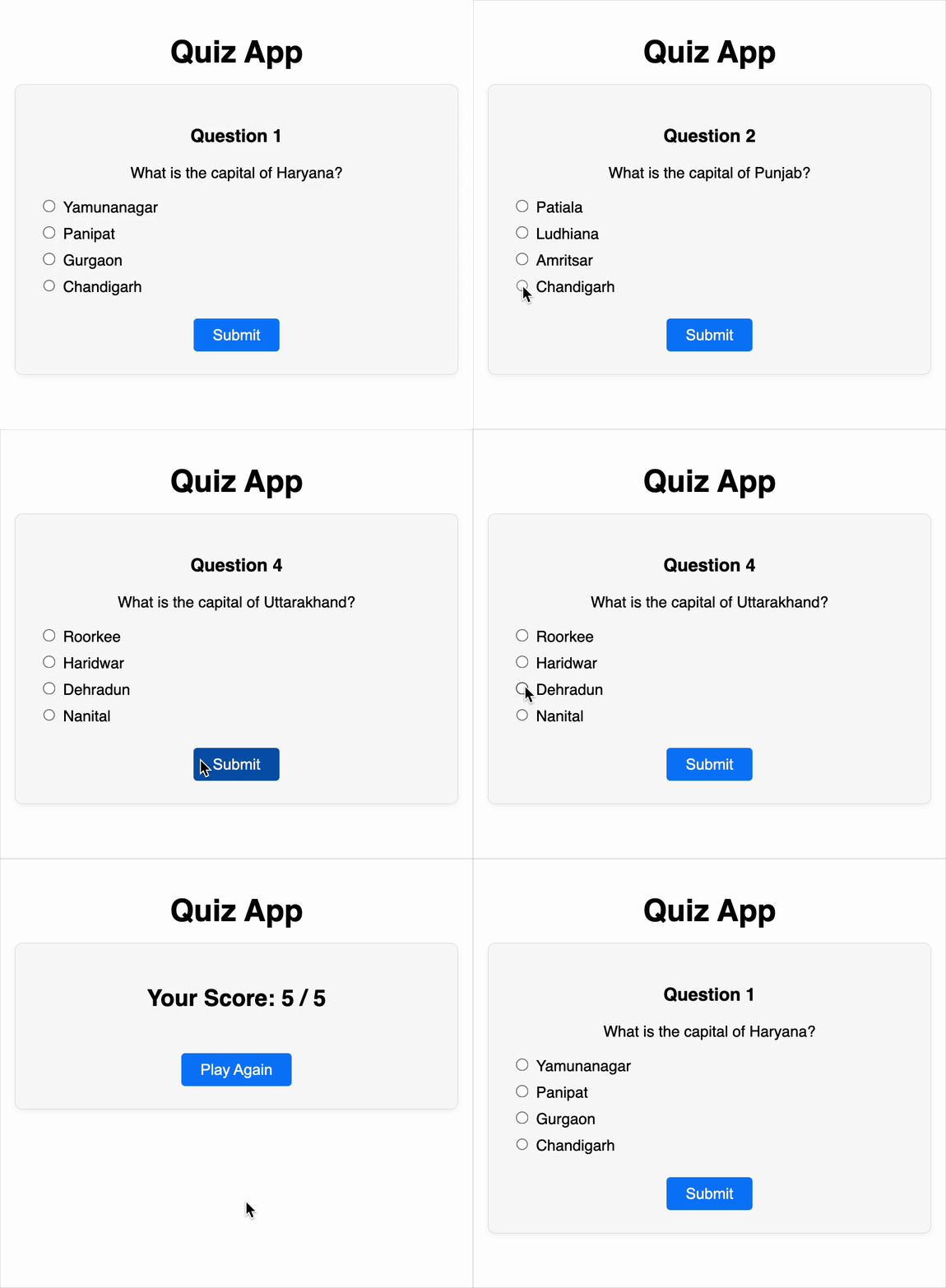
Create an interactive quiz where users answer multiple-choice questions (MCQs) one by one, view their final score, and can restart the quiz using a “Play Again” button.
Features
-
One question at a time Only a single question is shown on the screen at any time. Users must select an answer and click Submit to proceed.
-
Options shown as radio buttons Each question offers 4 options (A–D) displayed as radio buttons. Users can only select one option per question.
-
Submit button must be clicked to continue A Submit button must be present and labeled exactly as
"Submit". Users must click this button to progress through questions. -
Prevent submission without a selected option If the user tries to submit without selecting an answer:
- Display a warning message labelled "Please select an option before submitting." visibly in red.
- Prevent moving to the next question.
-
Final score is shown after the last question After all questions have been answered, display the user’s score in the format:
Your Score: X / YThis result should be accessible using the test ID
score. -
Quiz can be restarted using a “Play Again” button When the quiz ends, a "Play Again" button must be displayed. Clicking it must reset:
- Score back to 0
- Current question index to 0
- Selected option to empty
- Warning message cleared
- All UI returned to initial state
The "Play Again" button must use the test ID
"restart-button". -
The quiz title must be clearly visible The app must render a visible heading labeled
"Quiz App". -
Quiz data (questions) should be passed as a prop The quiz component must receive a
questionsprop (not hardcoded). Example:<QuizApp questions={qBank} />
Edge Case Handling
-
If the quiz data (
questions) array is empty, render a message like:No quiz available -
If the user clicks Submit without selecting an option:
- A red warning is shown
- User cannot proceed
-
When clicking “Play Again”:
- The score, selected answers, and question index must be reset
-
Only one radio option may be selected at any time
Data Test IDs (In Sentence Format)
-
The main question text must use the test ID:
"question". -
The first option (Option A) must use the test ID:
"option-A". -
The second option (Option B) must use the test ID:
"option-B". -
The third option (Option C) must use the test ID:
"option-C". -
The fourth option (Option D) must use the test ID:
"option-D". -
The final score display text must use the test ID:
"score". -
The "Play Again" button that appears after the quiz ends must use the test ID:
"restart-button".
Reference UI
Companies:
Solve Similar questions 🔥
Want to upskill? Explore our courses!

Namaste AI
Learn to build modern AI applications with real-world projects.

Namaste DSA
Master DSA from scratch with numerous problems, and expert guidance.

Namaste React
Wanna dive deep into React and become Frontend Expert? Learn with me now!

Namaste Frontend System Design
The most comprehensive and detailed course for frontend system design.

Namaste Node.js
Wanna dive deep into Node.js? Enroll into `Namaste Node.js` now!