

Multiselect dropdown
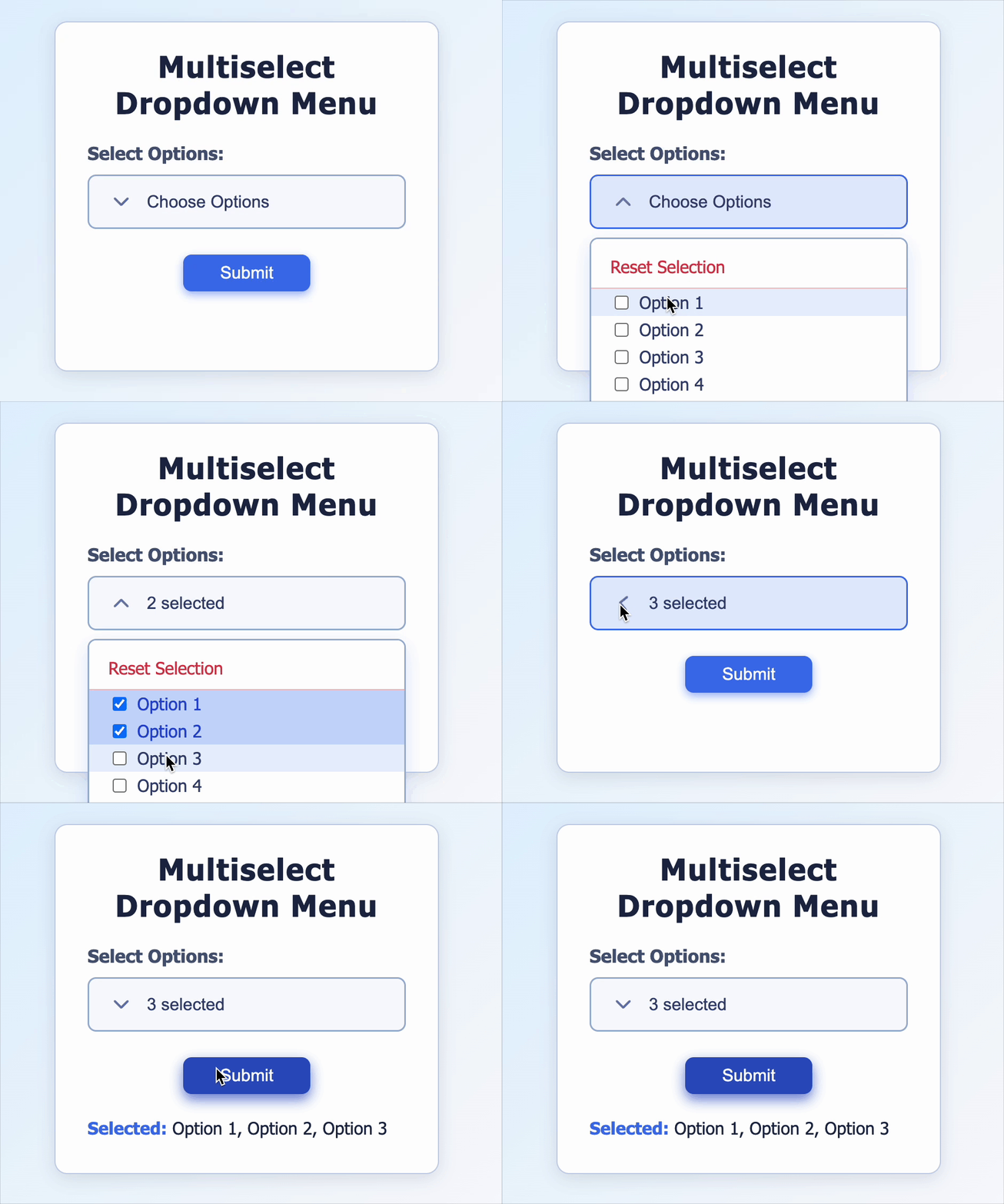
Create a React component that allows users to select multiple options with checkboxes from a dropdown menu. The component must handle option selection, deselection, and allow resetting all selections. It should display the current selection count and the selected options and validate user input on submission.
Requirements
Functional Requirements
- The component must:
- Display a label above the dropdown with the text
"Select Options:". - Show a dropdown toggle button with placeholder text
"Choose Options"when no option is selected. - Show the count of selected options
(e.g., "3 selected")when options are selected. - Include a dropdown icon that rotates on toggle open/close. Use lucide-icon
"ChevronDown" - Display exactly 10 options
(e.g. "Option 2, Option 7")with checkboxes inside the dropdown menu. The menu should be scrollable. It should be in a list format (<li></li>) - Allow selecting or deselecting multiple options by clicking each option.
- Provide a
"Reset Selection"button on top inside the dropdown menu to clear all selections. - Close the dropdown menu when clicking outside the component.
- Show a submit button below the dropdown. The button is clicked after the menu is closed.
- On submit:
- If no option is selected, display an error message:
"Please select at least one option." - If options are selected, display the selected options below the submit button:
"Selected: Option 3, Option 5"
- If no option is selected, display an error message:
- Display a label above the dropdown with the text
Edge cases and constraints
- Submitting with valid selections should not show any error.
- Clicking an option multiple times should toggle selection (select/deselect).
- Leading/trailing spaces in option labels (if any) must not affect selection logic.
- Dropdown button should display "Choose Options" if no options are selected.
- After valid submission, selected options should be clearly displayed in the result area.
- Clicking the Reset button must:
- Clear all selected options
- Hide any error messages
- Clear previous results
- Dropdown icon must rotate only when the menu is open.
Testing Requirements
Data Test IDs (Required for Testing)
-
data-testid="label": Label text element. -
data-testid="dropdown-button": The dropdown toggle button. -
data-testid="dropdown-icon": Icon element indicating dropdown toggle state. -
data-testid="dropdown-menu": The container element for the dropdown options. -
data-testid={option-${option}}: Each option item container, e.g.,option-Option 1. -
data-testid="reset-button": The Reset selections button. -
data-testid="submit-button": Submit button element. -
data-testid="error-message": Element showing validation error messages. -
data-testid="selected-options": Element showing the list of selected options. -
classname= "rotate": Used to check the rotation of the icon.
Reference UI
Companies:
Solve Similar questions 🔥
Want to upskill? Explore our courses!

Namaste AI
Learn to build modern AI applications with real-world projects.

Namaste DSA
Master DSA from scratch with numerous problems, and expert guidance.

Namaste React
Wanna dive deep into React and become Frontend Expert? Learn with me now!

Namaste Frontend System Design
The most comprehensive and detailed course for frontend system design.

Namaste Node.js
Wanna dive deep into Node.js? Enroll into `Namaste Node.js` now!