

List Sorter
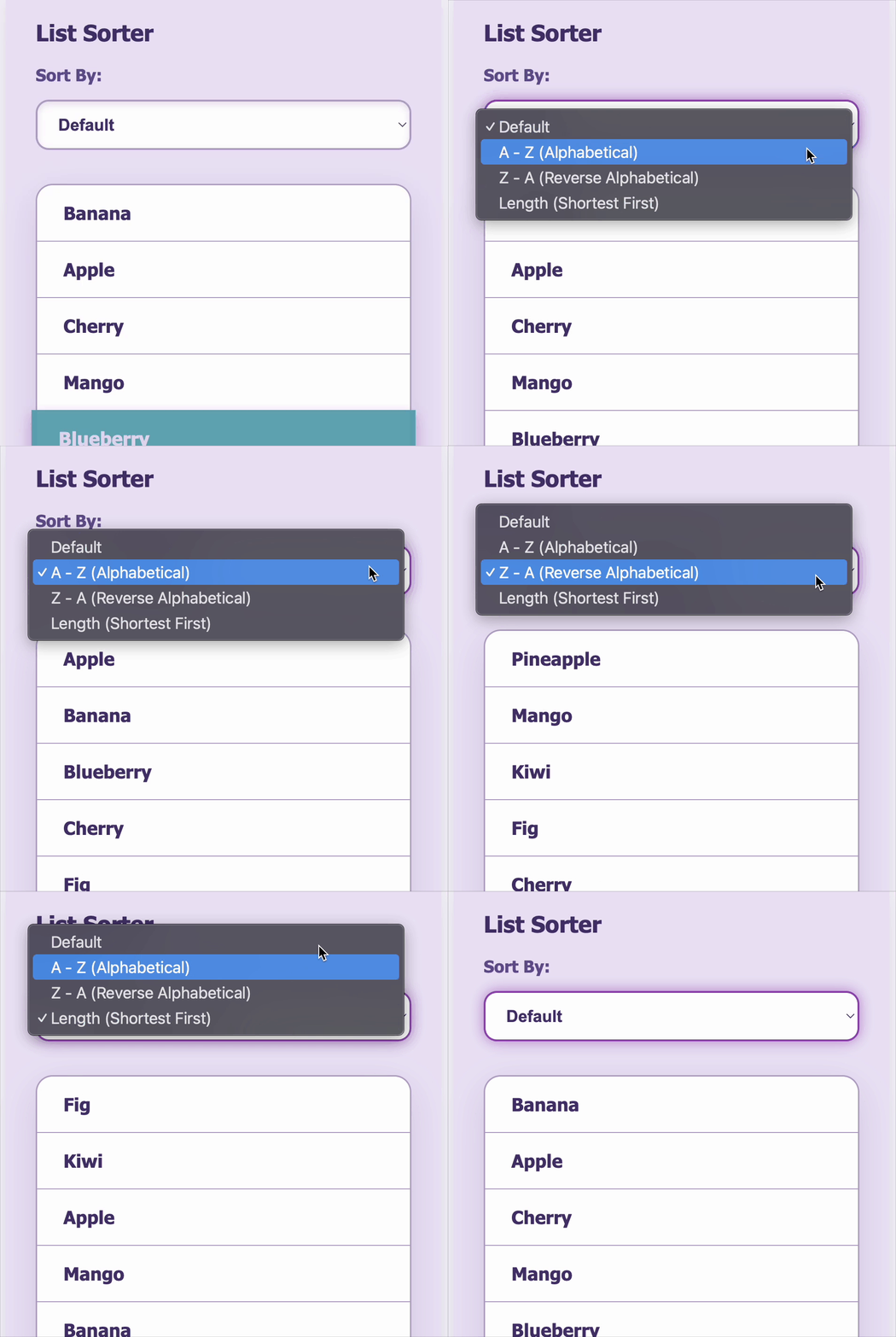
The ListSorter component allows users to view and sort a predefined list of fruits by three different criteria: alphabetically A-Z, reverse alphabetically Z-A, and by name length (shortest to longest). The component starts by displaying the fruits in their original, hardcoded order, and only updates when the user chooses a sort option from a dropdown.
To maintain correctness, the original input list must remain consistent across usage and tests — this list is:
["Banana", "Apple", "Cherry", "Mango", "Blueberry", "Kiwi", "Pineapple", "Fig"]
This list is used to check the initial state of the component before any sorting is applied. It ensures test reliability and aligns with expected behaviors such as stable sorting and unaltered default rendering. The component leverages React’s useState to manage both the list and the selected sort type, updating the list based on the selected sort criteria while preserving the original list structure through immutability.
Requirements
-
Display a list of fruit names.
-
Provide a dropdown to select the sort type with three options:
"A - Z (Alphabetical)"— sort the list alphabetically from A to Z."Z - A (Reverse Alphabetical)"— sort the list alphabetically from Z to A."Length (Shortest First)"— sort the list by the length of the fruit names from shortest to longest.
-
When the user selects a sort option, the list updates immediately to reflect the sorting order.
-
The component should maintain the current sorting state and update the list accordingly.
-
The dropdown should use the following values for selection, which must be tested using:
Corresponding dropdown option values:
- A - Z (Alphabetical) - "az"
- Z - A (Reverse Alphabetical) - "za"
- Length (Shortest First) - "length"
Edge Cases & Constraints
- The initial list order should be preserved until the user selects a sort option.
- Sorting should be stable and accurate for all fruit names.
- Sorting by length should order fruits by their string length in ascending order.
- The list should update on every change of the dropdown value.
- The component should handle cases where multiple fruits might have the same length or alphabetical order.
Example Inputs & Outputs
// Initial List
["Banana", "Apple", "Cherry", "Mango", "Blueberry", "Kiwi", "Pineapple", "Fig"]

// After selecting "A - Z (Alphabetical)"
["Apple", "Banana", "Blueberry", "Cherry", "Fig", "Kiwi", "Mango", "Pineapple"]

// After selecting "Z - A (Reverse Alphabetical)"
["Pineapple", "Mango", "Kiwi", "Fig", "Cherry", "Blueberry", "Banana", "Apple"]

// After selecting "Length (Shortest First)"
["Fig", "Kiwi", "Apple", "Mango", "Banana", "Cherry", "Blueberry", "Pineapple"]
Testing Requirements
- Verify that the component renders the heading, dropdown, and all list items correctly.
- Verify that the initial list order is exactly the original list.
- Test sorting for each sort type:
- Alphabetical A-Z
- Alphabetical Z-A
- Length (Shortest First)
- Verify that the dropdown reflects the current selected sort option after user interaction.
Data Test IDs (required for testing)
data-testid="container"— main component container div.data-testid="heading"— heading element with the component title.data-testid="sort-dropdown"— select dropdown element for sorting.data-testid="list-item"— each<li>representing a fruit.
Reference UI
Companies:
Solve Similar questions 🔥
Want to upskill? Explore our courses!

Namaste AI
Learn to build modern AI applications with real-world projects.

Namaste DSA
Master DSA from scratch with numerous problems, and expert guidance.

Namaste React
Wanna dive deep into React and become Frontend Expert? Learn with me now!

Namaste Frontend System Design
The most comprehensive and detailed course for frontend system design.

Namaste Node.js
Wanna dive deep into Node.js? Enroll into `Namaste Node.js` now!