

Expense Tracker
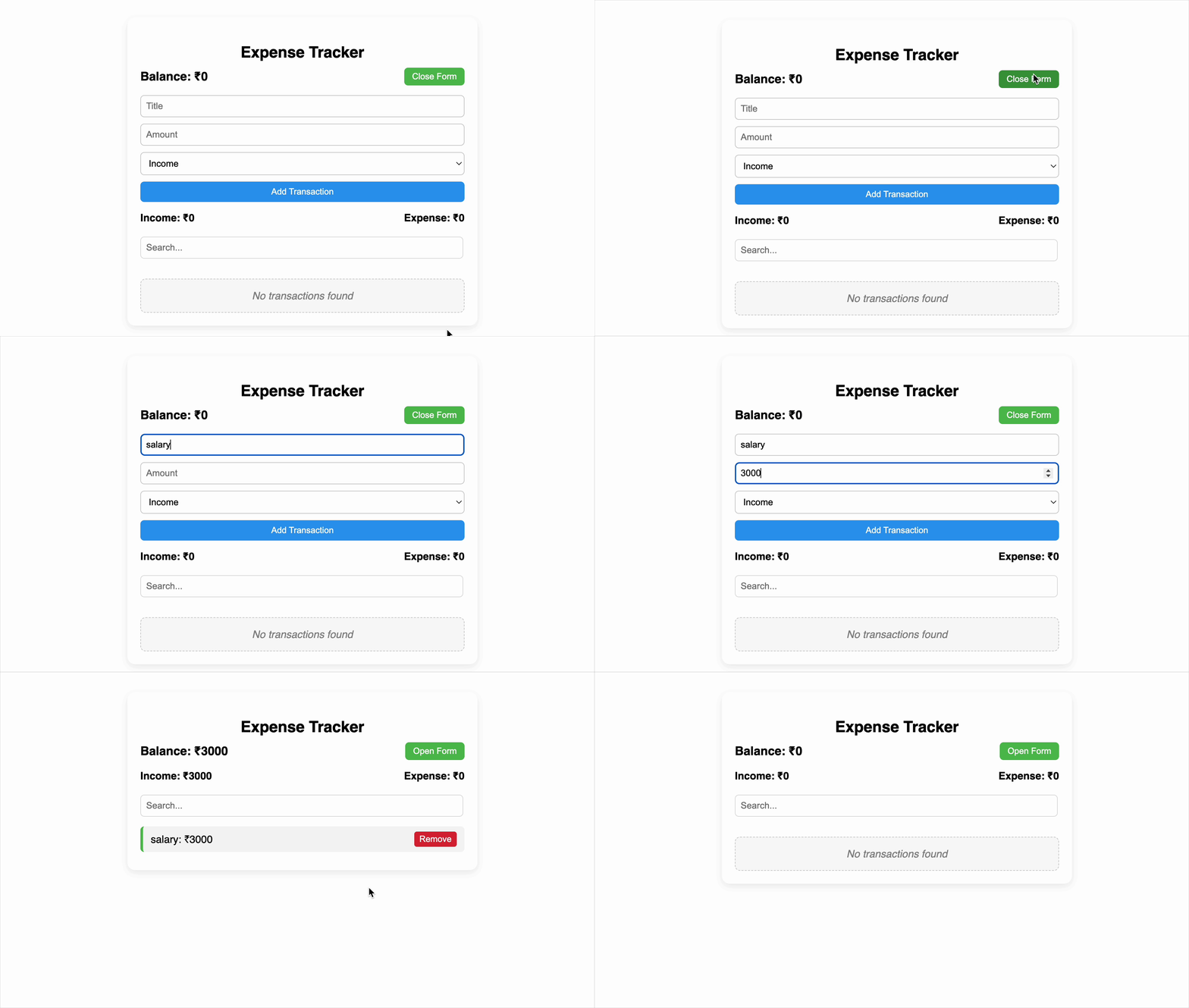
Build a simple expense tracker using React to help users manage their income and expenses. Users should be able to add transactions (either income or expense), filter them by title, and view the updated balance, income, and expense totals. They should also be able to delete any transaction from the list.
Requirements
Your application UI must include:
-
A toggle button to show/hide the transaction form:
- Text changes to "Open Form" or "Close Form" based on the state
-
A form with the following fields:
Title(text input) labelled as "Expense Tracker"Amount(number input)Type(dropdown/select: Income or Expense)- A button to add the transaction
-
A transaction list that displays all added transactions with:
- The transaction title and amount shown together in this format - Title: ₹Amount (e.g., Salary: ₹5000, Groceries: ₹1200)
- Delete button for each transaction
-
A summary section showing:
- Total Balance
- Total Income
- Total Expenses
-
A search input to filter transactions by their title (case-insensitive)
Functional Requirements
- Title must not be empty.
- Amount must be a positive number:
- Adding a transaction should:
- Immediately add it to the list
- Update the balance, income, and expense values in real time
- Deleting a transaction should:
- Remove it immediately from the list
- Recalculate the summary
- If there are no transactions or no match during search:
- Show the message:
"No transactions found"
- Show the message:
Testing Requirements
To ensure your solution is testable, you must use the following data-testid attributes:
data-testid="toggle-form-button" - Toggle Form Button
data-testid="title-input" – Title input field
data-testid="amount-input" – Amount input field
data-testid="type-select" – Type dropdown (Income/Expense)
data-testid="add-button" – Add transaction button
data-testid="transaction-item" – Each transaction container
data-testid="delete-button" – Delete transaction button
data-testid="balance-amount" – Balance display
data-testid="income-amount" – Income display
data-testid="expenses-amount" – Expenses display
data-testid="search-input" – Transaction search input
data-testid="no-transactions" – Message for no transactions
Reference UI
Companies:
Solve Similar questions 🔥
Want to upskill? Explore our courses!

Namaste AI
Learn to build modern AI applications with real-world projects.

Namaste DSA
Master DSA from scratch with numerous problems, and expert guidance.

Namaste React
Wanna dive deep into React and become Frontend Expert? Learn with me now!

Namaste Frontend System Design
The most comprehensive and detailed course for frontend system design.

Namaste Node.js
Wanna dive deep into Node.js? Enroll into `Namaste Node.js` now!