

Drag And Drop II
Build a Kanban-style task board in React that supports native HTML5 drag-and-drop without external libraries. The board should have three columns — To Do, In Progress, and Done — where users can:
- Drag and drop tasks between columns.
- Add new tasks.
- Edit task labels inline.
- Delete tasks.
Each task card should have the CSS class: className="task". The UI must be responsive, interactive, and reflect changes immediately via state updates.
Functional Requirements
1. Column Setup
-
The UI must have three labeled columns:
- To Do
- In Progress
- Done
-
Each column displays zero or more task cards.
-
Each column must contain an accessible
<h4>heading (for screen readers).
2. Drag and Drop Behavior
-
Tasks can be dragged from one column and dropped into another using HTML5 drag events.
-
After a successful drop:
- The task should be removed from the source column.
- It should be appended to the end of the target column.
-
Dragging into the same column should not duplicate or move the task.
-
Dropping outside a valid column should not crash or corrupt the UI.
3. Add Task
- A "+ Add a task" button should be present only in the "To Do" column.
- Clicking it reveals an inline text input.
- Pressing
Enteror blurring the input should add the task at the end of the column. - Input should clear and close after submission.
4. Edit Task
- Clicking on a task label should turn it into an editable input field.
- Pressing
Enteror blurring the input should save the new label. - Escaping the field or submitting empty input should discard changes.
5. Delete Task
- Each task should have a trash icon (🗑️) to delete it.
- Clicking the icon should remove the task from its column immediately.
6. State Handling
- Use React’s
useStateto manage column data. - Never mutate state directly — always copy and return updated objects.
- Task IDs should be unique (e.g.,
task-${Date.now()}).
7. Initial Render
- The board should render with 4 predefined tasks distributed across the three columns.
Note: Do not modify the initialData object defined in DragAndDropList.js, as it is used for test validation. You may only update state derived from it.
Edge Cases & Constraints
-
Dropping into the same column should preserve order and avoid duplication.
-
Dropping outside a column should have no effect.
-
Multiple moves must be supported and reflected accurately.
-
A column with just one task should still support drag and drop.
-
Tasks are always added to the end of the target column.
-
Initial task distribution:
-
e.g.,
Task 1,Task 2in To Do,Task 3in In Progress,Task 4in Done.
Reference UI
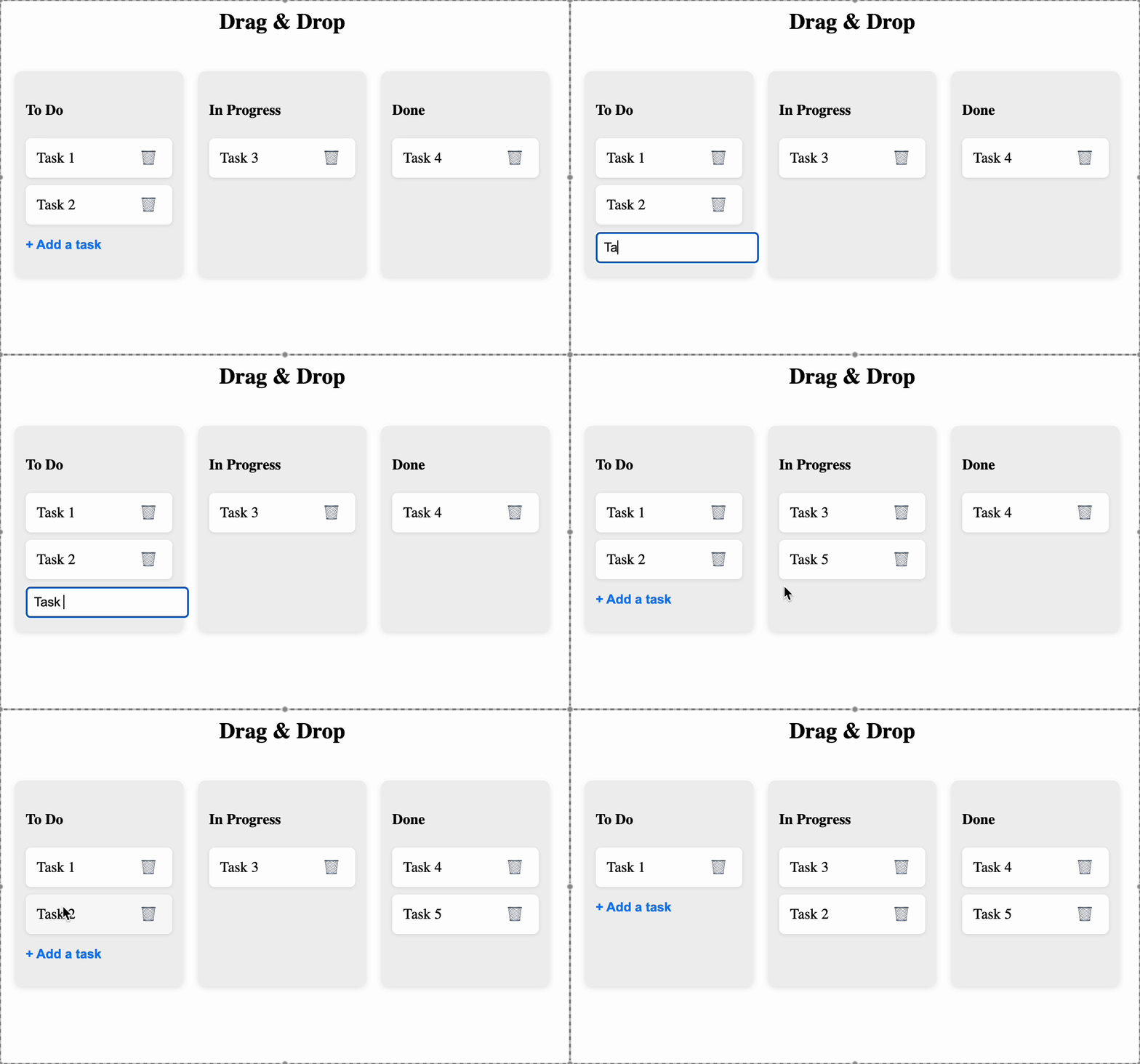
Companies:
Solve Similar questions 🔥
Want to upskill? Explore our courses!

Namaste AI
Learn to build modern AI applications with real-world projects.

Namaste DSA
Master DSA from scratch with numerous problems, and expert guidance.

Namaste React
Wanna dive deep into React and become Frontend Expert? Learn with me now!

Namaste Frontend System Design
The most comprehensive and detailed course for frontend system design.

Namaste Node.js
Wanna dive deep into Node.js? Enroll into `Namaste Node.js` now!