

Drag and Drop
React.js
medium
30 mins
Create a drag-and-drop fruits organizer using React that allows users to move fruits between "Available Fruits" and "Dropped Fruits" columns, reorder them, and reset to the initial state.
Requirements
- Render two droppable columns:
- Left column:
Available Fruits - Right column:
Dropped Fruits
- Left column:
- Display a reset button labeled "Reset Lists" to restore the initial state.
-
Fruit Items Display:
- Each fruit is a draggable item with a unique name.
- Initially, all fruits appear in the "Available Fruits" column.
- Empty messages display when a column has no items:
- "Drop fruits here" for the Dropped column.
- "No fruits here" for the Available column.
-
Drag & Drop Behavior:
- Dragging a fruit from one column to another moves it to the target column.
- Dropping a fruit on another fruit within the same column reorders the items.
- Dropping in an empty column area appends the fruit at the end.
- Visual feedback during drag helps indicate valid drop targets.
Edge Cases & Constraints:
- Reordering within the same column keeps all items intact.
- Dragging to a different column moves the item entirely.
- Reset button:
- Clears the dropped fruits.
- Restores all original fruits back to the Available column.
Testing Requirements
- Data Test IDs (required for testing):
data-testid="available-column"— Column for available fruitsdata-testid="dropped-column"— Column for dropped fruitsdata-testid="item-{id}"— Individual fruit items, e.g., item-1, item-2data-testid="reset-button"— Reset button to reset all itemsdata-testid="available-empty"— Message when available list is emptydata-testid="dropped-empty"— Message when dropped list is empty
Reference UI
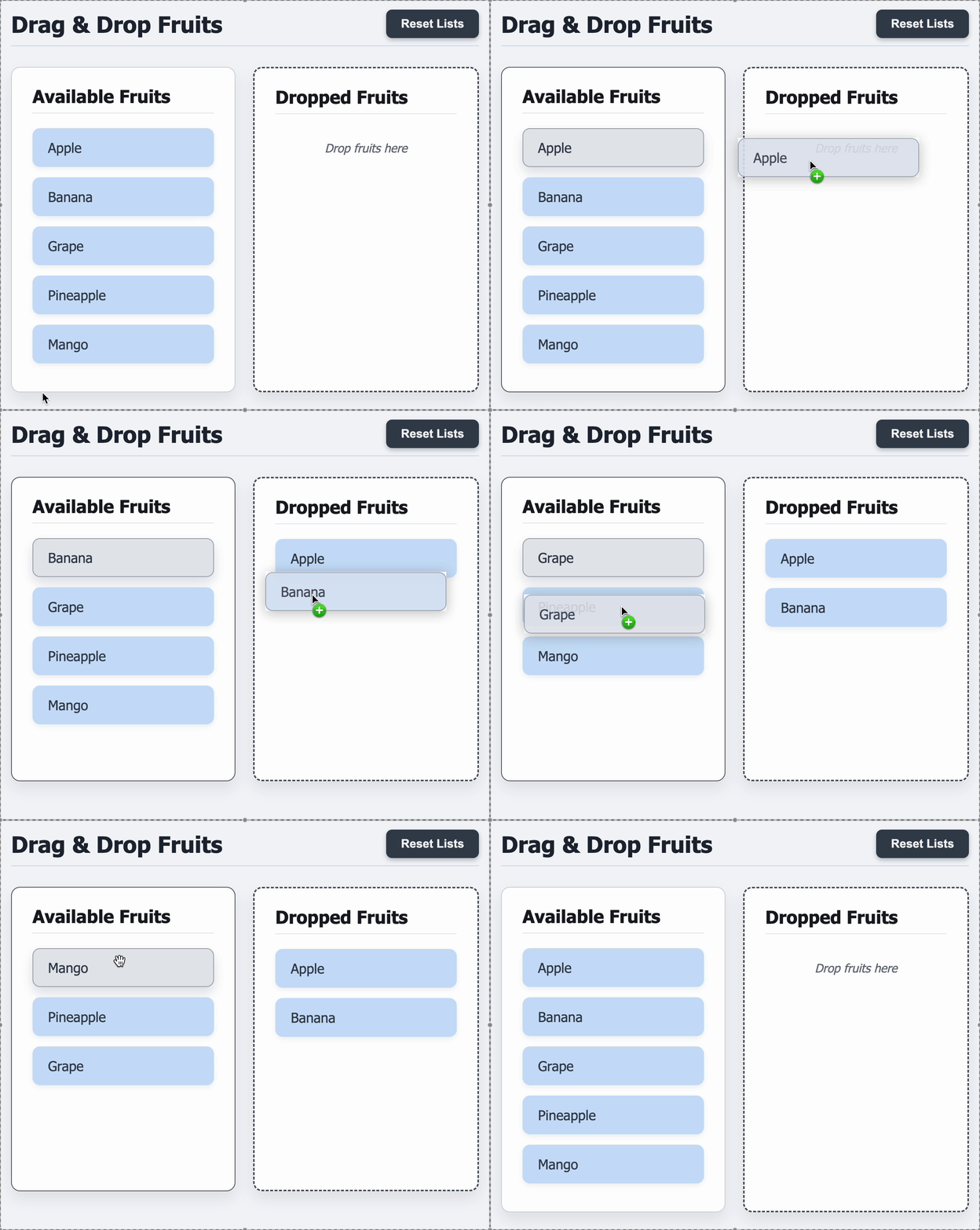
Preview what you need to build
Companies:
dropbox
amazon
uber
Solve Similar questions 🔥
Want to upskill? Explore our courses!

Namaste AI
Learn to build modern AI applications with real-world projects.

Namaste DSA
Master DSA from scratch with numerous problems, and expert guidance.

Namaste React
Wanna dive deep into React and become Frontend Expert? Learn with me now!

Namaste Frontend System Design
The most comprehensive and detailed course for frontend system design.

Namaste Node.js
Wanna dive deep into Node.js? Enroll into `Namaste Node.js` now!