

Cinema Hall
Build a cinema hall seat booking interface in React that:
- Displays a 10x10 grid of seats
- Ensure that the heading "Cinema Hall" is rendered.
- Allows seat selection, booking, clearing, and resetting
Each seat has a label like A0, B3, ..., J9.
Requirements
Grid Layout
- Create a grid with 10 rows (from
AtoJ) and 10 columns (from0to9) - Each seat is uniquely labeled using its row and column (e.g., A0, A1, ..., J9)
Seat Selection Logic
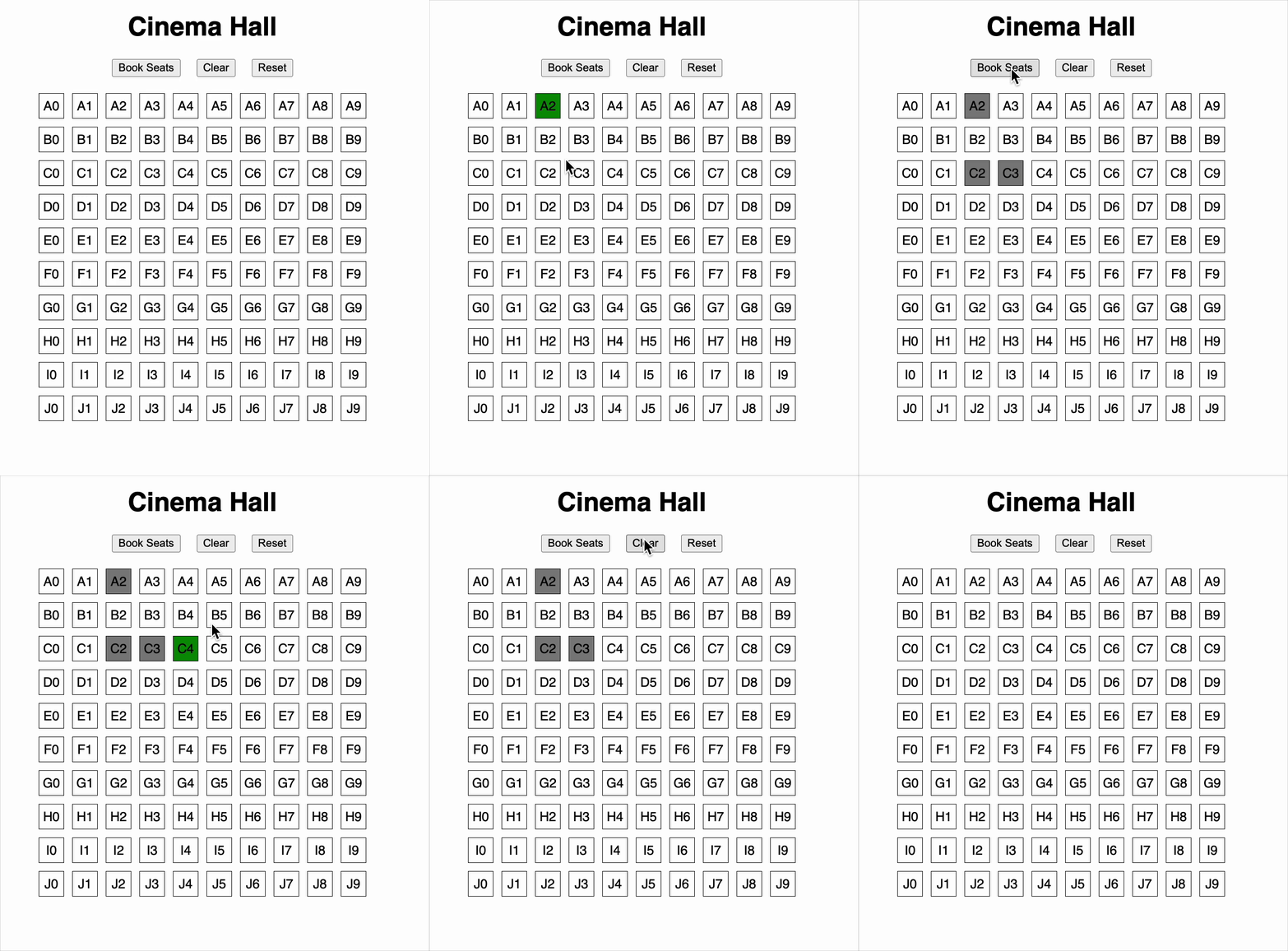
- Clicking on an available seat will select it
- Clicking on a selected seat will deselect it
- Clicking on a booked seat has no effect (it is disabled)
Action Buttons
You must implement three action buttons:
-
Book Seats
- Marks all selected seats as booked
- Clears the current selection
- If no seats are selected, show an alert:
"Please select at least one seat"
-
Clear
- Clears only the selected (but not booked) seats
- Already booked seats remain unchanged
-
Reset
- Clears all seats (both selected and booked)
- Returns the grid to its initial state
Seat States and Styling
There are three seat states, each represented by a different CSS class:
.seat→ for available, unselected, and unbooked seats.selected-seat→ for seats currently selected by the user.disabled-seat→ for seats that are already booked and unclickable
Testing Instructions
To ensure your solution is testable, you must use the following data-testid attributes:
Buttons
- Book Seats button →
data-testid="book-button" - Clear button →
data-testid="clear-button" - Reset button →
data-testid="reset-button"
Seats
Each seat should have a unique test ID in the format:
data-testid="seat-<SEAT_LABEL>"
Examples:
- A0 →
data-testid="seat-A0" - B3 →
data-testid="seat-B3" - J9 →
data-testid="seat-J9"
Reference UI
Companies:
Solve Similar questions 🔥
Want to upskill? Explore our courses!

Namaste AI
Learn to build modern AI applications with real-world projects.

Namaste DSA
Master DSA from scratch with numerous problems, and expert guidance.

Namaste React
Wanna dive deep into React and become Frontend Expert? Learn with me now!

Namaste Frontend System Design
The most comprehensive and detailed course for frontend system design.

Namaste Node.js
Wanna dive deep into Node.js? Enroll into `Namaste Node.js` now!