

Calculator
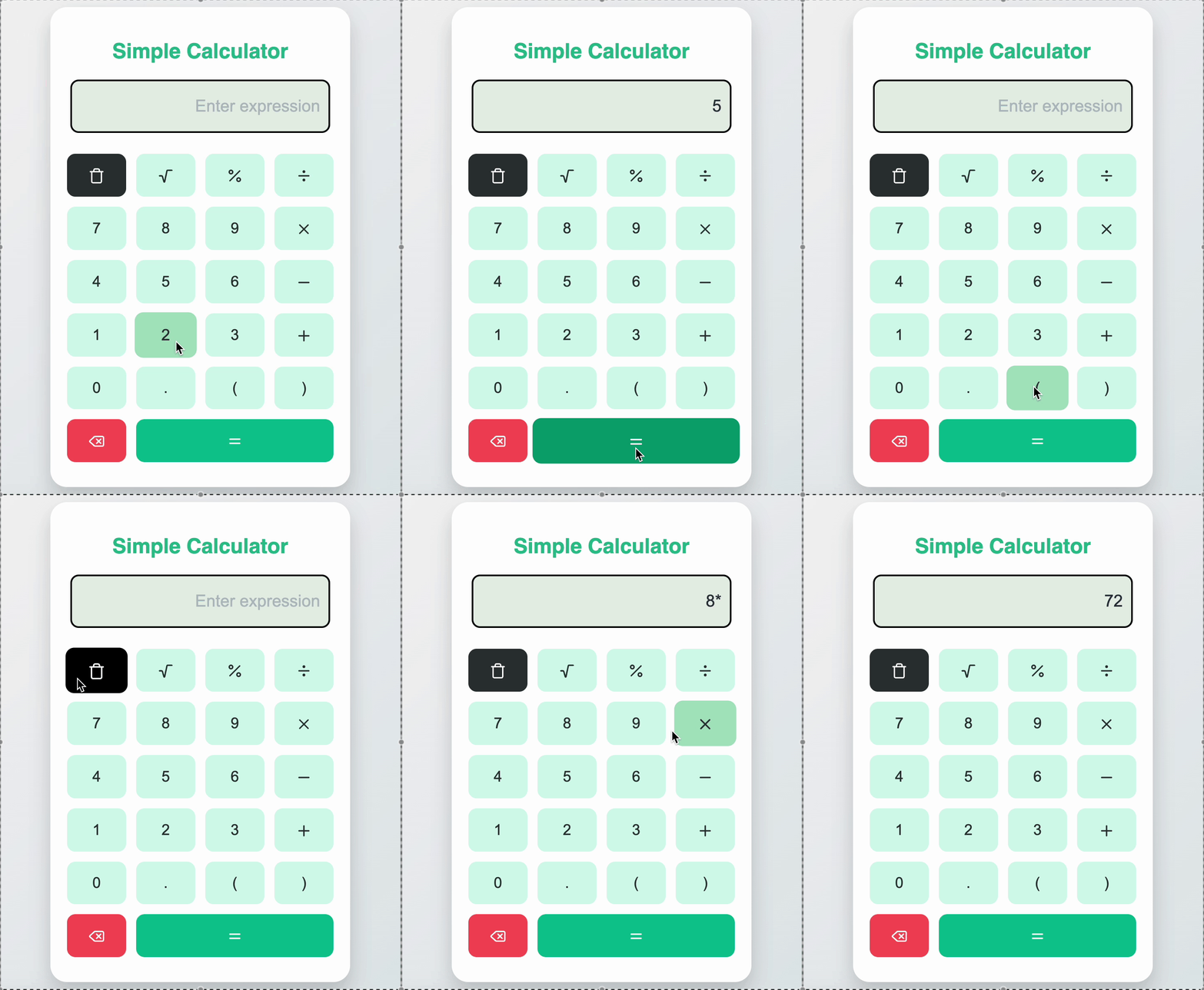
Create a simple responsive calculator component that performs basic arithmetic operations. It should feature interactive buttons and intuitive behavior for clear, backspace, and evaluation. The operators should be displayed using icons.
Requirements
-
A container for visual calculator boundary.
-
A display area implemented using an input field:
- Placeholder text: "Enter expression"
- Dynamically updates with user input
- Displays both ongoing expressions and evaluation results
-
Input must support the following characters:
- Numbers: 0–9
- Operators:
+,-,*,/,%,√ - Parentheses:
(and) - Decimal:
.
-
Button Grid:
- A grid layout of numeric and operator buttons
- Pressing
=evaluates the expression - Clear button resets the entire input
- Backspace button removes the last character only
-
Use icons from lucide-react for enhanced visual clarity:
- Clear -> Trash
- Backspace -> Delete
- = -> Equals
- % -> Percent
- / -> Divide
- X -> X
-
- -> Minus
-
- -> Plus
- √ -> Radical
-
Invalid expressions should display
Errorin the input box
Edge Cases & Constraints
- Initial state: display is empty
- Invalid expressions should not break app
- Repeated operators must be handled gracefully
- Equal button should safely evaluate valid expressions
- Icons must respond on click and be testable
- Display should align text to the right and scroll if needed
Example Behaviors
// Example 1: User inputs "7 * 8"
Display: "7*8"
On "=" click → Display: "56"

// Example 2: Clear
Display: "56" → Click Clear (Trash icon) → ""

// Example 3: Backspace
Display: "5+" → Click Delete icon → "5"

// Example 4: Invalid
Display: "+" → "=" → Error
Testing Requirements
Data Test IDs (Required for Testing)
General Elements
data-testid="calc-container"- Test for rendering the containerdata-testid="calc-display"— Calculator input display field with placeholder
Buttons
data-testid="btn-clear"— Clear all inputdata-testid="btn-sqrt"— Square root operator (√)data-testid="btn-modulus"— Modulus operator (%)data-testid="btn-divide"— Division operator (/)data-testid="btn-7"— Number 7data-testid="btn-8"— Number 8data-testid="btn-9"— Number 9data-testid="btn-multiply"— Multiplication operator (*)data-testid="btn-4"— Number 4data-testid="btn-5"— Number 5data-testid="btn-6"— Number 6data-testid="btn-minus"— Subtraction operator (-)data-testid="btn-1"— Number 1data-testid="btn-2"— Number 2data-testid="btn-3"— Number 3data-testid="btn-plus"— Addition operator (+)data-testid="btn-0"— Number 0data-testid="btn-dot"— Decimal point (.)data-testid="btn-open"— Open parenthesis (data-testid="btn-close"— Close parenthesis )data-testid="btn-back"— Backspace/delete last characterdata-testid="btn-equal"— Evaluate expression (=)
Icon-Specific Elements
data-testid="icon-clear"— Icon inside clear (Trash)data-testid="icon-backspace"— Icon inside backspace (Delete)data-testid="icon-equals"— Icon inside equals button (Equals)data-testid="icon-sqrt"— Icon inside Squareroot button (Radical)data-testid="icon-percent"— Icon inside modulus button (Percent)data-testid="icon-divide"— Icon inside divide button (Divide)data-testid="icon-multiply"— Icon inside multiply button (X)data-testid="icon-minus"— Icon inside minus button (Minus)data-testid="icon-plus"— Icon inside plus button (Plus)
Reference UI
Companies:
Solve Similar questions 🔥
Want to upskill? Explore our courses!

Namaste AI
Learn to build modern AI applications with real-world projects.

Namaste DSA
Master DSA from scratch with numerous problems, and expert guidance.

Namaste React
Wanna dive deep into React and become Frontend Expert? Learn with me now!

Namaste Frontend System Design
The most comprehensive and detailed course for frontend system design.

Namaste Node.js
Wanna dive deep into Node.js? Enroll into `Namaste Node.js` now!