

Billing Counter
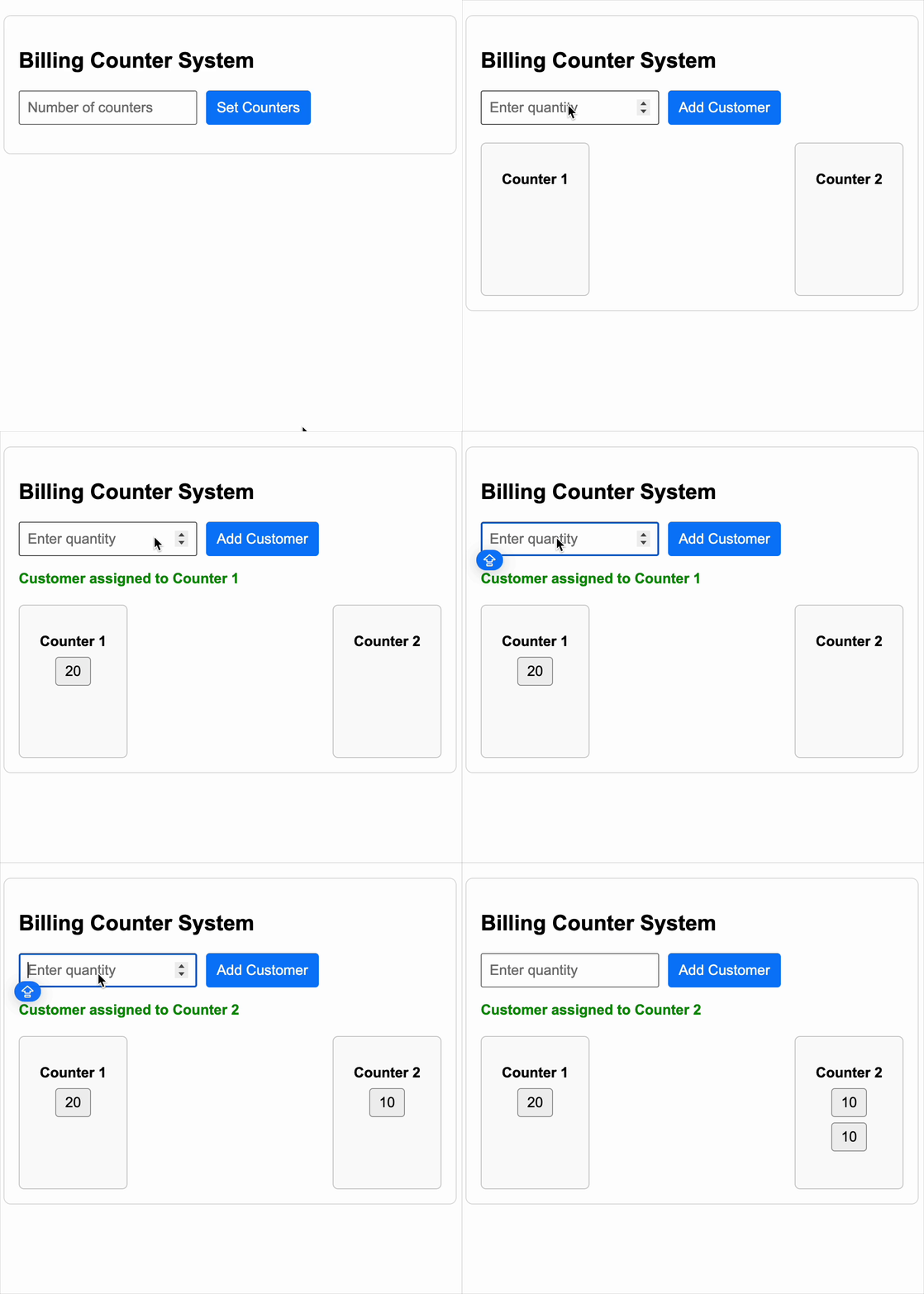
You are required to implement a Billing Counter Queue Management System. This system allows a store to set up multiple billing counters and dynamically assign customers (with a quantity of items) to the most optimal counter.
A customer should always be assigned to the counter that currently has the least total quantity of items. If multiple counters have the same total, choose the one with the lowest index (Counter 1, 2, ...).
Requirements
-
On the initial screen:
- Display a heading:
"Billing Counter System". - Accept input for number of counters (N), and on button click, initialize N empty counters.
- Display a heading:
-
After counters are initialized:
- Show an input field to enter quantity of items a customer has.
- Add button to assign customer to a counter.
- Display a message:
"Customer assigned to Counter X"where X is 1-based index of the counter. - Visually show all counters and their queues as boxes with item quantities inside.
Functional Specifications
- A customer can be added only if the input quantity is a positive number.
- A customer is always added to the counter with the least total quantity.
- If multiple counters have the same quantity, prefer the lowest index counter.
- Reset the quantity input after each customer addition.
- Counters must remain fixed after initialization (no re-initializing allowed).
- Show all customers in their respective counters.
Constraints
- Do not use third-party UI libraries.
- UI must be simple and clean.
- Use
data-testidattributes for testability (see below). - Styling can be minimal; focus is on functionality and correctness.
Testing Instructions
Use the following data-testids in your components:
- Container -
billing-container - Heading -
heading - Counter input field -
counter-input - Set counters button -
set-counter-button - Quantity input field -
quantity-input - Add customer button -
add-customer-button - Assignment message -
assignment-msg - Each counter wrapper -
counter-${index} - Each queue container -
queue-${index} - Each customer box -
customer-box - Counter heading -
counter-heading
Reference UI
Companies:
Solve Similar questions 🔥
Want to upskill? Explore our courses!

Namaste AI
Learn to build modern AI applications with real-world projects.

Namaste DSA
Master DSA from scratch with numerous problems, and expert guidance.

Namaste React
Wanna dive deep into React and become Frontend Expert? Learn with me now!

Namaste Frontend System Design
The most comprehensive and detailed course for frontend system design.

Namaste Node.js
Wanna dive deep into Node.js? Enroll into `Namaste Node.js` now!