

Array to Zigzag String Converter
Create a React component that allows users to input multiple comma-separated strings and outputs a zigzag merged string. The component merges the strings such that strings at even indices are appended as is, while strings at odd indices are reversed before appending.
Requirements
-
A user can enter multiple strings separated by commas in an input field.
- The input box should have a placeholder like "Enter strings like one,two,three"
-
A button is provided to trigger the merging operation.
-
Upon clicking the button:
- The input string is split by commas into an array.
- Each string at an even index (0, 2, 4, ...) is kept as is.
- Each string at an odd index (1, 3, 5, ...) is reversed.
- All strings are joined together without any separator.
- The merged string is displayed prefixed with
"Output: ".
-
If the input is empty or only spaces, the output should be empty.
Edge Cases & Constraints
- Input strings may contain spaces around commas; these should be trimmed.
- Empty input should result in empty output.
- Strings can contain special characters and numbers.
- Large or long strings should be handled correctly.
- The output concatenates all processed strings in zigzag order without spaces.
Example Inputs & Outputs
// Example 1: Two words input
Input: "hello,world"
Output: "Output: hellodlrow"

// Example 2: Single word input
Input: "single"
Output: "Output: single"

// Example 3: Multiple words
Input: "one,two,three,four"
Output: "Output: oneowtthreeruof"

// Example 4: Input with special characters
Input: "zig,zag!,foo#,bar$"
Output: "Output: zig!gazfoo#$rab"

// Example 5: Empty input
Input: ""
Output: "Output: "
Testing Requirements
- Verify that the input box has the correct placeholder text: "Enter strings like one,two,three".
- Test that entering comma-separated strings and clicking submit produces the expected zigzag merged output.
- Test that single word inputs are handled correctly and the output should also be a single word.
- Test that empty input results in an empty output string.
- Test that input with special characters and numbers merges correctly with odd-index strings reversed.
- Confirm the output text is always prefixed with "Output: ".
- Confirm that leading and trailing spaces in input strings are trimmed before processing.
Data Test IDs (required for testing)
data-testid="input-box": The input field where the user types comma-separated strings.data-testid="submit-button": The button which triggers the zigzag merging process.data-testid="output-result": The paragraph or element that displays the output result.
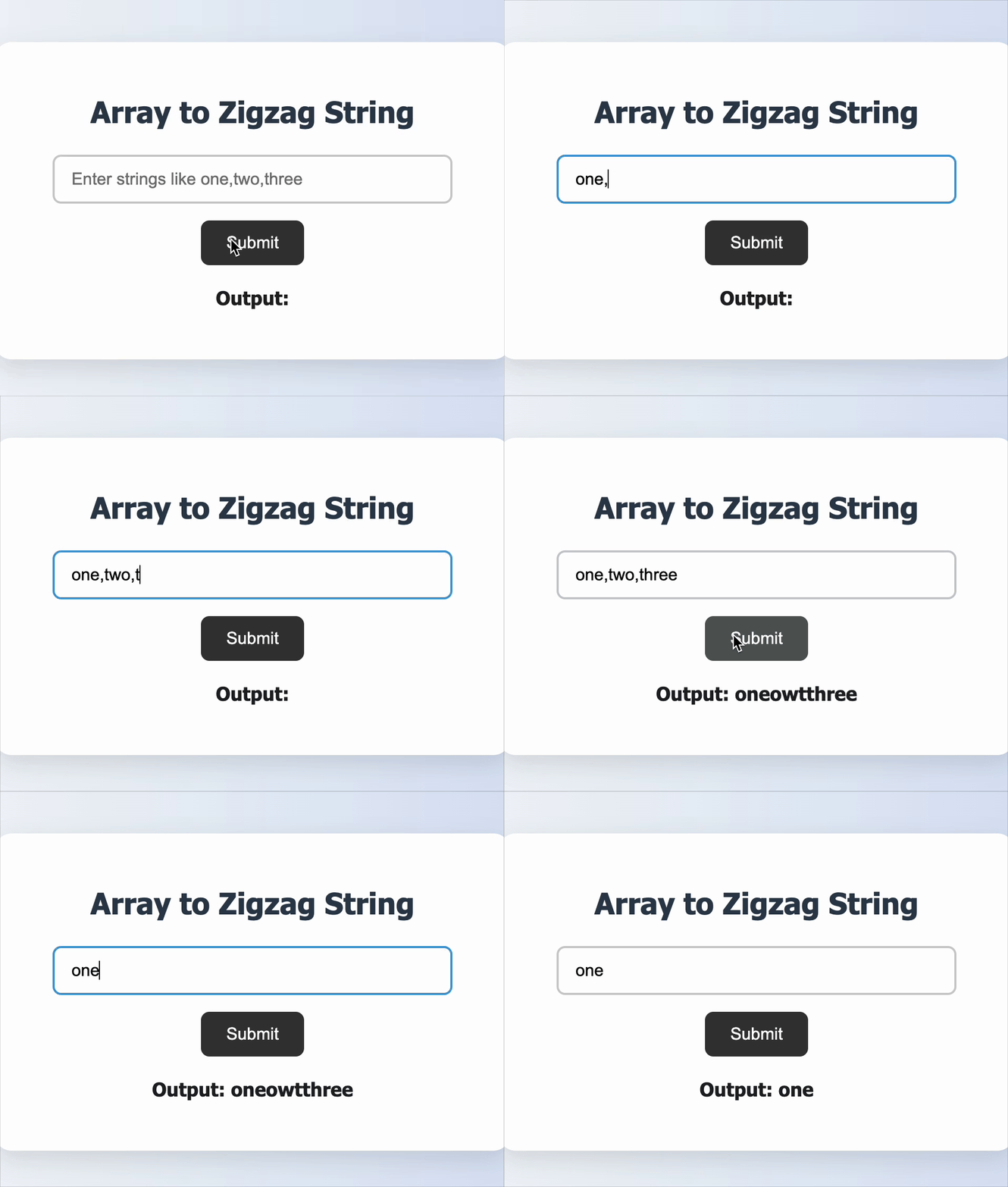
Reference UI
Companies:
Solve Similar questions 🔥
Want to upskill? Explore our courses!

Namaste AI
Learn to build modern AI applications with real-world projects.

Namaste DSA
Master DSA from scratch with numerous problems, and expert guidance.

Namaste React
Wanna dive deep into React and become Frontend Expert? Learn with me now!

Namaste Frontend System Design
The most comprehensive and detailed course for frontend system design.

Namaste Node.js
Wanna dive deep into Node.js? Enroll into `Namaste Node.js` now!